Your workflow is unique 👨💻 - tell us how you use Dropbox here.
Shared Folders
695 Topics
My Dropbox account is out of space. Should I permanently delete some shared folders?
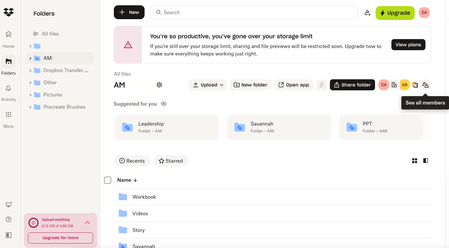
Good day My client shared some of his folders with me, but now I can't access anymore (new year's folders) due to my Dropbox out of storage. I have deleted some of the folders from my Dropbox but still can't access the new folders. It is a problem - I am only viewing the folders - doesn't upload anything. Is there a way to permanently delete the old folders in/on my Dropbox without deleting it on his side?15Views0likes1Comment
External users cannot upload to a shared folder they have edit access to
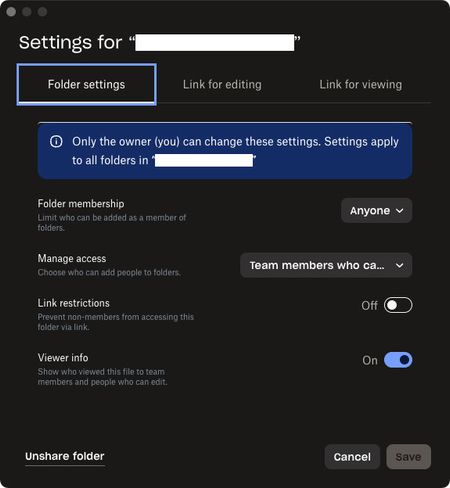
Been trying to get this to work for many years but always give up and use a different service. On my company’s team dropbox I want to create a folder with the purpose of collaborating with outside vendors. I can create invites, confirm access with edit permissions for the outside person, and they can join no problem, but they only ever have download permissions and can’t upload anything to our folder. Am I missing some permission setting? The other method of using a File Request for them to upload something does work but isn’t ideal. These are the settings used for the most recent attempt:180Views0likes4Comments
Do shared folders from other people count against my quota?
Someone shared a folder with me and it's making my dropbox too full to be basic account so I upgraded for two-months. IT seems wrong that Dropbox is forcing me to upgrade when someone else, who pays for their account, and shared a folder with me so I can work on a couple of documents for them. Is this right? Is there a workaround? Dropbox Plan: Basic Payment Method: N/A How did you upgrade? Recent downgrade Question or Issue Please describe the problem, in detail. Include what you expected to happen vs. what is happening. Please include any relevant screenshots, error messages or ticket numbers. I have an error because I downgraded my account to basic and can't access files, but these are not my files, they are just someone else's files I'm working on I'm not the folder owner Why do I need a paid account to access and work on someone else's files?41Views0likes1Comment
Is there an easy fix for accidentally dragging folders to different locations?
Device HP Z2 Tower G4 Operating System/Browser (if using the web) Windows 10 Dropbox App Version (if using the app) 241.4.4795 I have an ongoing issue with folders in our Dropbox Plus account. We use dropbox for our small company and we have a top level dropbox folder for each of our projects. All folders are owned by my boss (not me). Once in a while I will accidentally drag a top level folder into another folder. Dropbox for some reason allows this drag. But when I go to undo it, then Dropbox tells me that I don't own the folder and I can't move it back! The folder is then stuck in another folder! The only solution I have found to fix this so far is to move the folder back on the website. However this breaks the sharing for the folder so that my boss and any collaborators no longer have access to the folder! I then have to re-share the folder every time I accidentally drag them! This seems very silly, if I don't own the folder and can't move it back, why does Dropbox let me move it in the first place! Is there some better way to fix this?70Views0likes2Comments
I can't open a folder shared with me; it appears grayed out on the Dropbox website.
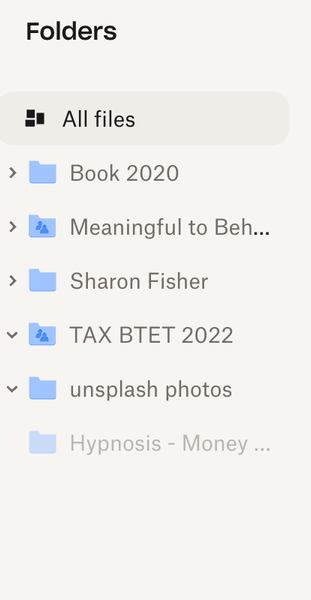
Device mac Book Air Operating System/Browser (if using the web) Chrome Syncing Status I have no idea how to check this Question or Issue I'd like to access the Hypnosis -Money folder--it is a MP3 shared with me but I can't --as you can see it is shaded out. Not clickable. Thanks!50Views0likes3Comments
Is there a way to share a folder with multiple emails at once?
If I want to share a folder with particular email addresses, is there a way to upload the addresses all at once or do i have to grant access one by one? I realize I can send a link by email myself, but don't want to do that.Solved951Views0likes1CommentA shared folder member is getting a "You are out of memory" error
My shared account, one of musicans that I share a folder with is using windows, and he keeps having issues. The error message he was receiving is “You are out of memory”, I have asked him to delete. his old free DropBox account, which he said he did. I know it’s not my account, because I have 2 TB, and not even close to using a 10th of it. He told me the message he gets from DB is he needs to establish an account using a email address?? I have invited him, with edit and view rights, and even sent a link. He thinks because he briefly paid for an account 30 years ago, the his windows laptop is hard coded. How can he strip any reference to his old DropBox off his windows laptop, and what if he tried a new password. Another weird thing is, when I look at his name it has a red disabled next to his name38Views0likes2Comments