Your workflow is unique 👨💻 - tell us how you use Dropbox here.
automation
13 Topics 110Views0likes1Comment
Dropbox API Integration - Quick File Automation
Hey Dropbox devs! Need some help building a sweet file management automation tool. What we're tackling: Custom API integration for automated file sync and backup workflows Bulk file organization scripts with metadata tagging and folder structuring Simple webhook setup for real-time file change notifications and processing Looking for: Dropbox API v2 experience with OAuth implementation knowledge Python or JavaScript skills for file management automation Understanding of cloud storage workflows and permission management
Any system, tool, or tip for bulk-creating structured folders efficiently?
Hi all, I’m currently trying to improve how I handle client onboarding, specifically, the folder structures we set up in Dropbox. Right now, I’ve been creating folders manually for each new client, with subfolders for contracts, reports, communications, etc. But as the volume increases, it’s becoming really time-consuming and prone to inconsistencies. I’m wondering if anyone has a system, tool, or tip for bulk-creating structured folders efficiently? Ideally something that works with Dropbox. I recently came across a tool called EZFolders that lets you generate folder structures using AI, either by typing a command or uploading a CSV. It also has an AI assistant that helps guide you if you’re not sure how to format things. Seems like it could help, but I’m curious if anyone here has used it or knows more about it before I dive in. Would love to hear what others are doing to save time with this kind of task!399Views1like3Comments
409 no_write_permission
Hi, I am using dropbox in n8n and have connected a dropbox team account. But I am getting 409 no_write_permission error. It was working fine a few days earlier but now I am getting this error for no reason. I changed nothing in n8n, nor in my dropbox settings. It was working fine a few days ago. It happened before too, and it got resolved after reconnecting and create a new node. But I am getting the same error again. Why am I getting this error and what is the fix. Please help me out! complete error: 409 - "{\"error_summary\": \"path/no_write_permission/.\", \"error\": {\".tag\": \"path\", \"reason\": {\".tag\": \"no_write_permission\"}, \"upload_session_id\": \"pid_upload_session:ABIJdIKguQwyyRnlJPP0VU6cKu7yvOT0Xo4yZCllqv3074TJtg\"}}"Solved405Views0likes5CommentsHow get notified if automation was successful/failed?
I have an Automated Folder that converts the uploaded file to PDF and saves it. I am using Dropbox API for it. Is there a way for me to programmatically check whether/when the PDF file generated by the automation is available? How should one go about it?114Views0likes1CommentStay organized and save time with new folder automation updates
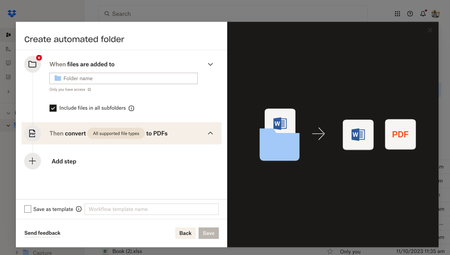
Hey Dropbox Community! We are so excited to introduce new enhancements to the folder automation features to help you stay organized. We’re introducing multiple step automations (up to five), including within subfolders. Now, you can configure multiple automations on selected folders and subfolders to automatically convert uploaded files to PDFs, rename files, add watermarks, and more. Get started by selecting “+Create” under the search bar, then select “Folder,” and finally select “Automated folder.” Tell us about your experience with Dropbox's Folder Automation Features in the comments below! Or comment down below any features you'd love to see to help you stay organized.13KViews2likes7Comments
How can I turn off automations on a folder?
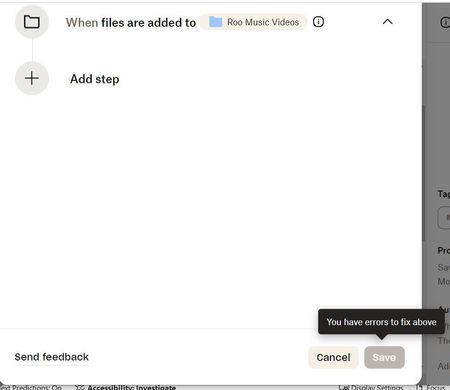
I set up my new Folder with automated conversion to MP4 because I thought I would need that format. However, I do not. I have been unable to figure out how to turn it off for that Folder. on my PC--I set it up on my iPhone originally. When I go to Settings and Automations on the right side of my PC and Delete the conversion step, I get the attached screen, which does not allow me to Save the change. So I must be doing something wrong.Solved3.2KViews0likes11Comments