Need to see if your shared folder is taking up space on your dropbox đšâđ»? Find out how to check here.
automation
43 TopicsEnable Emoji in file names.
I use emojiâs to help me find things quicker. I would like to add an emoji from the apple keyboard to the file folder name but when I click on rename and add the emoji it says âinvalid folder name...the folder name contains invalid charactersâ. Here is an example I wish to change âVehicles and DOTâ folder to say âđVehicle and DOTâ36KViews96likes32CommentsSearch and sort through images with facial recognition
Iâm in my final year of high school and my cohort has started a Dropbox to compile everyoneâs photos for the whole year. I think it would be really cool to be able to say find all the photos of me, or the photo of me and Person A. Similar of like how you can search by people on the Apple photos app. We have hundreds of photos and sorting through them is tedious. I think this could be a really cool idea.2.1KViews25likes12CommentsOption to automatically lock a file.
We constantly have issues with conflicted copies! Yes - even though there is the badge that shows up, and even though file locking is an option if done manually. I've done research and MANY other systems support this feature. I've been a long-time Dropbox user, but am looking aggressively at changing due to this issue. It shouldn't have to be a manual process to prevent someone else from opening the same file I am currently working on and saving a conflicted copy. Who would remember to do a manual file lock each and every time they open a document?!159Views2likes3CommentsKeep original file names in camera uploads feature on mobiles
The idea is not to rely in manually uploading all the time. I want to keep my pictures backed up in case of phone loss or damage, but the names are important as I keep the media backups in multiple places and if the names don't coincide, reconciliation is a hassle. I often end up having to double upload and compare pictures manually so I can see if any of them are missing, and delete the ones with names altered by the Dropbox app. This feels like unnecessary work altogether.166Views2likes4CommentsStay organized and save time with new folder automation updates
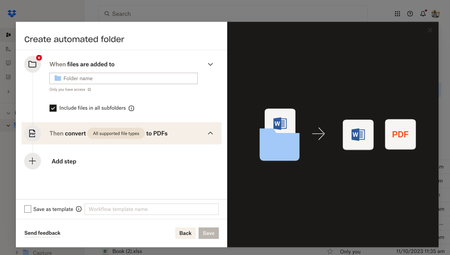
Hey Dropbox Community! We are so excited to introduce new enhancements to the folder automation features to help you stay organized. Weâre introducing multiple step automations (up to five), including within subfolders. Now, you can configure multiple automations on selected folders and subfolders to automatically convert uploaded files to PDFs, rename files, add watermarks, and more. Get started by selecting â+Createâ under the search bar, then select âFolder,â and finally select âAutomated folder.â Tell us about your experience with Dropbox's Folder Automation Features in the comments below! Or comment down below any features you'd love to see to help you stay organized. â13KViews2likes7CommentsAny system, tool, or tip for bulk-creating structured folders efficiently?
Hi all, Iâm currently trying to improve how I handle client onboarding, specifically, the folder structures we set up in Dropbox. Right now, Iâve been creating folders manually for each new client, with subfolders for contracts, reports, communications, etc. But as the volume increases, itâs becoming really time-consuming and prone to inconsistencies. Iâm wondering if anyone has a system, tool, or tip for bulk-creating structured folders efficiently? Ideally something that works with Dropbox. I recently came across a tool called EZFolders that lets you generate folder structures using AI, either by typing a command or uploading a CSV. It also has an AI assistant that helps guide you if youâre not sure how to format things. Seems like it could help, but Iâm curious if anyone here has used it or knows more about it before I dive in. Would love to hear what others are doing to save time with this kind of task!271Views1like3CommentsNaming conventions are sometimes buggy in subfolders.
I have a parent folder with an automation that's supposed to rename every file in its subfolders to a certain format, but it's been very buggy on if it actually works or not... I don't know if it's just bugged or if there is a solution. I'm using file requests in every child folder if that helps.493Views1like23CommentsThe option for old data to be deleted after a specific time.
It would be great if there were an option for the folder that old data is deleted after a specific time is over. For example: I want in Folder1 an automated deletion of data after one month. This option is only for Folder1. In Folder2 is this option not activated and the data is permanent stored. This option would be great for data that is generated of other programs which have access to Dropbox to store data.126Views1like2CommentsAutomate file name change to specific name
Is there a way to automate the name change of a file placed in a folder to a specific file name and remove the original name? For example an image is moved to a folder called "image1.jpg" and as soon as its moved into a folder its renamed to "chapter1a.jpg" I know through automations how to add the chapter1a but not to remove the original file name so it comes out as chapter1aimage1.jpg Any ideas on how to do this. - I assume its an easy fix??567Views1like1Comment