We’re Still Here to Help (Even Over the Holidays!) - find out more here.
iOS
284 Topics
I can’t save a video from my mobile Dropbox app to my iPhone gallery. Getting a couldn't save error.
I used my computer to upload a mp4 file that I recorded, after uploading it to drop box, I wanted to save it to my IPhone X gallery. I can’t really save it, all I see is “Couldn’t save. Sorry, this type of video cannot be saved to this device” I’m really confused, I tried multiple times but it does not work. Oh and I can watch the video normally on the drop box app. I just can’t save it for some reason. What should I do?Solved9KViews0likes6Comments
Is there a way to change the default PDF viewer in the Dropbox App for the iPad?
Is there a way to change the default PDF viewer in the Dropbox App for the iPad? When I click on "Open in" in a PDF, it only shows the option of Adobe, but I use PDF Expert. (In contrast, on my Mac, when I double click on a PDF in my Dropbox folder, it automatically opens in PDF Expert). If I can't change the default PDF viewer to PDF Expert on the iPad, what is the easiest way to open a PDF from Dropbox in PDF Expert? (Of course I already know that I can start IN PDF Expert and open Dropbox files there from Dropbox, which I have linked to it; but this is for when I happen to have begun from the Dropbox iPad app instead.)Solved1.8KViews2likes5Comments
Mobile app on iOS frozen due to an ad pop-up
hi, I have recently found that when opening my dropbox app on my iPhone 16 pro, after about 5 secs the screen is filled with the dropbox advert 'Try the best of Dropbox for free' this covers the whole screen and there is no way of shutting it down. See the screenshot below. Any suggestions apart from the normal, log out log back in again, would be gratefully received. Thanks, JillSolved41Views0likes4Comments
iPad Files app not showing Dropbox folders and how I managed to solve this.
In working with a new iPad, I discovered that the Files app was not correctly connecting with Dropbox. No Dropbox folders showed up either in the Files app or in any other app with an open feature that would normally have been able to access Dropbox files. Oddly, when I clicked “Dropbox” in the list, there were no folders but I could add a folder and that new folder showed up in Dropbox on other devices (and in the Dropbox app on the iPad)! So there was some connection but not much… This is not an issue I’m experiencing on any of my other Apple devices (Mac or iOS). In talking with Apple support they had me delete the Files app, reboot the iPad, then reinstall “Files.” I did that, but to no effect. They escalated me to a higher level of support but while I was waiting, I also deleted Dropbox and reinstalled it. That solved the problem! So, if you can’t access your Dropbox folders and files in Files or in any of your other iPad apps, just delete and reinstall Dropbox—problem solved (at least for me, this time!)5.9KViews4likes6Comments
I downloaded my iCloud photos as a .zip file, and need to save the content to Dropbox.
Hi everyone, i want to get my photos and videos off icloud and into dropbox for safe keeping, I downloaded all of my photos etc (in a zip file) but I can not do anything with the file! i tried to cut and paste into my picture file on the computer - no luck windows cant open it. I've no idea how to get the file into dropbox, if anyone can give me a step by step guide so I can turn off Icloud I will be very thankful. Cheers, TinaSolved5.8KViews0likes4CommentsThe Requested Operation Couldn’t Be Completed error - Dragging & Dropping into Files app on iPad
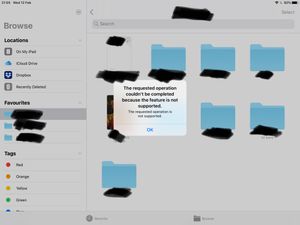
Dragging and dropping error using the stock files app on iPad OS (13 latest) with the latest version of Dropbox installed. Each time I try to drag and drop a file using the files app I'm greeted with an error message: The requested operation couldn't be completed because the feature is not supported. Any ideas to fix it? Or is it just another Dropbox issue that won't ever get addressed like the missing favourites bug? Note, dragging and dropping works flawlessly using Google Drive, One Drive, iCloud etc. I've tried removing and redownloaded Dropbox etc.8.6KViews2likes26Comments- 9.2KViews0likes5Comments

I'm trying to download .mp4 files to iPhone but get an error "Couldn't save to this device".
I am trying to download an mp4 file to my iPhone and get the error "Couldn't Save, Sorry, this type of video cannot be saved to this device." I have removed the Dropbox app, restarted my phone and re-downloaded the app. No luck. I have also cleared the cash. Still no luck. Google has been no help. I'm sure I am not the only one with this issue...please help 🙂 Thank you!Solved11KViews0likes7Comments