Your workflow is unique 👨💻 - tell us how you use Dropbox here.
iOS
146 Topics
No longer able to export a file on the iOS app
Device iPad, iPhone 13 Operating System/Browser (if using the web) ios 26.3.1 Dropbox App Version (if using the app) 460.2.2 Question or Issue For over a decade, I’ve been able to export a single file via email by just pulling up the file and hitting export. In the past year, I’ve had to change to using the check mark by the file to be able to export that single file. A more involved approach, but still doable. But as of today, the only way I can export a file is by sending a link to the folder. I don’t expect customers to follow a link to get the contract I’ve always sent to them directly. Plus, I’d have to make a folder for each contract so they didn’t see all the rest of my contracts. How do I fix this? Do I have to skip Dropbox and just send contracts directly from the signing app? How is this an improvement?Solved70Views0likes5CommentsIs viewing with download disabled for free accounts?
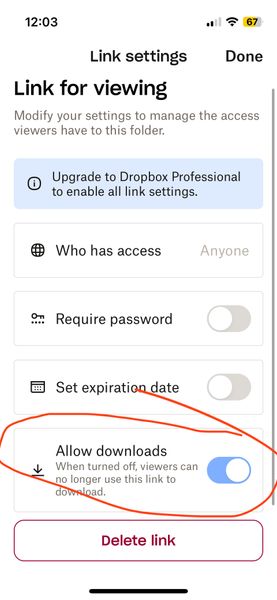
Is viewing with download disabled for free accounts? (I am on a free account) When I go to share (and subsequently generate a link) I now see a mandatory choice of either 1) editable or 2) viewable only. The software defaults to editable (which I think I was inadvertently using for a while and NOT what I want). When I noticed this today, I went to the viewable option instead and then looked at the settings. There are options (see screenshot below) but it seems like the option to have downloads enabled on viewable links is greyed out? But also kind of difficult to tell – it looks lighter blue than normal GUI switches I've seen in the past... It looks like it is on by default but I don't know if it being greyed out means that it is stuck on or that it is not functional (meaning even though its showing as on, the greyed-out-ness means it is actually off AKA no downloads for recipient). Can you please clarify this confusing interface before I send the link? I do not want to send things then recipients say they can't access it. The interface really shouldn't be this confusing. Thanks!Solved31Views0likes2Comments
Dropbox iOS app shows my Camera Uploads photos with my Family Room content
This is very strange, I an the organizer of a family plan, and when I select the photos section appears the family room pics by default. Then I activate the camera upload in my iPhone to see the Camera uploads folder, so after finishing with some folders, go to Photos in the Dropbox app and shows the Family Room pics and my personal photos. I don’t know how desactive the Family Room pictures showing mixed with personal photos. Additionally, the camera uploads not create the folders like as Smart Albums are in the iPhone. Device iPhone Air 17 iOS 26.372Views0likes4Comments
iMessage extension is not available anymore
Integration Affected iPhone imessage iPhone 13 pro max Operating System/Browser (if using the web) IOS 26.2 Dropbox App Version (if using the app) 462.2.2 Question or Issue Dropbox imessage app used to show up in imessage when you wanted to add an attachment. It used to be intuitive, now you have to jump through hoops just to add a link. What happened?55Views0likes1Comment
After the latest iOS mobile app update, my offline files have been re-syncing.
I upgraded to version 428.2 yesterday and now my Dropbox app always shows my offline files as queued for resync when I launch the app. I just tested it by syncing my files, then closing and relaunching the app and every entry in my offline list has that little blue circle with the white arrows. The files are still available so I guess it's not really re-downloading them? I'm hoping this is just a UI glitch.966Views0likes22Comments
Uploading selection of photos from Camera Roll to Camera Uploads folder via the iPhone?
How do I re-upload just one year of photos from iPhone to Dropbox with Camera Uploads? I tried selecting and sending but the file name is wrong - I want it to have the year-month-date the way it does with Camera Uploads. Then I put them in an album and tried "selecting where you’d like to upload from” but nothing. Paused Sync and restarted but still nothing. Under “Back up…” my only options are All Photos or one date. Seems like I should have more options like start and end date, or album(s).99Views0likes5Comments
Dropbox for iOS cannot be installed.
Application Affected dropbox for ios Device iphone 15 pro max Operating System/Browser (if using the web) ios 26.2、26.2.1、26.3 Dropbox App Version (if using the app) (for ios 460.2) Question or Issue Ios 26.2, 26.2.1, 26.3 cannot be installed. After clicking on the app store, turn around, and then return to get it. It can't be installed. I called apple customer service and replied that the application was incompatible with 26.2. I asked for help in the community, hoping to solve it.130Views0likes8CommentsThe Dropbox mobile app is filling up my iPhone storage
I have had a Dropbox Plus account for several years. I have the latest version of the Dropbox app (460.2.2) installed on my iPhone with iOS 18.7.1. When I was unable to upgrade to the latest iOS version and when I could no longer backup my iPhone to iCloud, I found that copying photos and videos from my iPhone camera roll to specific folders in Dropbox, deleting those items from my iPhone camera roll, and then deleting all the items in the Recently Deleted folder in my camera roll did not free up storage on my iPhone. I cleared the Dropbox cache on my iPhone and confirmed that I did not have any offline files. However, I did find that the Dropbox Photos folder on my iPhone had copies of all the uploaded files. Consequently, moving photos and videos to the Dropbox cloud did not free up space on my iPhone. In the iOS Dropbox app, the Photos folder has copies of all the photos that were uploaded to specific folders in the Dropbox cloud. When I delete one of those photos from the Photos folder on the iPhone, the copy in the Dropbox cloud is also deleted! Note that in the iOS Dropbox app, I had "Camera uploads" "On" with the following pertinent settings: "Upload from" "Videos" (only that folder), "Save HEIC photos as" "JPG", "Save Live Photos as" "Live Photo". Though photos should not have been affected, I turned off Camera uploads. I ran the same test with the same result: a photo sent to a specific Dropbox folder appears (in HEIC format) in that Dropbox folder online as well as in the Photos folder in the Dropbox app on my iPhone; deleting the photo from the Photos folder in the iPhone Dropbox app also deletes the photo from the specific Dropbox folder in the cloud. The PictureEcho website recommends using the "Free Up Space" option in the iOS Dropbox app to delete the copies of the photos on the iPhone and not on the Dropbox cloud, but I cannot locate that option anywhere in the Dropbox app on my iPhone. Restarting the Dropbox app does not make a difference. Reinstalling the app including removing all the Dropbox data stored on the iPhone would solve the immediate problem but would not address the bigger issue: as-is Dropbox is only useful for sharing (unannotated) photos and videos that I don't mind also storing on my iPhone. Since I have a backup service for my (Windows) laptop, without a solution I'll go back to moving photos and videos from my iPhone to my laptop. This greatly diminishes the justification for paying for a Dropbox Plus account. The "Free Up Space" option would help but I question the multiple steps required. In iOS select two photos, upload to Dropbox, close the Dropbox upload window, reselect the two photos, delete, open the "Recently deleted" folder (album?) and delete the two photos (or delete all). In the Dropbox app on the iPhone, select "Free Up Space" and then (as needed) delete the cache. Then there's the issue of the comments added to a photo in iOS (apparently) not getting stored in Dropbox. In Dropbox online I can view a photo with the iOS HEIC extension and view the basic HEIC metadata, but I cannot view comments added in iOS. I can add comments in Dropbox but presumably those comments are not visible in iOS (or on my Windows laptop) outside of the Dropbox app or website.248Views0likes10Comments
I'm trying to add Dropbox as a location in Files app, but it says syncing is paused.
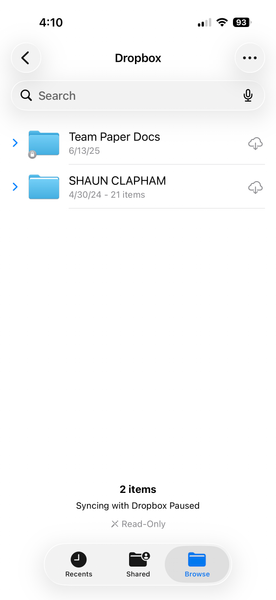
I cannot use dropbox as a location to select files from on iphone ios 26.2.1 I have restarted, installed everything over and over. Removed preview app, and nothing. Application Affected dropbox on iphone Device iphone 17 pro ios 26.2.1 Operating System/Browser (if using the web) files iphone app Dropbox App Version (if using the app) 460.2.2 Question or Issue Need a solution109Views0likes2Comments