Your workflow is unique 👨💻 - tell us how you use Dropbox here.
iOS
146 Topics
Ipad and Iphone viewing of long file names
Our company is having the issue that on the mobile app (using the ipad or iphone) often times the file name is too long to properly view what we are opening. I want to be able to read the entire file name so I know what i am opening since many of the beginning and last parts of the file are exactly the same for filing purposes so I want to be able to view the file name without having to open each one in order to find out. I'm hoping I make sense. Is there something I'm missing where I'm able to do this? I can't "right click" on the file name cause I'm mobile otherwise I would try that 🙂Solved33KViews22likes112Comments
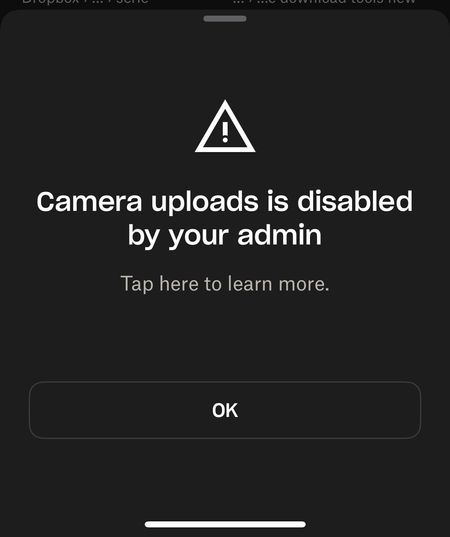
"Camera Uploads is disabled by your admin" error on iOS
So... i think there is something wrong with my dropbox ios app. It worked fine until about 2 hours ago. I have alread logged out, install/uninstall, power cycle the phone, everything level 1 helpdesk has been done. Yes, i have space, the account is working fine from the notebook. For example the screenshot upload from windows is fine. Both dropbox app and ios are the latest version. I'm not part of a team, never have been.Solved828Views4likes16Comments
Option to rename a file before uploading through the iOS app is not working
Suddenly today (and for the first time ever that I can remember) the RENAME button in the iPhone app upload is dead (does not work). Help please - I need to rename before uploading anything to Dropbox. Thanks, amcofficeSolved714Views4likes17Comments
iPad Files app not showing Dropbox folders and how I managed to solve this.
In working with a new iPad, I discovered that the Files app was not correctly connecting with Dropbox. No Dropbox folders showed up either in the Files app or in any other app with an open feature that would normally have been able to access Dropbox files. Oddly, when I clicked “Dropbox” in the list, there were no folders but I could add a folder and that new folder showed up in Dropbox on other devices (and in the Dropbox app on the iPad)! So there was some connection but not much… This is not an issue I’m experiencing on any of my other Apple devices (Mac or iOS). In talking with Apple support they had me delete the Files app, reboot the iPad, then reinstall “Files.” I did that, but to no effect. They escalated me to a higher level of support but while I was waiting, I also deleted Dropbox and reinstalled it. That solved the problem! So, if you can’t access your Dropbox folders and files in Files or in any of your other iPad apps, just delete and reinstall Dropbox—problem solved (at least for me, this time!)6.5KViews4likes6Comments
iOS app: "Convert all to classic integration"
I have noticed that Dropbox for iOS (v358.2) has a new action in the settings. Under `Native Files.app integration`, there is a button titled "Convert all to classic integration". But it is not documented anywhere. What does it do? How is the "modern" integration different from the "classic" one?5KViews4likes3Comments
How do I hide the sidebar/list column on the left side of the iPad app? Cannot find that option
How do I hide the sidebar? In the iPad app? The current one as of the date of this posting? I cannot find that option anywhere, and if it’s incredibly obvious and I’m overlooking it I will be upset with myselfSolved11KViews4likes7Comments
I need iPhone Live Photos to upload.
I cannot believe Dropbox does not support iPhone Live photos. Why??? I used Onedrive or Google Photos to upload my photos. and all of them supported live photos. I am always waiting for Dropbox to support it. Anyone can tell me when? I'm still using the Free plan until dropbox to support it.1.9KViews3likes2Comments“Couldn’t save content. Check your internet connection and refresh the page." on iOS mobile app
Running iOS 17.3, just updated. When I try to share content to Dropbox, I get an error message: “Couldn’t save content. Check your internet connection and refresh the page. There’s not internet connection issue; I’m connected. This is Dropbox-specific. If I use share to Save to Dropbox, that works fine; no error. This also seems unique to the latest iOS update, as I didn’t encounter it before that. I tried uninstalling and re-installing Dropbox, and simply re-starting. Neither helps.Solved18KViews3likes119Comments
iPod won't Connect to my Dropbox account.
Hello. I have an iPod running iOS 12.5.8. When I try to login to my account using the iOS app I get the following error, "Unable to Connect to Dropbox There may be a problem with your iPod's internet connection". There is no problem w/ my internet connection. I can connect to the internet fine. When I try to login from my iPod using Google I get an 'invalid" email address error. I know this email is correct b/c I can log in from my desktop. This used to work fine but suddenly stopped working. And yes I tried deleting and reloading the app and it still does not work. I don't have cellular data options on this iPod.204Views2likes6Comments