Your workflow is unique 👨💻 - tell us how you use Dropbox here.
Account Settings
40 Topics
Mac client keeps asking to turn on accessibility
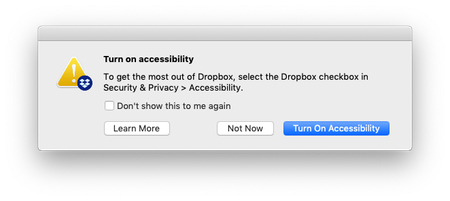
I'm running Dropbox for Mac v58.4.92, and every time I log in to my machine, I get a message from Dropbox asking me to turn on accessibility: Every time I tick 'Don't show this to me again' and then 'Not Now', but it comes back the next time I log in. What can I do to disable this message?Solved24KViews2likes14Comments
The dark mode for Dropbox resets on my macOS desktop app whenever I restart my device.
Hello Dropbox people. I see the setting is now in the Mac App but it doesn't work until you open the settings. So this means if you reboot your computer, or quit and restart DropBox, it goes back to using the light theme even if you picked dark. It's kind of annoying to have to go into settings each time to fix this.514Views1like23Comments
Can I back up a partitioned disk?
Hello ! I wanted to make a backup of some folders I have on a partitioned drive on my PC. The problem is that in the Backup Dropbox Beta configuration it only shows me folders on the C:/ drive. My dropbox is also on another drive that is not C. Does anyone know how to fix this? Thank you very much for any answer!Solved2.8KViews1like10CommentsHow your ideas helped shape Dropbox Replay
If you’ve been on the Dropbox Community forum over the last year, you’ll probably have noticed us talk about Dropbox Replay at some point. We’ve made no secret of our excitement for this particular product and we’ve written quite a few posts about, like this one about getting to know Replay or this one about getting feedback on your videos. What is Dropbox Replay? Just in case you missed these articles or any of the chatter about Replay, here’s a very quick rundown of what it is. Replay is a rich media reviewing tool that allows you to work and collaborate in real time. You can use it to mark up, comment and finalize video, image and audio projects and it integrates seamlessly with a range of editing software including Adobe Premiere Pro and Blackmagic Design DaVinci Resole to name just a few. There really is nothing better than seeing ideas come to life, watching them take shape from a mere concept, through various stages of design, testing, feedback and eventually being rolled out really is joy to behold. It can also be a bit of an emotional rollercoaster ride as unforeseen problems get in the way or we hit roadblocks, but ultimately having something new available to all of you makes it totally worth while. Your ideas and feedback A big part of getting Replay ready involved some of you taking part in our Dropbox Replay group. We can’t thank you enough for taking the time to give us feedback and suggesting new features while Replay was taking shape. Without your input, I wouldn’t be writing this post with Replay now available on all accounts. Your input was a vital piece of the Replay puzzle and we are extremely grateful to each and ever person who took the time to post, comment, give some kudos or upvote ideas within the group. But, all good things must come to an end and now that Replay is fully rolled out, we feel the time is right to close the Replay Group. Don’t worry, we’ll be keeping lots of the content that’s in there, anything that is still relevant will be moved and you’ll still be able to ask for help on Replay, only now you can do it on one of the boards in our Ask the Community section. Update: The Replay Group is now closed and all relevant threads/ideas have been moved into other areas of the Community. Got more to share? Leave a comment below Don’t worry, if there’s something you’ve been meaning to post in the Dropbox Replay group but you just haven’t got around to doing it yet, we would still love to hear your thoughts, so be sure to tell us what you think below or if you have any more feature requests you can let us know us over on our Share an idea board.877Views1like0Comments