Our Community is in read-only mode until April 8th, learn more here. You can still search existing threads or get help via Dropbox Support, the Dropbox Help Center, or Learn.
Account Settings
562 Topics
Dropbox only opens the Dropbox folder in finder - not the app.
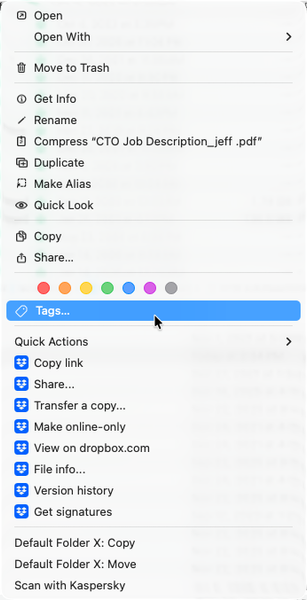
Any help would be appreciated - thank you! (I can't seem to find anything that can help...) Application Affected Dropbox Device Apple MacBook Pro M1 Max, 64Gb of RAM, 2Tb SDD Operating System/Browser (if using the web) MacOS Tahoe 26.2 Dropbox App Version (if using the app) 240.4.8493 (I got this from the "Get Info" in the finder) Question or Issue 1) Whenever I double-click the dropbox app, it opens the dropbox FOLDER in the finder. How do I open the app? 2) The menu bar icon, which previously would show sync status, sync issues, and provides access to preferences, is not shown. I have a 36" screen, and it isn't a case of "hidden" menu items. 3) I know that the app is (mostly?) running. Control-Clicking on a file shows the dropbox commands within the context menu. (See image below.) I also know its running because the various apps are shown in "Activity Monitor" (image below.) Steps I've done to try to solve the problem: Uninstall Dropbox Reinstall Dropbox Restart the computer. I don't feel comfortable doing the "Advanced Install", as it appears that doing so means losing all of my "selective sync" settings, which I've been setting up for years. (And since I can't get into the app's "prefs", I can't super easily see what is selectively synced or not. I'm at the point where I'm ready to toss the program out and move everything to Google, but I REALLY LOVE the program, and am hoping that I'm simply missing something simple, and there there is a quick fix. Thanks - Randall453Views0likes15Comments
Removed from team unexpectedly, team files now in my personal account
Hi, I was part of a Dropbox team and received an email saying I was removed by an administrator. The team owner says she did not remove me and isn’t aware of any changes. Nor does she know how to fix this. After this: A large folder of team video files is now showing inside my personal Dropbox These files are taking up my personal storage This was not the case before, they were only accessible through the team I’m not trying to delete these files. I need things restored to how they were before: I should not be removed from the team These files should not be stored in or counted against my personal account Can someone explain: How I was removed without the owner doing it? Why team files appear to have been transferred into my personal account? How to reverse this so access and storage go back to the original setup? Any help would be appreciated.43Views0likes3Comments
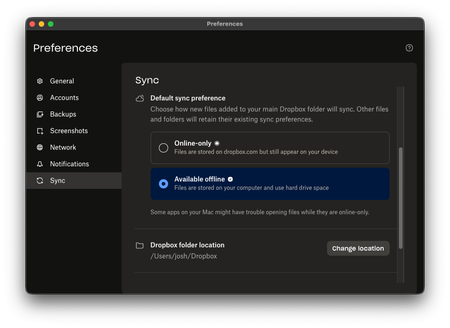
Dropbox keeps syncing my files as online-only despite my app preferences (on macOS Tahoe 26.3).
Hello Dropbox! I am running the latest Dropbox on MacOS Tahoe v26.3 (not a new install). As you can see, I have always had my files set to be available offline: However, any time I upload a file, it does not download to my computer as expected: How do I instruct Dropbox to always keep my files offline? I do not have any ignore rules or any other special circumstances, and the computer has ample storage space. Finally, I am on the Dropbox Plus plan, and I'm using around 10G of the 2T available. Any help would be very much appreciated! Thank you, Josh50Views0likes3Comments
macOS File Provider: Dropbox cannot relink to existing CloudStorage folder
Application Affected Dropbox on Windows PC and iMac Sequoia Device Windows PC and iMac Sequoia Operating System/Browser (if using the web) Latest Windows, iOS 15.7.4 After a routine restart, the Dropbox desktop app lost its login state and now cannot relink to the existing File Provider folder at ~/Library/CloudStorage/Dropbox; instead the installer tries to create a new Dropbox folder. I have been successfully using Dropbox with the macOS File Provider configuration (CloudStorage location) for several months. My Dropbox folder has consistently been located at: /Users/xyz/Library/CloudStorage/Dropbox I did not reinstall the Dropbox application and I did not intentionally sign out or attempt to relink my account. The issue appears to have started after a routine computer restart, at which point the Dropbox desktop client seemed to lose its login state. When I start the app now, the first thing I see is a “Welcome to Dropbox” message and the menu bar icon indicates that the application is “Waiting to be linked to a Dropbox account.” My existing Dropbox folder remains intact. The folder at /Users/xyz/Library/CloudStorage/Dropbox still contains all my files. The .dropbox marker file is present in that folder. All files are also visible and intact on dropbox.com. When I attempt to sign in through the desktop app, the following occurs. The app asks me to sign in with Dropbox. After signing in, the setup process shows the message “There’s already a folder named Dropbox.” If I select “Choose Another Location” and point to the existing folder, the dialog says “A folder named ‘Dropbox’ will be created inside the folder you select.” This suggests the installer is trying to create a new Dropbox folder rather than adopt the existing File Provider folder. Because of that message I have not proceeded, since it appears it would create a nested structure such as: /Users/xyz/Library/CloudStorage/Dropbox/Dropbox Currently the Dropbox icon appears in the menu bar but is greyed out and the client shows the state “Waiting to be linked to a Dropbox account.” To summarize: I was already using the CloudStorage/File Provider location successfully for months. I did not reinstall Dropbox. I did not intentionally unlink the account. The existing Dropbox folder and files are still present and intact. The client appears unable to relink to the existing File Provider folder and instead tries to create a new one. During the setup flow the client also displayed the message that the desktop app cannot sync over 500,000 files. I am not sure if this is related. However, only about 150–200k files are synced locally on my iMac. I also discovered the identical situation on my Windows PC starting at about the same time, which suggests this may be related to my Dropbox account rather than the individual devices or operating systems. Could someone advise how to safely relink the Dropbox client to the existing File Provider folder at: /Users/xyz/Library/CloudStorage/Dropbox without creating a second Dropbox folder? I rely heavily on Dropbox for daily work, so I would greatly appreciate guidance. Thank you.107Views0likes5Comments
I'm trying to update the email address of my Dropbox account, but it says it's taken.
Dropbox Plan Plus Do you have access to the email linked to the account? Can only receive email, not send, but takes a long time to come through. Are there any devices connected to your Dropbox account? PC Question or Issue I am trying to transfer my account over to my new gmail e-mail address, but I get error message saying that address is already taken.165Views0likes6CommentsSwitching to legacy mode and Dropbox icon next to search bar on Finder
Is there a way for me to switch from file provider to legacy mode and also get the dropbox icon to appear next to the search bar on the finder. My co-worker is saying this is important to our workflow but we can't figure out how to set this up.53Views0likes2Comments
I am unable to update my email address because the link from Dropbox does not arrive.
Hi...I am trying to update my account email..I am successful until the verification email to my new email address does not come through to my new email inbox or junk to complete verification....it also says "send again"......I have tried both many times....In my account settings it has the new email and says "pending verification".....any ideas.?Solved102Views0likes8Comments
Can I merge a paid and free Dropbox account?
I use Dropbox for my work. I hope you can help me join my two Dropbox accounts. By mistake, a long time ago, I created 2 Dropbox accounts. On the 2nd of February, I paid $184 for an international Dropbox I have another Dropbox account which is linked to another email, and I am getting reminders that I need to pay or some of my files will be deleted. Can I merge the 2 accounts so I pay only one fee?47Views0likes1CommentNot getting verification emails to add secondary email to my Dropbox account.
Device Mac Mini M2 Operating System/Browser (if using the web) Tahoe 26.3.1 Dropbox App Version (if using the app) Dropbox Plan Plus Question or Issue I've tried on a couple different browsers (Chrome, Safari) and I do not get verification emails to add a secondary email to my account. I've checked Microsoft's Quarantine area in my 365 account, I've checked the Spam folders and logged into and re-sync'd the account numerous times but nothing is coming through. (And interestingly I've seen a couple other people just post the same thing so perhaps there's an issue on your end that you're working on?)86Views0likes4Comments