Your workflow is unique 👨💻 - tell us how you use Dropbox here.
Account Settings
283 Topics
How to disable Dropbox almost full notification?
I would like to have the CHOICE to disable the "Dropbox Almost Full" notification. As a temporary solution, I have chose to not start Dropbox on system boot and close it, but I would like to know how can I disable this message with Dropbox open.Solved41KViews10likes32Comments
[Team admins] What’s New in the Admin Console Settings
We’ve made some big improvements to the Admin Console, and we want to hear what you think! Note: the Admin Console is available to team admins, not individual accounts. Managing your Dropbox team just got simpler, faster, and more intuitive. Whether you’re an experienced admin or just getting started, these updates are designed to help you work more efficiently and with greater confidence. What’s New in Admin Console Settings Take action and resolve issues fast: Quickly find what you need—settings, support articles, and team member information—all from a single search bar in the admin console. Simpler navigation: We’ve consolidated nearly 80 settings (previously scattered across 30+ pages) into a streamlined structure that’s easier to browse and understand. Global Settings lets you manage settings that apply across all Dropbox products (like Dropbox, Dash, Paper, Sign, and Replay) Dropbox Settings controls Dropbox-specific features (file sharing controls, storage limits, etc) Faster experience: Switching between settings no longer requires a full page reload. Everything loads smoothly within the redesigned Admin Console. Clearer design: Settings pages now follow our latest design standards, making it easier to see how different settings interact and to understand what changes will do. Why We Made These Changes to Admin Console We heard your feedback, and wanted to share what drove this redesign: To reduce frustration: The old Settings were spread thinly across many pages and were slow to navigate. The redesign makes finding and updating settings much simpler. To save you time: Faster loading, search integration, and direct access to key settings mean admins can spend less time clicking around and more time getting things done. To make setup smoother: Especially for new admins, the redesigned flow makes it easier to configure important team settings early on. To provide confidence: The new UI makes it clearer what you’re changing, when your changes are saved, and how different options work together. We’re continuing to improve the Admin Console experience and would love to hear what you think. Have thoughts, questions, or feedback? Share them in the comments below, and the team will be in touch.2KViews6likes0CommentsSwitch login to use Google
When I created my Dropbox account, I did NOT use Google to create the account. Now I see a "Sign up with Google" option. If there is a way that I can use Google's single-sign-on feature and avoid one more login, I'd like to do that. How do I switch?15KViews6likes7Comments
Dropbox unlinked my accounts suddenly
Hi there! I've have a free dropbox personal account for 15 years, and at some point added a free Teams account. Several years ago I upgraded the Teams account to a Professional account. ----- Today I got this message, and all my Professional files were taken off my machines (they're still on dropbox of course) Business Dropbox Removed: Your business Dropbox account was removed from this computer because your accounts were unlinked. Your files have not been deleted. ------ I would love to be able to link my two accounts, and continue having two separate dropbox home folders on my machine. Basically, I am leaving the country tomorrow morning and will have extremely limited internet access. I just need it to work how it used to, but I accept that I may need an alternate setup based on whatever Dropbox has changed. When I am signed into my Personal (free) account, it says I have 3TB of space, and the same for the Professional account. Within the settings menu the Pro account is called Personal Account, but when I check the billing plan for the Pro account, it calls it Dropbox Professional. Any solutions? Many Thanks! (too bad this is my only option for customer support 🙂Solved11KViews5likes27Comments
Incorrect name in Dropbox email
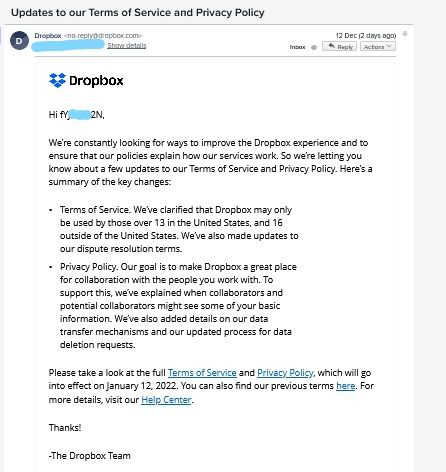
Apologies if this is posted in the wrong place or has already been raised. On 12/12/2021 I received an email from Dropbox titled 'Updates to our Terms of Service and Privacy Policy'. This email started with 'Hi fYJ0*****2N'. My dropbox password was 'fYJ0*****2N' (I've changed this both here and permanently to access my account. Later the same day I received the same email - this time addressed to my name. Is this a data leak? Certainly sending passwords via email isn't great! Have others received this email or is it just me (note, I've changed my password!)? PS: I have Dropbox emails sent to a separate email alias (dropbox@....) so am sure it was from them. See screenshot;Solved10KViews4likes11Comments
My account was suspended, how can I access it again?
Hi I have been using DropBox for a long time to send the files to my customers. Recently, one of my customers invited me to join her Business Team. I accepted the invitation, but I was suspecting that all my personal files were been sharing with the team, so I asked the administrator to change my email address, so I separate my personal files and team files. Today, I received an email saying that my account was suspended and I can't access my old DropBox anymore. I need my account back. How do I proceed?Solved10KViews3likes10Comments