We're making some changes to the Dropbox Community 👩💻 - Find out more here.
Android
26 Topics
I can't access a Dropbox offline folder through Termux with claude cli.
On Android, I can not access dropbox offline folder through termux with claude cli. Could you add an option to make the offline files appears in a folder, such as download, so that termux can directly access ? In this way, we can do coding on the phone without github43Views0likes1Comment
Embedded Word documents will not open in Excel when using the Android mobile app.
Integration Affected Excel Device (Dell 2 in 1 16 inch laptop model DB06250 Operating System/Browser (if using the web) Windows 11, Home and Chrome Dropbox App Version (if using the app) V 242.4.5815 Question or Issue Hello, I cannot open embedded word documents in Excel spreadsheet, in Dropbox on my Samsung S24 Mobile phone. The spreadsheet is fully workable on my mobile, excepting when I press the cell containing the embedded (not linked) word document., it only identifies the cell (eg B2) rather than open the embedded fileit says "This version of Excel doesn't support interacting with embedded files" When I open the offline folder it works perfectly on my laptop Also, sometimes when I open the file on my mobile, it comes up with "open with" and when I press that, it goes straight into the spreadsheet. The screen shot shows an unfilled circle, whereas the others are all filled? I cannot find in Dropbox application, where I can upload a newer version of Excel? Hope you can help, please Kind regards Doug103Views0likes3Comments
1Password not syncing to Dropbox
Integration Affected 1Password version 7.9.4 Device Google Pixel 9 Pro Operating System/Browser (if using the web) Android 16.6.3.855170483-release-arm64-v8a175632286 Dropbox App Version (if using the app) 458.2.4 Question or Issue I recently noticed that when I open the 1Password app on my Google Pixel phone I get an error message saying the following: Sync error There may be a temporary problem with your network or the Dropbox server. Please check your connection and try again after some time. The version of 1Password I'm using is old and is no longer supported by them. The new version requires a subscription service. Also, the Dropbox account I have is the basic account, and is not the subscription service. Could the fact that I'm using an older version of 1Password and my Dropbox account is the basic one, and not the subscription service be part of the problem. I'm thinking of dropping 1Passwpord and using a difference password database. Has anyone else come across this issue recently?Solved1.1KViews1like12Comments
Dropbox app crashes and won't work with the Microsoft Word app on Android
Dropbox files will not open, except occasionally, in word on my s25ultra phone. Got a message from phone. "dropbox app keeps crashing. put to sleep to avoid excess battery use.' I need to use the dropbox app. When the docment in dropbox does occasionally open in word after an eternity, then it will not close and you have to clear all active apps to get it too close. Word works perfectly with my one drive files.293Views0likes19Comments
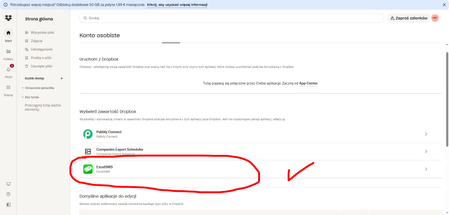
Issue connecting Dropbox to Excel SMS (consent loop during login)
Hello, I’m trying to connect Dropbox in the Excel SMS app on my smartphone. During the Dropbox sign-in process, the app keeps asking me to grant access permissions. After I accept, it returns me to the same consent screen again and again, so I can’t complete the connection. This happens every time I try to link my Dropbox account within the app. I’m attaching a screenshot showing the issue. Here is the app link: https://play.google.com/store/apps/details?id=com.samapp.excelsms.excelsmsfull&hl=pl Could you please advise what I should check or how to complete the authorization properly? Thank you in advance for your help. Best regards, MichałSolved82Views0likes3CommentsError when automatically backing up files to Dropbox through third party app on Android
Hello, I’m experiencing an issue that appears to be a recent change in Dropbox behavior. I use a third-party application on my Android phone that backs up data to Dropbox. The app automatically connects using Dropbox integration, selects the Apps folder, and creates its own subfolder inside it where backups are stored. This setup has been working reliably for years. Recently, I started getting the error: "Exception in 2/sharing/ validate_folder_path: (".tag":"bad_pat h","bad_path":"contains_app_folder")" I have already tried: Disconnecting and reconnecting Dropbox Letting the app create a new folder inside Apps Recreating the Apps folder None of these steps resolved the issue. Nothing has changed in my setup or workflow, and this started happening suddenly. Could you please confirm whether there has been a recent change related to sharing or access validation for folders inside the Apps folder, and whether this behavior is intended? Thank you for your help.167Views0likes4Comments
Using DB to sync Password Vaults
I have a Android phone (ver. 9). I use a password vault that depends on its database file being synchronized between PC desktop and my cell phone. On a previous cell phone, this arrangement worked very well. Now with my new Pixel 7 pro phone, it is not working. I suspect it is because my cell phone version of DropBox is not syncing correctly. I would like the DB to automatically synch every time I open or close the cell phone. But I suspect it is not happening. I don't know how to determine if I am looking at the latest DB contents on my cell phone. I also do not know how to force a synch. Can anyone point me in the right direction? Thanks, Tom1.2KViews0likes3Comments
Can't add Dropbox as a place on a Microsoft Office app on Android tablet
Microsoft wont add Dropbox as a place I use dropbox on Desktop and Apple devices with a different account. It works fine with excel to save documents. For the last 6 months my android devices have worked great as well. However, recently, when trying to save an edited excel document that I’ve opened with dropbox on my android device, it does not give me the option to save the document to Dropbox folders once I’ve edited and click “save as”. After clicking “add a place” then Dropbox, and then signing in, it loads and takes me back to excel, yet it still doesn’t show up. No error message, just isn’t an option. Click add a place again, and can click dropbox as an option again, sign in, ect. It’s an endless loop. I have tried uninstalling both apps, disconnecting Microsoft and excel from the dropbox’s connected apps, other troubleshooting. nothing working so far. If you know a solution, please advise. thanks!Solved248Views0likes3Comments
How can we do basic spreadsheet editing on a mobile device?
The other main cloud storage providers both have spreadsheet editing software. And they apparently no longer support Dropbox. My only option to have a shared spreadsheet stored in the cloud with easy editing ability seems to be to use either Google sheets (with Google drive) or Microsoft Excel (with one drive). Your PDF markup feature is fantastic. Something like that would be great. Hit the edit button and bingo you can enter some data. No downloading or opening in a 3rd party app.Solved457Views0likes10CommentsDropbox Passwords UI issue on Pixel 9. Search and Save buttons in the notch area aren't clickable.
I'm having a usability issue with the Dropbox Passwords app on my Google Pixel 9. The search bar at the top of the app is placed directly in the notch area, making it impossible to tap or interact with. Similarly, when creating a new password, the "Save" button is also positioned in that same top area – meaning it can't be tapped either. As a result, I’m unable to search or save new entries. I've cleared the app cache, removed and re-installed the app. I've restarted my phone and I'm still getting the same issues.945Views1like21Comments