Your workflow is unique 👨💻 - tell us how you use Dropbox here.
Computer Backup
31 Topics
Default downloads folder on MAC went missing after uninstalling dropbox on my MacBook
When I installed dropbox on my MacBook few days ago, I synced my downloads folder on my dropbox. After a day I decided to uninstall the dropbox because I just realized I have an iCloud storage. So when I actually uninstalled dropbox, then boom the downloads folder went missing, I cannot access it anymore, anything I airdrop to my MacBook cannot be found. I had a chat with apple support, they told me I should message dropbox support for the matter. Please help me....2.5KViews2likes3Comments
Documents, Dowloads, Desktop, and Music folders on Mac
Recently, I downloaded Dropbox basic 2GB to try it out on my iMac, but then I decided to delete it. I deleted the app from my mac as well as from the trash folders on my mac. I realized like many, my Desktop, Documents, Downloads, and Music folder were "missing" (could not click on them and had files were gone). They names of the icon were still there, but the original icon was gone (the arrow pointing down for Downloads, for example), and upon clicking them, they showed: "The operation can’t be completed because the original item for “Downloads” can’t be found." (similar to this picture/post in link from an article found elsewhere) It seems like all my documents are missing, and when I log back into Dropbox online, when I click "documents", it lists very few documents compared to what was on my computer before downloading Dropbox I tried to restore my computer from backups multiple times (after deleting Dropbox, and most likely data/zip files; I fear that data is lost forever) to see if that would resolve the problem... which it did not and (probably made it worse/ensured this never gets resolved). I have read though previous threads that state the computer back up option was probably on and I need to reinstall the app and change the settings. The problem is, I do not have the app/icon on the computer, and every time I try to re-download the app, I am met with a message that states "could not be saved, because an unknown error occurred. Try saving to a different location." but it does not give me an option to save elsewhere no would I know where I could save it to I do not know what to do, and it seems like I cannot save ANYTHING to my computer (desktop, documents - i don't even know where screenshots go after I take them) and am assuming this is why I can't reinstall it. Even if I could reinstall it, I am not sure if it would fix things and make my computer go back to normal pre- Dropbox. Again, don't know what to do at this point... Help would be GREATLY appreciatedSolved3.6KViews2likes6Comments
Can't select iMac desktop "Pictures" folder to be backed up or synced.
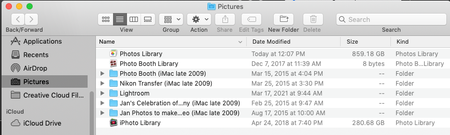
Hello, when I started my 3 TB DropBox business trial last month I was under the impression I would be able to back up all my photos (over 1 TB) from my iMac desktop computer (not from my iPhone, which only holds a fraction of my photos). I have searched endlessly, please help. System: iMac desktop/OS Mojave 10.14.6. My photos library is located: Macintosh HD > users > home (my name) > Pictures (folder) > Photos Library. I also have other folders of photos that are not in Mac photos in there. See snapshot below: What I am doing: I am going to DropBox on the top bar of my computer > to my icon > preferences > backups > manage backup. Photos/Pictures is not a folder option. The only options are: Desktop, Documents, Downloads, Music, and Movies. I also tried going to my icon > preferences > sync > choose folders, and I get the same options I just mentioned above. I appreciate any and all assistance. Thank you kindly. LTDTMSolved4.2KViews2likes7Comments
Not able to access backup files, get an error when trying to.
Hi, I'm not able to access my backup folder. I get an error message says: Error Something went wrong. Do not be afraid. Your files are safe and Dropbox is notified. Go to our status page to check if this is a known event. You can also visit our help center and forums for help or return to the home page.Solved8.2KViews1like18Comments
Backup feature is so broken that I cannot get my data.
I have backed up an external drive containing a folder of about 200GB in size, with many files inside it and an important, layered folder structure. Your backup feature is so broken that I cannot do anything with that backup, and now that the drive I had backed up with it has become corrupted, I am left in an impossible position. I cannot download the backup (too many files in zip?!), I cannot move it to the sync space, I cannot access it except file by file through your **bleep**ty web interface. Your software has been worse than useless - this is important data and if I knew your backup would not actually be ACCESSIBLE TO ME I would have used something else. The outcome is worse, I repeat, than if I had not used your software at all. What is worse is I gather from your support staff that the features that would have enabled me to solve this have actually been REMOVED, HAVING PREVIOUSLY EXISTED. Your support staff do not understand the seriousness of this breach of design. I need that data, which is mine, now and you are withholding it from me. I am currently informing the UK regulatory body about this. What I need is not some lame feature request putting in, but immediately that your tech team get that data and let me download it in full. It is possible if you escalate this issue enough for that to happen. Dropbox users should be quitting over this kind of broken design, I will be and I’ll be telling every professional in my field about how bad my experience has been.1KViews1like7Comments
Dropbox has taken over files into my PC, and how I can restore them
I bought a new PC a couple of years ago and decided it would be a good idea to install Dropbox. I am not a techie and somehow every single document and file that I have created, despite being saved to my PC, was also saved in dropbox. I really did not want this to happen as I wanted to keep dropbox for the important and quick-to-access stuff. The really bad news was that it also decided to transfer massive historic files into itself without my wanting it too, hence the knotweed analogy - I simply couldn't find a means of stopping it as none of the google search steps matched what I was seeing in dropbox. There was no 'pause syncing' button. Today I deleted a few unwanted files but decided to remove the software from my desktop. Every single file that I had saved to my PC has been removed, this even though they were only meant to be saved on my PC, not in dropbox. I accessed the app and emailed certain files to myself but they cannot be downloaded. How is this even possible? What's the solution to: 1. Preventing dropbox from stealing every piece of my data and storing it in itself if / when I re-install it? 2. Recovering my spreadsheets etc without manually reconstructing them? That would take days and a huge amount of lost income. Thanks if you have read this far.5KViews1like18CommentsCannot delete My PC folder (no backup feature turned on) - help please!
My Dad has done something to his dropbox account which has got his system into quite a state, and I haven't been able to figure out exactly what he did or how to fix it. A few days ago suddenly what has happened is that somehow he now has a "My PC (MachineName)" folder appear in his online dropbox folders. And it is trying to sync an enormous amount of data off his PC - so he immediately paused the sync feature. Every time he tries to resume no matter what we do it continues on trying to sync up data from his computer. He does not have the "backup my computer" feature turned on that I have seen mentioned in another post, at least not according to the client app. I have tried using the "Selective sync" feature of the PC client app to exclude the My PC folder. However while you can uncheck it and click Apply/OK, it immediately appears back in the list again when you reopen the dialog or try to sync. Choosing "Do not sync this folder" also gets ignored in the client app for "My PC" - the moment we enable syncing again, it starts trying to sync up more data within that folder tree. It is impossible to delete the My PC folder entry in the web client, nor it's immediate subfolders. It is only child files/folders of those subfolders (i.e. children within: Desktop, Documents, Downloads, Music, Pictures, Videos) that appear to be "deletable" in the web client. Given it is still trying to "sync" every time we try to connect I am reluctant to choose the delete option anywhere at this point. There is no "My PC" folder entry within his client PC dropbox folder (i.e. no folder locally to delete) - Dropbox is trying to sync his actual computer data folders that are outside of the client dropbox folders area. I have looked with hidden files turned on, still can only see his other "regular" dropbox folders he syncs with in there. I tried uninstalling and reinstalling the Dropbox client app, still the same problems. Spent an hour remotely connected to his PC trying to figure this out and failed. Incredibly frustrated. He has no idea what he did (elderly and not a computer whiz) and me as a computer geek can't figure it out either, just concluding that Dropbox has some appalling user interface aspects to it in this scenario or is buggy as heck. How do we get some support to get this figured out? Dropbox is completely unusable in it's current state, he is very close to blowing his storage limit from all the garbage it is trying to push up and there seems to be no way to cancel whatever the heck it is it thinks it is trying to do???Solved5.1KViews1like15Commentsdrop box has deleted all my download files in download folder on mac
drop box has deleted all my download files in download folder on mac how can i restore the downloads that drop box has somewhat deleted and replaced with the folder name in finder "My files in dropbox" having only just decided to implement dropbox into my mac os workflow this is not a program i want to be become dependant using as the first hurdle has arisen problems i dont want to experiance again.3.9KViews1like13Comments
Deleted Files on pc
I have had dropbox for a while and mainly use it to transfer pictures and such to and from devices, However, when I updated dropbox on my computer there was an option to sync files. Not really paying attention I agreed and now my ALL of my Documents and Downloads have backed up on Dropbox. I dont have an option to remove the backed-up file but can delete the files within, however when I do that they also dele from my computer. I just want to remove this sync and delete the files from Dropbox and keep them on my pc UPDATE. I THOUGHT I UNCHECKED THE STUPID OPTION AND IT DELETED ALMOST EVERYTHING IN MY DOCUMENTS AND DOWNLOADS FOLDERS.Solved10KViews1like53Comments