Your workflow is unique 👨💻 - tell us how you use Dropbox here.
Computer Backup
31 Topics
Syncing is stuck on my Windows 10 computer. Can you help?
I am running dropbox in Win10. I started having issues the last couple days with syncing. The icon would show syncing but the sync was not resolving. I needed to make some space anyway so I moved about 2 GB of files to trash on the web interface and also deleted them from my local Win10 drive (in retrospect I should have maybe done only one or the other). I figured I needed to reinitialize my Win10 machine since everything was on the cloud. So I 1) made a copy of my local Dropbox folder 2) Broke the link from my web interface 3) Uninstalled Dropbox 4) Deleted the AppData/Local/Dropbox folder after making a backup copy of that 5) Downloaded new version of Dropbox and installed, trying to skip backup of documents, desktop (and more). 6) Dropbox has been running now for hours and no online files are displaying and the one file that I transferred to my local folder is also not uploading. Dropbox reports 'Syncing' but there is almost no Dropbox network activity in the windows task manager (0.1 Mbps every minute or so). 7) When I try to access settings to check my settings to make sure it is not trying to sync my documents, desktop, etc., I can't access those settings. I don't see the 'import' tab mentioned elsewhere in the forums. I have a 'backup' button, and the dialog reports 'This PC: Automatically back up your Desktop, Documents, and more' but there is no checkbox to turn it off. But I don't see changes online or where to find if it trying to backup these items. But it has been running a long time and I don't see any progress. I appreciate suggestions to reinitialize my local computer! I am baffled that the reinstall did not fix it and breaking and restoring the link. I have been nervous to make changes on my other two devices. Additonal info: after looking at https://help.dropbox.com/installs-integrations/sync-uploads/files-update-issues, I find nothing in my Symantec quarantine. My hard drive has about 250GB free. The subfolders under .dropbox.cache are empty. I am on a managed computer, so I am unable to turn off the firewall, but Dropbox is enabled through the firewall when I look at the entries. I turned off my Symantec Endpoint protection, but that did not help. When I sign out and relink, selecting Advanced, and then Selective sync. Dropbox cannot get a list of folders and after a short delay reports 'Unable to connect'.Solved12KViews0likes34Comments
Deleted Files on pc
I have had dropbox for a while and mainly use it to transfer pictures and such to and from devices, However, when I updated dropbox on my computer there was an option to sync files. Not really paying attention I agreed and now my ALL of my Documents and Downloads have backed up on Dropbox. I dont have an option to remove the backed-up file but can delete the files within, however when I do that they also dele from my computer. I just want to remove this sync and delete the files from Dropbox and keep them on my pc UPDATE. I THOUGHT I UNCHECKED THE STUPID OPTION AND IT DELETED ALMOST EVERYTHING IN MY DOCUMENTS AND DOWNLOADS FOLDERS.Solved10KViews1like53Comments
Documents, Downloads, and Desktop folders are gone on my MB Pro. Dropbox has folders but no files
Hello there! So to preface, I'm relatively new to Dropbox, and only got it for a couple work gigs. But the moment it had access to my computer, it started creating a backup I think? Which, with only 2 GB of Dropbox Basic storage, there was no way it could do that with the 200+GB of stuff on my computer. So naturally it filled up pretty quickly, and I paused the sync. At this point I try to free up some space, so I go to the dropbox folder in my Mac, select the attempted backup of my computer, and delete it. I think it was then that the folders disappeared, but I didn't notice until I was in the Dropbox system preferences trying to make it stop creating automatic backups...tried to deselect the Desktop, Downloads, and Documents folders and save, but then a message popped up saying the folders couldn't be located... So now this morning comes around, and the folders(Desktop, Downloads, Documents) are back on my computer, along with all my personal folders inside them, but all of my actual DOCUMENTS...all my pdfs of taxes, all pictures, work documents.. are just GONE. Can anyone help me out? where did all my actual files go and how do I get them back?? Many thanks in advanceSolved9.7KViews0likes36Comments
Missing desktop files after deleting dropbox
Hi a while ago (6 months ago) I downloaded DropBox app and checked syncing with my personal Desktop files (although I think I disabled that immediately). It synced, but because I was using free version, only 2GB from my 60GB desktop were stored, the rest was not. Some time ago i uninstalled Dropbox (but now I am confused if i really did) and everything was fine. I kept on living like that since then, no issues, but today when I found I still have some remaining of files with 'Dropbox' in their names, I deleted them and all my Desktop files are now gone + I cannot save anything on my Desktop as it is just gone also, when I check what is my Desktop is pointing to it says "Desktop -> /Users/chopchop/Dropbox/My Mac (iMac (Chop))/Desktop" So I assume I just deleted my Dropbox directory today, and by deleting it, I deleted my desktop files which were not stored in Dropbox unfortunatelly. Should I just reinstall dropbox? When I try, it says that original dropbox directory is missing or relocated. Should i just create new directory and move app there? do u have any idea how to resolve lack of Desktop + this referencing, or do u recommend any files-recovery software which could help?Solved9.1KViews0likes40CommentsNot able to access backup files, get an error when trying to.
Hi, I'm not able to access my backup folder. I get an error message says: Error Something went wrong. Do not be afraid. Your files are safe and Dropbox is notified. Go to our status page to check if this is a known event. You can also visit our help center and forums for help or return to the home page.Solved8.1KViews1like18Comments
Sync or Backup from D: drive?
I'm new to Dropbox. I own three computers--a Home PC, Office PC, and laptop. I got Dropbox to achieve two main goals--1) to have backup security against data loss and (2) be able to access and work with data from any of my computers in an an efficient, organized way from any workstation. I would appreciate help on 2 questions: First, on my Home PC, I use solid state C: drive for operating system & programs and 😧 drive for data. I think my PC puts Desktop, Documents, and Downloads on C: although I don't create much data outside 😧 drive. My question is whether Dropbox can Sync or Backup from Desktop, Documents, and Downloads on C: AND my data on D:? I don't want to go down this road and find a dead end. Second, assuming that my question above does not lead to a dead end, then how might I best achieve my two goals? Is Sync or Backup better for this? Should I turn on sync on all three computers? Will that result in the My Dropbox Home Page listing the three computer names/identifiers--so that I can click on one name to get into the attached files? In advance, Sync would seem more straightforward and intuitive, but I worry that a mistaken deletion on DB or PC will just sync by deleting in the other location. I guess I'm wanting my files to live in two places--local and cloud--in a way that helps keep data safe and allows access from multiple locations. I'm assuming that someone(s) out there "gets" what I'm saying here in an amateur way and can give me experienced, knowledgeable answers and guidance. Thanks in advance... mlpetersonSolved5.4KViews0likes8CommentsCannot delete My PC folder (no backup feature turned on) - help please!
My Dad has done something to his dropbox account which has got his system into quite a state, and I haven't been able to figure out exactly what he did or how to fix it. A few days ago suddenly what has happened is that somehow he now has a "My PC (MachineName)" folder appear in his online dropbox folders. And it is trying to sync an enormous amount of data off his PC - so he immediately paused the sync feature. Every time he tries to resume no matter what we do it continues on trying to sync up data from his computer. He does not have the "backup my computer" feature turned on that I have seen mentioned in another post, at least not according to the client app. I have tried using the "Selective sync" feature of the PC client app to exclude the My PC folder. However while you can uncheck it and click Apply/OK, it immediately appears back in the list again when you reopen the dialog or try to sync. Choosing "Do not sync this folder" also gets ignored in the client app for "My PC" - the moment we enable syncing again, it starts trying to sync up more data within that folder tree. It is impossible to delete the My PC folder entry in the web client, nor it's immediate subfolders. It is only child files/folders of those subfolders (i.e. children within: Desktop, Documents, Downloads, Music, Pictures, Videos) that appear to be "deletable" in the web client. Given it is still trying to "sync" every time we try to connect I am reluctant to choose the delete option anywhere at this point. There is no "My PC" folder entry within his client PC dropbox folder (i.e. no folder locally to delete) - Dropbox is trying to sync his actual computer data folders that are outside of the client dropbox folders area. I have looked with hidden files turned on, still can only see his other "regular" dropbox folders he syncs with in there. I tried uninstalling and reinstalling the Dropbox client app, still the same problems. Spent an hour remotely connected to his PC trying to figure this out and failed. Incredibly frustrated. He has no idea what he did (elderly and not a computer whiz) and me as a computer geek can't figure it out either, just concluding that Dropbox has some appalling user interface aspects to it in this scenario or is buggy as heck. How do we get some support to get this figured out? Dropbox is completely unusable in it's current state, he is very close to blowing his storage limit from all the garbage it is trying to push up and there seems to be no way to cancel whatever the heck it is it thinks it is trying to do???Solved5.1KViews1like15Comments
Dropbox has taken over files into my PC, and how I can restore them
I bought a new PC a couple of years ago and decided it would be a good idea to install Dropbox. I am not a techie and somehow every single document and file that I have created, despite being saved to my PC, was also saved in dropbox. I really did not want this to happen as I wanted to keep dropbox for the important and quick-to-access stuff. The really bad news was that it also decided to transfer massive historic files into itself without my wanting it too, hence the knotweed analogy - I simply couldn't find a means of stopping it as none of the google search steps matched what I was seeing in dropbox. There was no 'pause syncing' button. Today I deleted a few unwanted files but decided to remove the software from my desktop. Every single file that I had saved to my PC has been removed, this even though they were only meant to be saved on my PC, not in dropbox. I accessed the app and emailed certain files to myself but they cannot be downloaded. How is this even possible? What's the solution to: 1. Preventing dropbox from stealing every piece of my data and storing it in itself if / when I re-install it? 2. Recovering my spreadsheets etc without manually reconstructing them? That would take days and a huge amount of lost income. Thanks if you have read this far.4.9KViews1like18CommentsRemove Link to Local Downloads - Mac
I installed dropbox on my Mac, I tried to stop it from taking over from iCloud but i mistakenly gave it permissions to sync my downloads folder. Now it is asking me to upgrade (my dl folder is large). I only need to use dropbox for a few documents so don't want to upgrade. I have signed out and uninstalled locally but i can't get rid of teh link in my account, see below. Any help would be greatly appreciated here! Thanks, JoeSolved4.4KViews0likes16Comments
Can't select iMac desktop "Pictures" folder to be backed up or synced.
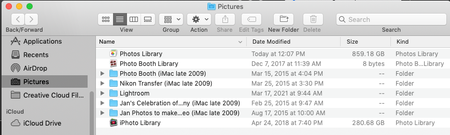
Hello, when I started my 3 TB DropBox business trial last month I was under the impression I would be able to back up all my photos (over 1 TB) from my iMac desktop computer (not from my iPhone, which only holds a fraction of my photos). I have searched endlessly, please help. System: iMac desktop/OS Mojave 10.14.6. My photos library is located: Macintosh HD > users > home (my name) > Pictures (folder) > Photos Library. I also have other folders of photos that are not in Mac photos in there. See snapshot below: What I am doing: I am going to DropBox on the top bar of my computer > to my icon > preferences > backups > manage backup. Photos/Pictures is not a folder option. The only options are: Desktop, Documents, Downloads, Music, and Movies. I also tried going to my icon > preferences > sync > choose folders, and I get the same options I just mentioned above. I appreciate any and all assistance. Thank you kindly. LTDTMSolved4.2KViews2likes7Comments