Your workflow is unique 👨💻 - tell us how you use Dropbox here.
Desktop
1972 Topics
Apple Silicon (M1) Desktop Sync Compatibility
Please can you upgrade the Dropbox app so that it works natively on Apple Silicon Macs (M1) without Rosetta. Rosetta is not an option as it annihilates the battery. This may be a duplicate of the below idea however that started for ARM processors in general and you haven't looked at it in 6 years so starting an Apple specific idea in the hope you see it. https://www.dropboxforum.com/t5/Dropbox-ideas/Desktop-app-with-syncing-for-devices-with-ARM-processors/idi-p/57554/page/18 There are also lots of comments on this thread to help support the case for demand: https://www.dropboxforum.com/t5/Dropbox-installs-integrations/Dropbox-Apple-Silicon-M1-install/td-p/500325Solved235KViews2016likes496Comments
How does one remove the Dropbox link from the Navigation Pane om Windows 10?
I don't notice it on Win8.1, but I have already hacked out a bunch of stuff in the registry on Win8.1. I have the Dropbox folder conveniently located in the root of a second hard drive, I don't need the link cluttering up the Navigation Pane, or the Desktop for that matter.Solved153KViews24likes73Comments
Bring back the green 'synced' checkmark in the system tray.
In my Windows system tray (next to the clock), Dropbox used to show that it was fully synced by showing a green check-mark over the Dropbox icon. This was really helpfull. If Dropbox was offline, it would show no overlay icon. Recently (and according to Dropbox itsself) this has changed, the Dropbox icon now shows no overlay if it is fully synced, but to me, i constantly think my Dropbox is offline, instead of 'fully synced'. So the idea is: please bring back the green 'fully synced' checkmark. Or -at least- make it an option to show it. Please upvote this idea if you agree141KViews502likes336Comments
How do I remove Dropbox from my Mac if I get an error message when attempting to uninstall?
I am trying to delete the Dropbox app from my Mac, but it gives me an error message saying 'The item “Dropbox” can’t be moved to the Trash because some of its plugins are in use', even after closing all other open applications. What could these plugins be and how can I stop them from being in use? ThanksSolved137KViews20likes48CommentsThis application failed to start because it could not find the Qt platform plugin "windows" error?
Hi, My Dropbox is complaining! New PC, due to work, and now dropbox gives me this error message: This application failed to start because it could not find or load the Qt platform plugin "windows". It worked fine, problem came up, I reinstalled, same problem again after a restart and redone the reinstalled and getting same problem again: What to do? Thanks in advance for any help.Solved129KViews0likes6Comments
Dropbox removing external disk support for Mac users
In case anyone's unaware... if you're a Mac user storing your Dropbox on an external drive, you'll shortly lose that ability. https://talk.tidbits.com/t/dropbox-drops-support-for-storing-files-on-an-external-drive-and-onedrive-retains-it/20797/16 https://help.dropbox.com/installs/macos-support-for-expected-changes Just confirmed this with DB support (see below). Gutted - been with Dropbox for years and our entire video team flow is based around it 😕 >Hi there, I read today that you are scrapping the ability to store the Dropbox folder on external disks, on OSX. I'd like to ask more about this please. > Hello Jon, and thank you for contacting Dropbox Support. My name is Joseph, and I will be more than happy to look into your request, right away. That is correct Jon, as part of the Dropbox for macOS update, the Dropbox folder must be located in ~/Library/CloudStorage. >This is a showstopper for us, and will mean we have to move to another service. We have a large distributed team using DB for video work, no way it'll fit within internal drives. Is there a workaround? > I totally understand and I apologize for the inconvenience. Unfortunately, there is no workaround on this as changing the location of your Dropbox folder is no longer supported by macOS. >This change doesn't seem to have hit us yet - we're running a variety of machines inc Ventura What will trigger its enforcement? Can we stay on an earlier OS or Dropbox version? >The updates happening automatically every time the Dropbox app is restarting, for example if your device never restarts it should maintain the older version but we can't guarantee full functionality on older versions of the application. >So what will happen - if we have a Dropbox folder on an 8TB drive and a tiny internal drive - will it try to clone stuff across and eat up the space? What's the mechanism? >That's right, it will try to move the content on your internal drive until it has no space and gives you an error. >Is Smartsync still supported? I.e. will it move stuff to being online only if it won't fit? >It is, however it is now known as online-only.Solved118KViews25likes697Comments
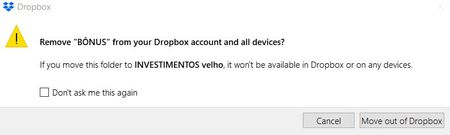
Remove X from your Dropbox account?
Hello, recently I have been receiving warnings that say "Remove X from your Dropbox account and all devices? If you move this folder to X it won’t be available in Dropbox or on any devices." X are names of folder I’m simply moving in my computer, but not deleting in anyway, nor from Dropbox nor from my computer. At the bottom of the message, it says "cancel" or "move out of dropbox". What is all that and why it started appearing to me? BEST116KViews2likes13Comments