We're making some changes to the Dropbox Community 👩💻 - Find out more here.
Dropbox Backup
570 Topics
AirDrop broken on MacOS Ventura
I'm using MacOS Ventura and I can't receive files via AirDrop anymore. My Downloads folder is inside my Dropbox as I'm using Dropbox Backup, so it is all inside the Cloud Library now. The Spotlight Search is broken and now also I can't receive airdropped files anymore. They are sending but afterwards they are just nowhere to be found on the hard-drive. It's quite the mess. @DropboxTeam: It would be highly appreciated if you can expedite looking into resolving the issues on Ventura!Solved22KViews16likes98Comments
Backup folder name change
Hello! I have 2 macs, one personal and one for work. Both had backup enabled and when I went online, I saw both computers' backup directories. The directories were both in the format of "My Mac (computername)" However, recently I disabled the Dropbox backup on my work laptop because I didn't think it would be wise to backup my work stuff to Dropbox. But I was subsequently told it was OK, so I re-enabled the backup. While everything was uploaded to Dropbox just fine, the name of the work laptop backup directory is now simply "Mac (2)". I would like to rename the folder to the "My Mac" format I previously had, but it is not letting me rename the folder. Any assistance would be great. Thanks in advance.Solved11KViews13likes43CommentsTurning on dropbox backup but folder name is weird
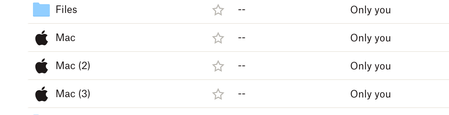
I had tested the Dropbox Backup feature in the past so I know that when turned on my Computers should be added as My Mac (Unique Mac Name). I decided to turn it back on again when setting up two new Macs that I have but the backup now creates the folders as just Mac, Mac (2), Mac (3) I've gone through the steps of unlinking Dropbox from each computer. Checking their names in System Preferences and also in the Security tab of my Dropbox account. The computer names are correct in Dropbox but the backup feature is still creating the folders as just MacSolved16KViews10likes56Comments
Dropbox moving my documents folder
Hi guys, I just tried the latest beta feature that allows me to backup my mac's folders. The issue is that when I select to backup my documents folder, dropbox just moves my entire documents folder from /Users/username/ to /Users/username/Dropbox/My Mac/ folder without asking me if that's OK. It just created a symlink in my home folder (/Users/username) that points to the the dropbox folder. THIS IS A HUGE ISSUE. 1. A backup software shouldn't move around the source files. I want my data to stay in a specific location that I prefer. 2. I have another backup software running on my machine that has to now re-upload ~9gb of files because dropbox decided to move the folder. 3. The replacement folder it created doens't even match the icon of documents folder. This frankly feels like an intrusion of my data. Until dropbox can figure out how to backup files/folders without moving my data in the dropbox folder I am turning this feature off. I hope this feedback reaches the right folks. Thanks.4.7KViews9likes11Comments
Linux commands for Dropbox Backup
I was pointed here to give a suggestion from this thread: https://www.dropboxforum.com/t5/Dropbox-files-folders/Trying-to-backup-on-Linux/td-p/548352 It would be nice if the functionality was added to (https://help.dropbox.com/installs-integrations/desktop/linux-commands) Some commands like: `dropbox backup enable/disable` and `dropbox backup add/remove /path/to/folder/or/file` Currently the advice is to mount into the dropbox folder (https://askubuntu.com/questions/1366889/how-can-i-use-dropbox-to-back-up-arbitrary-folders/1366896#1366896)7.7KViews8likes8Comments
Why can I only back up specific folders?
I just started using the back up feature in Dropbox but it seems to only back up 3 folders: DOWNLOADS, DESKTOP & DOCUMENTS. I don't keep important stuff in any of these. How do I select my 2 most important folders? It doesn't seem to let me choose.4.5KViews7likes10Comments🌟🤝Community Spirit Badge 🤝🌟
Hey everyone! 🌟 It’s Theresa here. You’ve probably seen me hanging out in the Community, jumping into conversations and joining discussions (if you haven’t seen me before, well, hello 👋). And while doing that, I’ve noticed something pretty great (well, we all have here on the Dropbox Community Team) – so many of you are out here making this Community an amazing place. Whether you're helping others, sharing useful tips, or just bringing good vibes ✨, your contributions really stand out. To recognise and celebrate this, we’ve created a brand-new badge… This badge is all about celebrating the people who make this space feel like home. It’s for those who do more than just answer questions – the ones who offer a helping hand 🤝, share great tips 💡, and keep the good vibes flowing. Whether you're solving tricky problems 🧩, sharing useful resources 📚, or just making the Community a fun place to hang out 😃, we see you and we appreciate you. The Community Spirit Badge is a one-time award 🏆, so if you earn it, you know you're doing something special. It's a little extra recognition for those who truly bring the Community to life. We’re so excited 🎊 to launch this new badge and can’t wait to start recognizing the amazing individuals who truly bring the spirit of this Community to life. And if you spot someone who you think deserves the Community Spirit Badge, don’t hesitate to tag me Theresa within the thread. T 💙 (Dropbox Community Manager)854Views5likes0Comments
My backed up desktop folders disappeared from my computer and are only on the Dropbox cloud
Hi everyone - have had Dropbox for a while, and have had specific files from my Macbook back up to Dropbox (my documents file and my desktop). When I used the laptop last night everything was located on my Macbook and in Dropbox where it should be. This afternoon, came home from work and I have nothing on my desktop anymore (all files, folders, etc) and my entire My Documents folder are gone from the Macbook but are in Dropbox. Anytime I create a new file on the desktop it disappears into the dropbox cloud. There are sync issues identified, and I can't fix them because Dropbox can't find the files in their original location...not sure what to do or how to fix. I want all the files in both places, not just in the cloud on Dropbox. Any help appreciated. Thanks!5.8KViews5likes22Comments
Stop Dropbox from backing up external drive
I made the mistake of accepting a request from Dropbox to back up an external drive plugged into my Mac. I didn't stop to think the files in that drive were going to be huge video files that should NOT be backed up to Dropbox. How do I stop the backup of that external drive? The help section says go to the preferences of the Mac Dropbox app and uncheck folders I don't want to be synced. There is NO such option. The only option is to uncheck something about set up notifications for new external drives. There was another help suggestion that suggested right clicking "the backup" and pausing it. WHAT backup?? I don't see the external drive listed anywhere in my Dropbox folder, and right clicking the external drive icon on my desktop doesn't show any Dropbox options. How do I stop this backup without disabling ALL backups?? Thank you for any help on this....Solved19KViews5likes22Comments