Our Community is in read-only mode until April 8th, learn more here. You can still search existing threads or get help via Dropbox Support, the Dropbox Help Center, or Learn.
Dropbox Backup
162 Topics
I can't back up the Documents folder, if the Dropbox folder is on the D\: drive.
Device Omen 17 laptop Operating System/Browser (if using the web) Windows 11 Dropbox App Version (if using the app) 244.4.6580 Syncing Status "Up to date" Question or Issue I moved Dropbox to my D\: drive in order to clear space on my C\: drive I had to disable backups to make the move I then received an email telling me 4680 files were deleted I try to enable backups for Documents and it won't, stating 'Dropbox and folder are on different drives' I move Documents (Properties > Location > Move) to D:\Dropbox\Documents (2026) It won't backup, stating 'Not in default location' Is it possible have have Dropbox on the D\: drive and make backups of Desktop, Documents and Downloads? I'm concerned that my files are being deleted according to the email I received. Can someone please help?188Views0likes13Comments
How can I remove a backup from my Dropbox account?
Device Dell Inserpon Operating System/Browser (if using the web) (Windows 11, Dropbox App Version (if using the a Syncing Status ("Up to date", " Question or Issue I have files from my previous employment that I no longer need to access through the Drobox app on my Windows computer. But I still want to have access to those files on my computer s HD. I moved the files to my HD My Documents file, and now it appears the storage has increased by that amount in Dropbox. I have been searching the community, but I cannot seem to find a way to separate my My Documents storage from Dropbox. Can anyone guide me on a solution?45Views0likes1Comment
My Backup online shows as 0 bytes. What is happening?
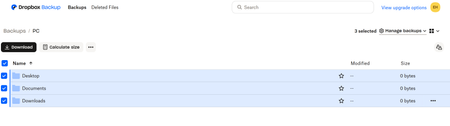
Hi I was able to download the Dropbox App for my surface pro and setup the backup. After successfully backing up, the dropbox online says my "Desktop" "Documents" & "Downloads" backed up but there are 0 bytes in each folder. I only wanted to back up these three folders. Can someone please help me? Thank you, EmilySolved138Views0likes7Comments
Can I upload from a external Hard drive straight to Dropbox?
Can I upload from a external Hard drive straight to drop box? It’s plugged into the computer and I can see the files when I look at it but when I try to upload to Dropbox it says there are no files there? I don’t have the space to transfer to computer and then upload so not sure where to go from here as I need all those files in my drop boxSolved5.6KViews0likes4Comments
Photoshop won't save for web unless Dropbox Desktop & Documents backup disabled
This issue affects Adobe Photoshop and the Dropbox backup features on Mac Big Sur. When the Desktop and Documents are selected as Personal backup folders, it seems to mess up the Adobe permissions, so that the Save for Web option in Photoshop doesn't work. Only when you deselect the Desktop and Documents backup options do the permissions reset. Not sure if this is a Dropbox problem or Adobe problem. I found the solution in the Adobe forums here: https://community.adobe.com/t5/photoshop-ecosystem-discussions/p-save-for-web-error-a-write-permissions-error-has-occurred-photoshop-22-1-1/m-p/11747734 Would be good if we could fix this so I can continue to back up my Desktop and Documents folders.6.6KViews2likes9CommentsUnderstanding Dropbox Backup
I am a scientist that has used Dropbox (DB) for about 12 years. I have a 2TB family plan and only have used 15% of it. My OS is Mac Sierra (10.12.6) with 32GB of RAM. I use the Finder a lot more than most Mac Users. My DB files are in a subfolder of my user (home) folder. Here are my 2 questions: 1. In the past I was told that only the desktop and files in documents can be backed up with DB backup. Is this still true or can my hard drive folders and files in my User (Home) folder be backup up with the new DB upgrades? 2. Given my work and the long time I have used DB, I have 250 GB within the DB main folder (with many subfolders and files. Will the backup, after it initially syncs, slow my computer's operations by eating up a lot of User memory, or is this an incremental backup that rapidly updates those new folders and files (the way SuperDuper does and also Time Machine). I cannot afford to have a slow computer due to RAM consumption.Solved8.6KViews0likes8CommentsCan't redirect into reparse point please choose different target path
So, I uninstalled Dropbox. Now I find that my folders; Desktop, Documents, Downloads, Music, Pictures, and God knows what else are all set to my Dropbox folder. When I go to 'restore' these folders to their correct, default Windows 10 path, I get the above error message. This is outrageous. What is the solution?Solved15KViews0likes67CommentsStop Dropbox from backing up external drive
I made the mistake of accepting a request from Dropbox to back up an external drive plugged into my Mac. I didn't stop to think the files in that drive were going to be huge video files that should NOT be backed up to Dropbox. How do I stop the backup of that external drive? The help section says go to the preferences of the Mac Dropbox app and uncheck folders I don't want to be synced. There is NO such option. The only option is to uncheck something about set up notifications for new external drives. There was another help suggestion that suggested right clicking "the backup" and pausing it. WHAT backup?? I don't see the external drive listed anywhere in my Dropbox folder, and right clicking the external drive icon on my desktop doesn't show any Dropbox options. How do I stop this backup without disabling ALL backups?? Thank you for any help on this....Solved19KViews5likes22Comments