Our Community is in read-only mode until April 8th, learn more here. You can still search existing threads or get help via Dropbox Support, the Dropbox Help Center, or Learn.
Dropbox Basic
118 TopicsMac OS Sequoia is arriving. Is DropBox ready?
Hi everyone, who remembers the chaos that happened last year with the Mac OS Sonoma update and all the issues we had with DropBox? There was a particular version that caused syncing to go haywire. I remember it all too well, as it took us almost a month to figure out how to fix the problem. What will happen with Mac OS Sequoia? I admit, I'm quite anxious and would appreciate some reassurance from the DropBox team. Thanks.Solved13KViews8likes69Comments
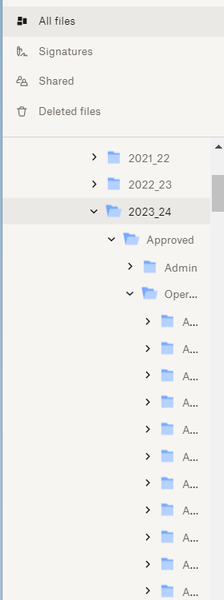
How to expand left sidebar width on the website?
How can I expand the left sidebar width. I have many levels of files and I can not see the names of folders that I want to move files into. As you can see below, all I can see is the first letter of the folder "A" and there are several of them. I want to be able to expand the left sidebar so I can see the names of those folders and not just the first letter. I was able to do it before, but not now for some reason. Thanks!2.5KViews8likes14Comments
Desktop access without syncing.
Hello. I see it mentioned a few times previously, but am wondering if there is any active development on a way to access Dropbox files from the desktop without either syncing or using the web app...basically as a file server. It sounds like this would be a common use case. I need to be able to save/print files from an application to Dropbox (for Business), but don't need the overhead of keeping those files locally and syncing them. Does anyone know if Dropbox has at least considered this kind of functionality? Thank you.Solved19KViews5likes22Comments
Opening the Dropbox folder enables Num Lock.
Hi, I have a weird little problem. Every time I open the Dropbox folder (double click on the icon on the task bar), there's a Windows notification popping up that Num Lock has been enabled. This only started happening after I upgraded my Windows 10 to 11. Any ideas how to fix this?Solved1.3KViews4likes29Comments
Dropbox icon missing from menu bar on macOS Ventura
dropbox Icon missing from Menu Bar on macOS Ventura. Before installing Ventura dropbox icon was visible in Menu Bar. I stopped the dropbox application and restarted it and there was no change. I uninstalled the dropbox desktop app and reinstalled it and it still does not appear. The files are syncing when I add new files to the dropbox. Please Help.19KViews3likes57Comments
Unable to Log into Dropbox App. "Previous sign in interrupted. Please try again"
I have been unable to log into the Dropbox application on my Windows 11 computer. I have tried using both Chrome and Edge. I have uninstalled and reinstalled both the normal and the offline installer version of the dropbox application installer. I have reset the browser and deleted all cookies and plugins. The application always errors out with teh message "previous sign in interrupted. Please try again"2KViews2likes7CommentsCan't open Dropbox folder with Explorer (Windows 10)
I have been using DB for several years without problem. Today I find I cannot open folders in my Dropbox folder on my C: drive with Explorer. I can see them if I use the web app. I have rebooted and reinstalled the program, to no avail. If I click on it, I get the hourglass, which will not stop unless I forcibly close it with Task Manager. Any ideas? Rather desperate here. I do have another Dropbox account through my institution, but it does not reference this folder.4.3KViews2likes19Comments
Permissions error after Mac migration / localhost
Hey everyone! The Dropbox app recently moved my Dropbox folder in to the Library and now my web development environment isn't working properly. Whenever I go to my 'localhost', I get error messages. The error messages I am receiving are: - "Forbidden. You don't have permission to access / on this server." (MAMP 5.3) - "Forbidden. You don't have permission to access this resource. Server unable to read htaccess file, denying access to be safe." (MAMP 6.8) My setup: - I keep my development files on Dropbox - I use MAMP as a PHP server - Mac Ventura 13.3 Help!Solved4.5KViews2likes10Comments
New Mac Ventura Update - Online/Offline Files Not Syncing
I've recently updated to the v.167.4.4719 version of Dropbox which now changes the location of where your dropbox is located and also changes the way the icons represent what is downloaded online/offline. The issues I'm having are as follows and I wanted to see if anyone else was experiencing this and worked out a way to fix it? 1. Syncing files online/offline. - It seems as if right-clicking a file and making it online gives me the error code "The file is currently in use by an application." even though I just have finder open. Then any files I have downloaded offline, if I try to make them online-only it does nothing, no sync or change of status on the file. 2. New Icons. Above is a file I have online-only that has the green check mark as if it's downloaded offline then also this new cloud icon. If I right-click and go "make available offline" nothing happens. Then if I click the cloud icon, it downloads the file as if it's offline but then the green check mark disappears. Now again if I try to make this "online only" by right-clicking and selecting the option, it gives me the error "The file is currently in use by an application." Overall this whole update seems buggy and confusing. I've been using dropbox for over 10 years and have never experienced these kinds of issues. I contacted support today and they told me I couldn't roll back my version of dropbox which worked totally fine, and also there's nothing that can be done about this. It really doesn't feel good enough and I'll be looking elsewhere if these things cant be addressed soon. Please share below if you've had a similar experience.3.3KViews2likes15Comments
New MacOs Problem due to default to Online Only Files
Been having issues recently with terrible performance around video editing I was doing. The files were choppy and acted like they not fully entering the software. After digging digging and digging I just found out from DropBox support that with the new MacOs Monterey apparently when you add files to your Dropbox folder via Finder it first has to upload all the files to Dropbox then if you want them to also be on your hard drive you have to go to the file (or folder) and tell it to make them available off-line. Telling it to make them available offline means that it now has to download all the files you just uploaded. Usually not a big issue but... If you do any video work then this SUCKS! For example, today I shot a bunch of 4K and Raw video so needless to say the files are quite large. So moving the files off my camera's SD card to put them on my hard drive (which is also a dropbox folder) kicked off the process of uploading the files to Dropbox. In my case it needed to upload almost 60 Gig of video which even with decent internet it takes a while, in some cases a couple hours. Also while the files are uploading it basically makes them unusable in any video editing software (for me Premiere Pro) because it appears they are having to download what is being uploaded verses just using what should be stored locally on my hard drive. So what is the fix according to Dropbox Support? Well there isn't one so you have to upload first, then after they all upload you have to go back and set the files to Available Offline which at that point Dropbox then downloads the files back to your hard drive. Needless to say downloading 60 Gig does also take some time. I hate this and have been with Dropbox for over 10 years but going to have to change. If this change was caused by the new MacOs then why didn't the dev team at DropBox have this figured out already and before Apple released Monterey? Just annoyed that I spent hours and hours trying to figure out why I was having such bad performance issues while trying to edit video only to figure out there is a default to "On-Line Only" first. Ugg. So wanted to put this here in the community in the hopes that someone who is struggling with the same problem will find it and stop beating their head against the wall.7.7KViews2likes22Comments