Our Community is in read-only mode until April 8th, learn more here. You can still search existing threads or get help via Dropbox Support, the Dropbox Help Center, or Learn.
Dropbox Capture
37 Topics
Dropbox Capture screen recording skips and buffers upon playback
When I do a screen recording using Dropbox Capture (v94.0.3), the resulting video skips and buffers upon playback. It's unwatchable. I have tried waiting for the full video to load before playing it - that does not help. I've uninstalled and reinstalled Dropbox Capture - that doesn't help. Cleared my cache too, that didn't fix it. I'm using Windows 11 on a PC, and other screen recording software does not do this (Loom, the native Microsoft screen record software, etc). The capture feature works just fine for still images so there is only a problem with screen recording. I've been using Dropbox Capture for a few months since it was in beta--this was not a problem about a month ago. Anyone have a solution?11KViews5likes47Comments
Dropbox iOS Conversion of HEIC Photos to JPG on Portrait Mode Photos not Viewable on Sierra
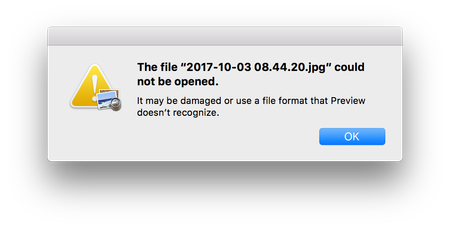
I have my iPhone set to capture HEIC, and Dropbox client set to Save HEIC Photos As JPG. If you take a "Portrait Mode" photo on the iPhone in HEIC, and have Dropbox convert this to JPG, the JPG is unviewable on a Mac running Sierra. Non "Portrait Mode" photos are viewable fine on Sierra, and Portrait Mode photos that can't be viewed on Sierra, can be viewed on High Sierra. NOTE: Portrait Mode is not the orientation of the phone, but a special mode that tries to create fake Bokeh by blurring the background through software. System Info: iPhone 7+ iOS 11.0.2 Dropbox for iOS v66.2.8 macOS Sierra v10.12.6 macOS High Sierra v10.13 Dropbox for Mac v35.4.20 Please see Screenshots:Solved11KViews0likes16Comments
blank login screen with new installed dropbox on new installed macOS high sierra
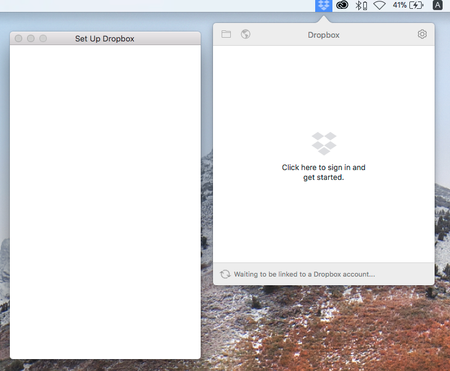
Hi all, Join here today and my first question, since this is my first encountered problem after using dropbox so many years. I fresh install macOS Sierra from recovery mode, new formated ssd, to my MacBook Air (mid 2011), and then upgrade to macOS high Sierra (10.13) immediately. Then I download dropbox desktop app from dropbox.com and successfully installed, while the first running of the application, it pop up a blank "Set Up Dropbox" window, I cannot type anything to login as usual. So I cannot login my dropbox account nor sync file. Captured screen below: I've try restart, re-install dropbox app, and restart my mac, nothing change. Any idea how to solve this problem?Solved8.4KViews0likes12Comments
Dropbox Capture paste into Outlook message creates attachments instead of being inserted in the body
For the last couple weeks, my Dropbox Capture is pasting screenshots as attachments in Outlook emails, instead of being inserted inside the message body. Does anybody know how to modify that behavior?...it was working fine before... Many thanks, DiegoSolved4.9KViews0likes13Comments
Very, very low video quality in DropBox Capture. Are there any settings to change that?
I just installed DropBox Capture and the video quality is absolutely terrible. It's like it was compressed down 100x, no text is readable and the audio is very choppy. I cannot find any quality or compression settings. Any idea what the deal is or how I fix it? In theory this is a very nice tool for me so I would like to get it working well.4.7KViews0likes9Comments
Dropbox Capture doesn't open
Hi all, I've just recently tried to install Dropbox Capture to replace my Loom account, but after installing the app, I do not have the icon in my menu bar, and I cannot find how to record any videos with it. I'm on MacOS and I see the process running in the Activity Monitor, but no luck using the software. Any ideas what might be causing this? Thanks, Alex.Solved4.5KViews0likes13CommentsCapture limited to 120 minutes now
I've noticed Capture is now limited to 120 minutes. Is there a way to increase this? I'm not going to share Capture with people for an extra 20 minutes when we're already paying for Dropbox. If this is a new company policy, it's a nail in the coffin for Capture as far as I'm concerned. Unfortunately, we use this a lot and we'll need to look for an alternative straight away.Solved3.3KViews0likes10CommentsDoes Screen Recording capture audio of a video playing?
If I have a video playing on the screen that I am recording using the "Screen recording" option, will it also capture the audio from the video? Also, when using "Audio recording" does it record sound coming through the sound card or microphone or speakers?Solved3.2KViews0likes5Comments
Dropbox Capture videos buffering
Hello, I'm evaluating Dropbox for my business and am trying out the Dropbox Paper feature. The recorded video buffers and stalls and is more-or-less unwatchable. I don't have problems like this with any other similar tools (Loom, MS Streams, Youtube). I'm in Australia and a colleague in New Zealand has the same buffering there. If I upgraded to a business plan, would the same buffering occur?3KViews0likes5Comments