Your workflow is unique 👨💻 - tell us how you use Dropbox here.
Dropbox Family
45 Topics
Family plan is too expensive for what it offers
While I would like to have the ability for my wife and I to share a combined account with our own individual logins - it's not worth the extra $80/year, almost doubling the cost for only a limited increase in features. If it came with double the storage I might consider it, but even then I'm not sure I need that much more storage at the moment. Please reconsider the pricing on the family plan as I will never upgrade at anywhere near that price. It makes more sense to just have 2 Plus accounts since it comes with the extra storage. With the amount of competition out there for similar cloud storage, it's getting more difficult to justify the cost of dropbox, so I was really expecting a minimal increase in price, if any at all versus the Plus plan I am currently paying for.15KViews22likes32Comments
Message from Dropbox about completing date of birth by 1st September or lose Family Plan Access
I received the same email & have the same issue. I can't find where to update the DOB from! This truly frustrating for how much we pay for this service. Not to mention that we store important personal and business data on it. DropBox team, please sort this out!Solved7.9KViews2likes57Comments
Black Friday deal for Family plan?
I'm on a monthly Family plan with 2TB of storage and was wondering if anyone knew of an upcoming Black Friday/Cyber Monday sale. I'd like to switch to yearly billing, and I know many companies offer larger discounts on yearly plans during BF/CM, so I was thinking this would be a good time to do so if there was going to be a good sale. I see there's a generic discount baked into switching to yearly, but I'd prefer to snag a lower sale price if possible.Solved7.4KViews2likes3CommentsGet support for your paid Dropbox account
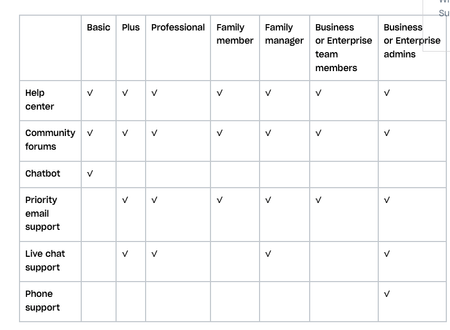
Obviously, you know that we (the Dropbox Community forum) are always here for you. No I mean it, we’re here 24/7, but of course, there are other ways to get support too. Check out your options below, or ask us a question and we will do our best to direct you to the right spot. Getting support on a Dropbox Basic plan: You’ve seen us talk about the many benefits of Dropbox Basic before but when something isn’t working quite right, you can get help: Right here, the Dropbox Community forums The Help Center The Chatbot Getting support for your paid Dropbox account If you need more support than that, and you are on a paid Dropbox plan, you can also access priority email support. With email support, you can expect an email response from support within 1 business day (Monday–Friday). Users on the Enterprise plan can expect a response from email support within 1 hour, any day of the week. Live chat and phone support are also available during your local business hours, 9:00 am – 5:00 pm. How to receive support in your preferred language Help isn’t help if you can’t understand it - so make sure you can access support in your preferred language, so here’s what you need to know. All Dropbox customers have access to support in English. Depending on your account type and location, support may be available in French, German, Japanese, Portuguese, and Spanish. Sign in and visit dropbox.com/support to see your language options. If your language isn’t listed at dropbox.com/support, you can send an email or start a chat in your preferred language, and you’ll be routed to the appropriate team. And if that doesn’t make it clear, you can check out this table to see how you can best get support, check this out. So, we hope that answered your questions about getting support, but if not, tell us about it in the comments below!5.5KViews3likes2Comments
Family Room versus Team Folders for two people
I am currently a Dropbox Individual Plus subscriber, considering an upgrade to Individual Pro. My wife has her own Plus account, so together we have 4TB storage available. What's missing for us is the functionality of a Team / Group area like the business plans - with easy shared access, locked editing for version control, streamlined Paper usage, etc. Essentially I would like to set up Dropbox as a "cloud-based NAS for two". A Family Plan might work for us, but we would lose total storage space and some extra Pro functionality if we both decide to upgrade. Since it's just us, a Business plan doesn't make sense because we'll be paying for an unused third member if I understand correctly. So my question is, what's the best way to configure Dropbox as our "Cloud-based NAS", with a shared team area and at least 4TB total space? Thanks, SkySolved5.1KViews1like3CommentsUpgrade to Family Plan
Hello If I upgrade from my individual plan to the Family plan, will the files and folders in my original account automatically be added to the new plan? Also, will anyone I invite be able to keep their original contents in the new plan as well? Thank you.Solved3.7KViews1like6CommentsUsing family plan for a small business?
I cannot see anything in the T&C regarding this but it's possible I missed it. Anyway, does Dropbox require businesses to use Dropbox Business regardless of whether they need the extra features? Or can they use a personal/family plan if it fits their needs? We're a team of 4 people and the family plan features currently are more than enough for us and the pricing fits our limited budget. While I can sign up and "pretend" it's a "family", I do not really want to be in violation of the T&C for any reason and to avoid liability.Solved3.4KViews1like1Comment
Question about the Family Plan
Hi, I'd like to know if 6 users (basic account) being invited to Family Plan can log in as many devices as they want? Does it means after they accept the invitation to Family Plan, their basic account will become family plan account? Their accounts (6 users) will enjoy all benefits of Family Plan account as listed in this link (https://www.dropbox.com/plans) , is it correct? . Thanks!Solved3.4KViews1like8Comments