Our Community is in read-only mode until April 8th, learn more here. You can still search existing threads or get help via Dropbox Support, the Dropbox Help Center, or Learn.
Dropbox Rewind
40 Topics
My files were deleted. I need a way to recover permanently deleted files.
hello this is Ahmed from Mahd commercial business, we have files that were permanently deleted few hours ago, and it is affecting our business. we are currently trying to locate these files at any of our devices, but unfortunately we were not able to locate them anywhere. we wish for our files to be restored so please see us through the process of doing so. best regards, Mahd team.Solved6.6KViews0likes9Comments
Shared files got moved and became copies only I can open
I have a ticket in but I need help it's been over a day. Long story short when I updated my Mac yesterday it moved files from shared folders to a copy of it with the end saying "my name conflicted copy date". I'd like to know if I can rewind either the original or the copy so that the files go back to the correct place. I've already disconnected Dropbox from my desktop. I just need to put things back the way they were. Any help is appreciated.Solved4.6KViews3likes13Comments
CANCELLING A REWIND REQUEST!
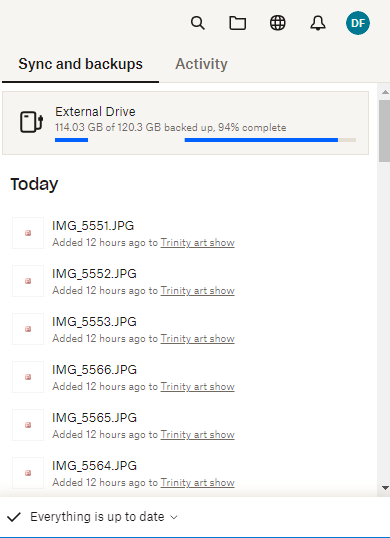
How do I cancel a rewind request? I accidentally requested a file to rewind on my external hard drive backup instead of my main dropbox folder. How do I stop the rewind? It started syncing and changing my last backup of my external drive! I unplugged the external drive to keep it from doing the rewind but I can't figure out how to cancel the rewind (not pause it). See screenshot below. At the bottom it says everything is up to date. It's what's going on at the top that I need to stop. The far left number (114.03 GB) keeps decreasing which tells me it's deleting files. Help!Solved4.1KViews0likes7Comments
Unshared file/folder by clearing membership
we have 5 groups that share files. one of them completely dumped all its folders at the same time and this is the message in the Activity Unshared file/folder by clearing membership. I can not find the files anywhere, they are not showing up in deleted files. When i Rewound to prior to this happening as suggested by Dropbox support nothing was restored. How do I undo what has been done to get my files back? I have all Dropbox Business accounts and this should not be able to happen. If Dropbox is cloud based the files should be somewhere.3.6KViews1like12Comments
Lost Files that were permanently deleted after ransomware.
My company has stored files on Dropbox for 8 years and have recovered from 2 Ransomware hits in that time. We have had easily 1 million + files on Dropbox for business. We use roughly 4-5 TB of storage on their servers. We had another ransomware attack last month and I went on dropbox to recover my files yet this time they had disappeared. I contacted Dropbox support who informed me we didnt have the files stored with them. I provided proof that the files were on dropbox to which they replied. The hacker had permanently deleted the files and they are now not recoverable.......ever. They explained that by law they had to provide a service to permanently delete files when the app requests it. When the hacker encrypted our files he permanently deleted our backup then encrypted the files. I have the encrypted versions in our dropbox folder on the app but no way or recovering them. When I connect the hdd to dropbox it will remove these files also, which I am not doing even though they are encrypted. So as it stands we have lost well over 1 million files, artwork, photoshop psd's and illustrator files along with excel and word documents that all were business critical. We have also lost all our network backups, SQL database backups and server images. Dropbox have tried rewinding the accounts and tried recovering the accounts and claim that everything is lost..........however they did recover 2 folders from the files that they claim were completely deleted. How can they recover, roughly 2% of the files, that were lost without being able to recover anything. What needs to happen to get the rest of the files back ? I am trying here because everytime I contact support I get them saying we will do a rewind, so I tell them that wont work. They then send me to second level support who reply sorry all files have been deleted. So I ask how come some can be recovered and Support dont even reply they just keep closing the ticket forcing me to start again. I could do with help on the next step. I have sent solicitor letters and emails but nothing is sent back not even support tickets now.3.1KViews0likes11Comments
Mass Deletion initiated by Dropbox on our Shared Team folder
Hi, I was notified of a mass deletion on our shared folder today that we did not initiate. Our entire team folder has been deleted without warning and without our knowledge. Activity states that is was done by the Team Admin (which is me) and Dropbox (as a member). None of the files can be restored through the GUI and I’m getting no response from Dropbox on the matter. This is the worst service I have ever witnessed. The shared folder in question was also removed and then somehow recreated since the empty shared folder states it was created today on the day of deletion. While the actual shared folder is over 3 years old and contained all our team data! So something or someone has deleted those files and then recreated the same folder. None of my staff members have done so and we see no indication of a breach since all of our access happens through a SSO and MFA. Since the fake team folder is created today there is no option to rewind since there is no history! I can see the folder being deleted in my activity yet I have no way of restoring it. This is actual madness! Can someone here please assist? Thank you.Solved3.1KViews0likes7Comments
How long does Dropbox Rewind take?
Hello! Two days ago a member of our team accidentally deleted most of the shared folders in our Business account. Therefore we are now using Dropbox Rewind to rewind back to the day before this happened. However, it seems to be taking awefully long, even for a relatively small folder. We work a lot with large numbers of large files. How long does it usually take to Rewind? And can I close the Dropbox web-interface when it is still rewinding?Solved3KViews0likes2Comments
Dropbox rewind isn't working properly for Dropbox Plus and above users
hello everyone, I am having an issue, now I know I can restore deleted files and folders but selecting is cumbersome and there is no select all button, I tried to use dropboxes rewind feature but when ever I try it states there was an internal dropbox error and I want to rewind my intire dropbox, I am currently on the plus plan, is there another way I can get this working?Solved2.8KViews1like13Comments
Rewind Feature doesn't seem to work as expected.....
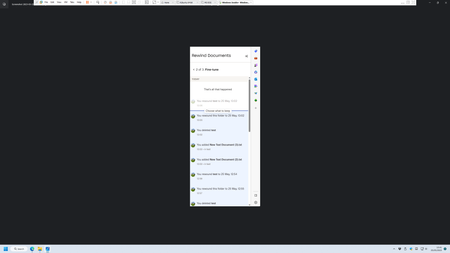
Hi ... I'm having issues when testing Rewind/Versioning using Windows 11 Workstation - MS Edge .. I hope the below makes sense, I've put the text in bold for the questions... Thanks in advance. I create a folder called Test located in the My Documents folder which is then synced by Dropbox. In this folder called Test I create five individual text files and allowed to sync with Dropbox. I then delete the folder called Test including the five Test text files and allowed Dropbox to sync. I then visit Dropbox.com and select My Documents "..." and use Rewind This Folder. Using "Rewind This Folder" I select the time before the folder and file deletions were made and restore the Test folder. On opening the newly restored Test folder I was expecting to see the five Test text files but the folder is empty. Does this method only restore the folder and not the files that were stored in the folder - Is this correct ? con't I then decided to rewind the newly restored Test folder using the same procedure listed above. However Rewind This Folder only allows me to restore four of the five Text files. The last file to be created/deleted can't be selected to be restored. I've attached a picture showing an example of not being able to select the latest "Fine Tune" action above the line... How do I select the very latest action under "Fine Tune" using MS Edge.2.8KViews0likes9Comments