Need to see if your shared folder is taking up space on your dropbox 👨💻? Find out how to check here.
Dropbox Transfer
23 Topics
Remove Dropbox "Send with Transfer..." menu item from macOS Finder context menu
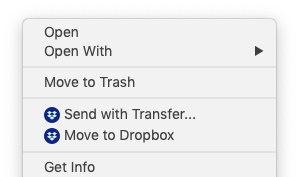
A somewhat-recent version of Dropbox for macOS has added the new menu item "Send with Transfer..." when right-clicking any file on your Mac, not just files in Dropbox. I know that Dropbox's Finder Extension can be disabled entirely. But this disables syncing badges and all Finder integration. I want to keep the Finder Extension enabled for the Dropbox folder itself... I just want to disable the global menu items when outside of the Dropbox. The similar "Move to Dropbox" menu item can be disabled individually: /Applications/Dropbox.app/Contents/MacOS/Dropbox --move-to-dropbox=False https://www.dropboxforum.com/t5/Dropbox-installs-integrations/Pleeeeease-does-anyone-know-how-to-permanently-delete-the-Move/td-p/13682 Is there a similar setting to hide the "Send with Transfer..." menu item individually? Until this menu item is removed I will be forced to disable the entire Finder integration.4.1KViews3likes7CommentsRemove "Send with Dropbox Transfer" from the context menu?
Hi, Using Dropbox v177.4.5399 on Windows 11 Home V22H2 now and loving it, this app works great! I had a question about the context menu options though When I right-click on a folder I see "Send with Dropbox Transfer" listed as a context menu option, which I don't use. Is this possible to remove?Solved1.5KViews1like2Comments
How do you turn off expiration date e-mail notifications for Dropbox Transfer files?
When sending a file through Dropbox Transfer, I get get notified everytime a file will expire within 2 days. As I send all of my work to my clients through Dropbox Transfer, I get quite a lot of these e-mails and they start to clutter up my inbox. Is there a way to turn them off?Solved3.1KViews1like8Comments