Your workflow is unique 👨💻 - tell us how you use Dropbox here.
Dropbox Transfer
17 Topics
Dropbox downloads files bigger than 20 GB
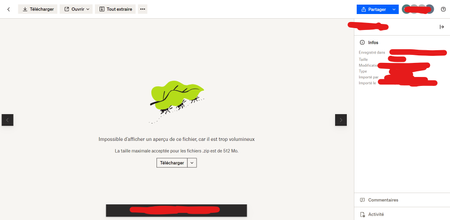
Hi, We are sharing enormous files sometimes with dropbox, files over 20GB/50GB and beyond, we've been doing that for a long time with dropbox but recently I've encontered a server error when downloading any big file via chrome without downloading the application. Our internet connection is stable and very good. We've tryed with differents computers in differents network. We've zipped our files so it get smaller and we go into the file page to make sure we're downloading only one file and dropbox is not doing a zip file of our zip file. And then we get the server message when we're about half through the download. I was wandering if anything changed with dropbox recently about file downloads if there is new limitations. We're not using Dropbox Transfer we use normal file sharing through the application. We've got all the same options in there so I don't really know why there is dropbox transfer since it used to work just fine. Thanks in advance,6.3KViews0likes3Comments
Dropbox transfer right-click option vanished from windows 11
Hello, would like to ask for a hepl with Dropbox transfer. I used Dropbox transfer from my Windows 11 by clicking right button on my mouse and there was "send with dropbox transfer" option. I could select more files and do the same. But now I can not see this option anymore in my windows. There is just Dropbox > View in Dropbox / Version history. Any guess what shall I do? I have account with 5 TB storage including this transfer feature. Thanks in advance, Jana5.3KViews1like26CommentsI'm getting an error when trying to download files from a Transfer, what can I do?
Hi all. I've been having some problems receiving large transfer files from a fellow Dropboxer. He originally sent one 20 gig file, which was well within his limits for his account, but I couldn't download it. I got half of it down, and it just quit giving me an error message (error 79). He then broke up the file to it's component folders and sent them individually. Most were around 1 gig or under, and I had no problem downloading them. There was one folder, however, that was 11 gigs, and once again I got the same error message after attempting to download around half of the file. My limit for space on Dropbox is 4.2 gigs, but as a recipient of the transfer file my space shouldn't matter, or does it? Anyone else encounter this? Regards, CameronSolved4.5KViews1like3Comments
Dropbox Transfer Limits
Hi, I'm using Dropbox Transfer on a Dropbox for Business account. Are there any limits on public access and number of downloads? We have something we need to send to the press that will be downloaded many dozens of times via a web page. I only see settings for password and expiration and no information on other limitations. Thanks!Solved4.2KViews0likes1Comment
Fix incorrect internet speed warning when downloading large Dropbox Transfers
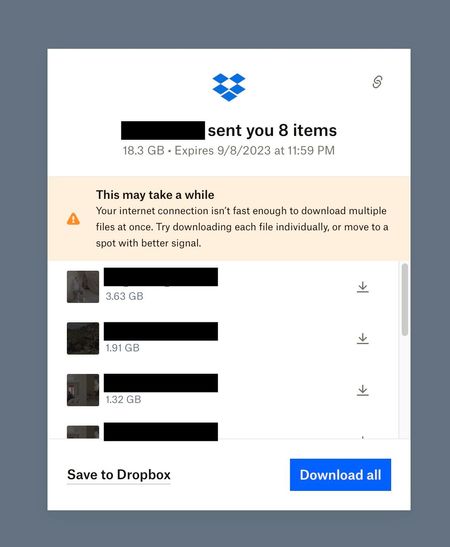
I'm not sure if it's a lot of files, or a large size that triggers this warning. The warning claims the internet connection is not fast enough, and also suggests moving to spot with better signal, erroneously assuming it's a wifi or cell connection even if it is hardwired. The warning is incorrect. For large transfers, it come up on any internet connection I've tested, including very fast home internet (300mb/s down) and very fast commercial dual 10gigabit fiber connections at a film post production facility in NYC. It looks sloppy to be sending my clients big files, and have them see this warning, when they connect from a state of the art, top 0.01% internet connection designed specifically for downloading large files quickly.3.1KViews1like6CommentsDropbox Transfer and download
I have sent several transfer links to myself from my pc in order to copy large video files to my tablet. I did this from the video file on my PC directly. I get an email message with the link for the transfer with no problem but when I click on download the download manager says its downloading a file called, file.bin, and not the video file name in the link. If I preview the file it plays the video no problem. I've been unable to locate the file.bin on the tablet. What am I doing wrong? And how do I find the transfer files in the app? There's no folder for transfers? Where are the files on dropbox that I created the transfer for? ThanksSolved2.8KViews0likes2Comments
I can't download a Dropbox Transfer as it's expired now. What can I do?
Really hoping there is a solution to my problem! So I have a film developing company that I use, which sends your developed photos to your email via a DropboxTransfer. I usually download the files directly to my iCloud file on my iPhone. Recently, my iCloud decided to delete some of my photos 😞 . I went back to email that he sent to me in an attempt to download the file again; but to my surprise I was unable to do so. The file stated "These files will be available until 6/10/2022 at 11:59 PM GMT-04:00". So, is there a way for me to have this time extended or renewed? (Or anything??) I am really desperate to have these memories recovered. Thank you.Solved2.2KViews0likes4Comments
How can I find out who downloaded my Dropbox Transfer?
I received a Dropbox Transfer notice that said my transfer was just downloaded by an unknown and very fake sounding name It also notified me that I had 8 views and 3 downloads of my information. How do I find out who this person is who may have my information? Thanks all.1.5KViews0likes1Comment