Our Community is in read-only mode until April 8th, learn more here. You can still search existing threads or get help via Dropbox Support, the Dropbox Help Center, or Learn.
File access
58 Topics
Windows cannot find folders revealed by search Dropbox
Device Custom PC - 13th Gen i7, 48GB Ram Operating System/Browser (if using the web) Windows 11 Dropbox App Version/Browser Version 241.4.4795.0 Question or Issue When I search dropbox and then click on a folder, windows cannot find the folder. This is only happening with some folders, not all. This was never a problem prior to the recent update.Solved285Views0likes12Comments
Dropbox created new folders with files that can't be opened - unprompted
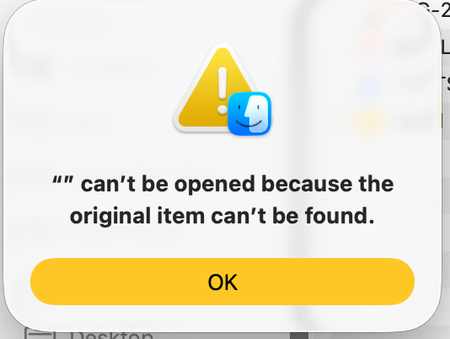
My Dropbox, completely unprompted, moved the location of my folders in Finder under only the Dropbox tab, and at the same time created a significant number of new folders with hundreds of files - none of which can be opened. I was able to find the files I had previously, but I'm concerned that these files and new folders may be either malware or my own files which I no longer have access to. I'd love to understand how to return things back to normal and why this occurred in the first place. I am also unable to open the Dropbox app itself - when I click it it opens up Finder. Solutions from existing forums which cover this issue did not work for me. Thank you. Device MacBook Air 2024 Operating System/Browser (if using the web) macOS26.3.1 Dropbox App Version (if using the app) Can't find, because I can't open the app. This is the error message when I try to open my folders from their previous location in Finder: This is an example of the new folders Dropbox has created: This is what the files inside these folders look like: This is what comes up when I try to open the files in these new folders:98Views0likes5Comments
I can't access or download my local files in my Dropbox folder
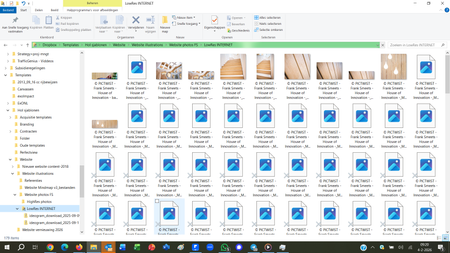
Device HP Spectre x360 Convertible 13-w0XX Operating System/Browser (if using the web) Windows 10 Dropbox App Version/Browser Version (240.4.8609)/(Firefox 147.0.2 - 64 bits, Google-Chrome) Question or Issue Since quite some time I can't use (download) files from my dropbox. I continuously synchonize my documents with Dropbox (as back-up), and have the impression that things changed when I installed a new laptop (the previous one crashed). In the security chapter of the admin in stated: "Vault is no longer available—your files were moved to a Dropbox folder." Also my windows explorer became VERY slow in recognizing files and folders and showing the content (see screenshot). Where and how can I unlock those (blocked) files? Anything else I should do to avoid this repeating. because I will need a new laptop in the course of this year?162Views0likes4Comments
Searching only for specific file types using web interface
I would like to be able to search for specific file types of any kind I like-- not just the subset of types offered in the "Type" dropdown menu. For instance, I want to find only *.des files- nothing else returned. Searching for "*.des" returns a few files with that extension but a lot of files that do not have that extension and, most importantly, not all of the *.des files. This has been raised several times with moderators marking this as resolved, but it really isn't. Apart from *.pdf files, there doesn't seem to be any way to search specific file types. This is a very basic query so I'm rather surprised this feature is not offered.70Views0likes1Comment
My account is over quota - how can I see and download my files?
Question or Issue I have reached a limit on my dropbox and I received this message when I log in to my account: "You’re over your storage limit – your files may be deleted Sharing and file previews are restricted since you’re over the limit. Upgrade now to get additional storage space and unlock advanced sharing, file uploads, PDF editing and more" I am unable to see and thus download any of the files that I have. What do I do? All I want is to download the files and delete them in my Dropbox. It allows me to upgrade, but I don't want to pay to be able to simply download my files. I've tried to email the support centre to ask if to could maybe allow me to see the files to download them, but received a response that my account type does not allow for email support. Thanks,Solved462Views0likes7Comments
Advanced search based on key phrases
I seriously need advanced searching. Dropbox used to have these features (like search exact phrase) in 2015, but somehow removed them. So how can I do advanced searching in dropbox? Like: List files with age between x and y Contain the phrase "a b c" are of type *.pdf ...Solved16KViews10likes52Comments
How can I save or download all my files before downgrading my account?
Hi there, I want to stop the dropbox subscription for our non-profit organization but we have about 890 GB files . How can i best copy or download ALL files to a harddrive ? I have an old macOS Big Sur, version 11.7.10 in case that matters. I am not terribly tech savvy, a step by step guidance would be very helpful.. Thanks! Vera160Views0likes1Comment