Your workflow is unique 👨💻 - tell us how you use Dropbox here.
Folders
62 Topics
accessing online-only files from macos terminal
I have a large, shared dropbox folder that is set to "online-only", but I want to make specific files available offline. I know I can do this via right clicks in the Finder window for individual files, but I need to do this for many files. How can I do this via the macOS terminal? I'm using macOS 12.6, and dropbox v166.4.29203.9KViews3likes13Comments
Hundreds of "Selective Sync conflict" folders created in my Dropbox folder
MacBook Pro M1 16" 2021 Dropbox version 230.4.8797 "Everything is up to date" This was most likely triggered by recently using an old computer that hasn’t been used for a while. But regardless of that, I don't understand why Dropbox would create empty copies of online-only folders on my (current) machine. The most obnoxious thing is that they've been created at the top level, so new copies of folders that should be nicely tidied away in multiple sub-folders are suddenly mixed in with actual top level folders (that have content in them). Please tell me I can just delete them since they’re all EMPTY. Obviously, if this will affect the online copies (specifically their actual contents), that’s not acceptable and I need to find another solution. Preferably one that doesn't involve going into each of these folders online. Thanks folks.Solved644Views2likes4Comments
My Dropbox app is stuck syncing files on Windows 11 after an advanced reinstall.
Device Desktop PC Operating System/Browser (if using the web) Windows 11 Pro Dropbox App Version (if using the app) 237.4.5655 My desktop app has been stuck syncing for about a week. We ran out of space on our work Dropbox network (80TB used). I freed up around 20TB of space and all PC's on the network apart from mine successfully (after some time) synced the changes. Mine however was stuck at 5.5 million files syncing. I left it to do its thing for several days with no change. So I followed the "advanced reinstall" instructions on this page https://help.dropbox.com/installs/advanced-reinstall. The reinstall was successful and it seemed as though things were moving again. However for the last few days I've been stuck with between 12,000 and 16,000 files syncing. The number gradually goes up day to day. I'm working on Dropbox still, as are my colleagues so this may be why. I have to manually download my colleagues files and place them where they should be syncing before using them. When I hover my mouse over the DB icon in the system tray it says its downloading the 16k files, uploading around 40 files. But very little download up upload bandwidth is actually being used. I have a gigabit connection so I don't believe its actually doing much at all on the network. How can I fix this? We have around 60TB of files on our DB network and I have around 500GB of that synced at any given time. Thanks for any assistance!418Views1like20Comments
Suddenly cant create multiple folders at once
I use dropbox online for work. We have to create multiple folders a day for multiple clients. For years now, the easiest thing to do has been to click "Create Folder" and then use /'s to tack on the rest of the folders within. So for example Client Name/Current Policies/Address/Policy Name In doing so, the Policy Name folder would be created inside the Address folder, and so on with the Client Name folder being the main folder in the tree. This was working for me just yesterday. Today, when I try to create folders in that manner, I get this error: The following characters are not allowed: \ / I'm assuming this is some new implementation, though I cannot for the life of me figure out why they feel it would be necessary to do so. Creating each folder in the tree one by one is tedious and time-consuming and cannot possibly go over well with the plethora of businesses that do their work through dropbox and have to regularly create multiple client folders. Anyway, my question is, is there a workaround, or another way to create multiple folders that I'm missing? For reference, I cannot use the app version on my computer; I have to use the online version.Solved215Views1like9CommentsThere's no distinct sync icon for folders containing both online-only and offline files on Win11.
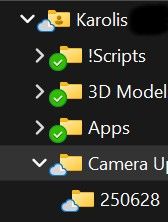
Device (PC and Laptop) Operating System/Browser (if using the web) (Windows 11) Dropbox App Version 233.4.4938 After icon change I can't find a way to see if folder contains files that are both online-only and available offline. Even if folder contains folder or files that are offline (downloaded) it still shows up as online. In order to figure out what is synced or not you have to go folder by folder. I have ten of thousands of folders. This new icon system is broken.129Views1like4Comments
Right-click option to sync any computer folder to my account, without moving it inside Dropbox.
As for me, synchronization of folders via the application is done a little inconveniently and not even clear, and in fact it does not exist.. Let me explain what I mean: I would like to right-click on the folder that I want to synchronize with the folder from the hard drive, so that synchronization works automatically when adding files to this folder.. Why should I transfer files every time that I want to be in the cloud, it is inconvenient and you need to constantly spend time on this.. Let synchronization work for me..!! I think it is very convenient and, first of all, a function that saves time..!!347Views1like4Comments
I see duplicate Dropbox folders on Windows, after reinstalling the desktop app, and they both sync
Hi there I had a problem where I noticed one day about a month or so ago that my backup of my current computer had disappeared so couldnt access any files from my computer on my phone. The only way I could see to fix it was to reinstall dropbox on my computer which it fix the backup problem. However I now have a problem on my computer where my windows explorer shows two indentical dropbox folders. How do I remove of them without losing any files? Anything I do to one of the folders affects the other, they both have the same files and both sync. Thanks in advance.Solved8.9KViews1like29Comments
Can I access someone else's Dropbox without adding their whole Dropbox to my own account?
Hello Community. I have been asked to use/add files to another organisation's Dropbox and they have sent me a link inviting me to edit their folder. However, the link from Dropbox suggests that I need to 'Add to Dropbox' - that is, adding that organisation's whole folder to MY Dropbox. That company's Dropbox is going to be HUGE and I obviously don't want to add their whole company Dropbox to my own private Dropbox. Is there a way they should be inviting me to EDIT or ADD to their Dropbox that doesn't mean their whole Dropbox needs to be added to MY Dropbox? Many thanks in advance, lane_RHLSolved10KViews1like10Comments