We’re Still Here to Help (Even Over the Holidays!) - find out more here.
Folders
29 Topics
Export folder of scattered files on Android to access from a third party app
Hello, I'm on Android, trying to access files from a third party app. I can't seem to find the files on the local device even when I have them marked as offline accessible. I see there's a way to export an individual file, but the large number of files I'm trying to have access to are spread through a bunch of folders and I need to keep the folder structure intact, so it's not feasible to manually download each file. Is there a way to get my Dropbox files into a folder that I can access with a third party app somehow? This seems like a pretty basic use case so I'm frustrated I can't seem to find a way to do it.69Views0likes6CommentsMy local files won't open. I can see them in the Dropbox folder, but can't preview them.
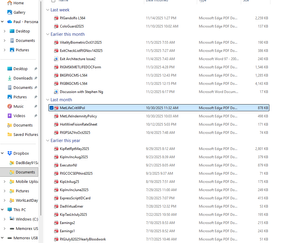
Unable to access my files on DropBox! Have had a DB account shared between a work laptop + my personal laptop (both Win 11 + fairly new) for quite some time. Recently retired-Work laptop went away. Can't seem to access much of anything on my personal laptop now. When I go to click on pictures or documents, I get the following: Hmmm… can't reach this page It looks like the webpage at file:///C:/Users/pgand/Downloads/Dropbox/Documents/MetLifeCritIllPol.pdf might be having issues, or it may have moved permanently to a new web address. ERR_FAILED I really hope I haven't lost everything I ever copied here. I attached a SNIP from File Explorer-they all LOOK PERFECT yet I can't ACCESS ANYTHING. Please help if you can thanks ! If so, kind of deceptive of DropBox as all the copies went well ! Please help if you can thanks !Solved380Views0likes22Comments
How can I access my folders in Dropbox on desktop?
Hello - none of my folders are available in my laptop Dropbox account. They are all visible and live in my IPhone app. How can I find them on my laptop account? I use Chrome. Family plan. Plenty of storage space. Thank you so much.70Views0likes2Comments
I can't access folders or files with a cloud icon, when accessing my Dropbox folders.
In my Dropbox in one of my folders - I have documents. To the right of my document - is STATUS Some are blank -- I can get into this folder Some have a Cloud - I receive an error that states - Make sure Dropbox is runnong on your PC, then try again. Of course it is on my PC - I do not have issues with other documents. Some have arrows that go into a circle -- This again, I can get into the document. HOW can I fix the documents that have a CLOUD??? Lesa103Views0likes2Comments
Unable to see the cloud icons on my folders after the app's latest update.
Operating System Windows 11 Dropbox App Version/Browser Version 232.4.5988 Question or Issue I put all my files on online only and usually I'm able to see the cloud icon on top of the files/folders here but I can't view them anymore after the latest update, is this a feature or bug?Solved236Views0likes11Comments
I can't see my "syncing issues" or new updates when I check my Dropbox folder.
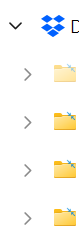
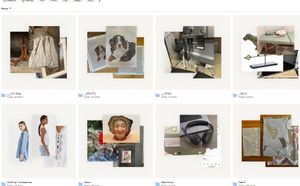
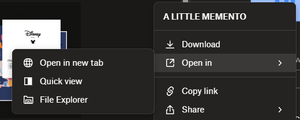
Device (Dell precision 3551) Operating System (Windows 11,) Dropbox App Version (232.4.5988) My dropbox says it has sync issues but when I select show me the issues it just shows me a blank window. Not sure if that is related, I think I have always had that but wanted to add just in case. I have been finding recently that my dropbox files and folders haven't been up to date, new files haven't been showing on my desktop file explorer although I have everything set to sync online only. If I go to dropbox.com, it also wont give me the option to view these files in file explorer like other folders (see images). Has anyone else experienced this or knows what it might be?131Views0likes8CommentsFile count differs between laptops on a specific folder
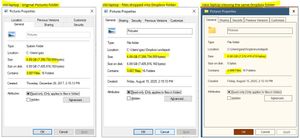
Device Lenovo P-series laptops Operating System/Browser (if using the web) (Windows 10 and 11 Dropbox App Version/Browser Version Windows File Explorer and Properties windows Question or Issue I am migrating a 7GB folder with approx. 3,000 photos from an Old laptop (Lenovo P51 Win10) to a New one (Lenovo P14s Win 11). Using Old laptop, I opened File Explorer and copied the Pictures directory to a new Dropbox folder. Viewing the directories' Properties windows using File Explorer, the contents are identical. But when viewing the same Dropbox folder on New laptop, it has eight fewer files. I've repeated the process twice with the same results. What is happening?119Views0likes5Comments