We’re Still Here to Help (Even Over the Holidays!) - find out more here.
Folders
29 Topics
Offline Online Green checkmark / Cloud icon indicators not visible / Finder MacOs 12.3 M1
Hi, was wondering if the Green / partially green and Cloud icon indicators for Selective sync inside finder are coming back soon? I know that you're working on a fix with new Macs and online previewing, is this part of the same problem? Dropbox v145.4.4921 MacOs 12.3 M1 Hope to hear from you, makes it really hard to get an indication which folders and files are stored locally. Greetings.Solved4.6KViews3likes13Comments
Files online but not in Windows explorer
I have seen that this was an issue in the past, but the solutions are now out of date, so I am hoping someone can help me with this. Sometimes files that I know are in Dropbox, and that appear in Dropbox online, do not appear in Windows Explorer. When I download them from Dropbox online to get them back into Explorer, it asks whether I want to replace the file, etc., so I know they are there. They just don't show up when I search. Windows 10. Do I need to change my Sync settings? I also want to make sure both titles and content are searchable. Any help is appreciated. Thanks.4.6KViews0likes30Comments
How to move my main folder back to the Dropbox folder
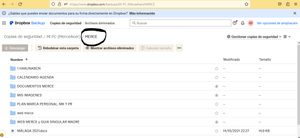
Hello, for some reason I suddenly find my main Folder (MERCE) in the Backup Folder, instead of being located as before inside Dropbox. C:\users\***\dropbox\MERCE (before it was like this), see below. It appears inside My PC (***). I use Windows 10 I don't know how I should move the main folder MERCE into the DROPBOX location, and outside the Dropbox Backup, or if I could do a copy and move it to DROPBOX location. This error produces that when accessing from another computer via dropbox online version, sometimes I cannot edit, download, move etc. because of course it's not in the right place. Now: Thank you for helping me!Solved1.5KViews0likes7Comments
Newly added documents don't show up on our Dropbox.
We are having a problem where new documents being added to our DropBox are not showing up. The person who added the documents can see them but no one else can. I can't tell what documents are and are not syncing either. Right now some of our documents from 2 months ago aren't showing up.Solved371Views0likes16Comments
My local files won't open. I can see them in the Dropbox folder, but can't preview them.
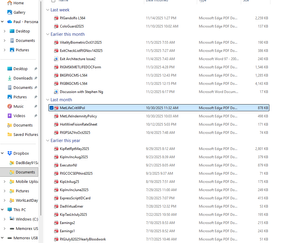
Unable to access my files on DropBox! Have had a DB account shared between a work laptop + my personal laptop (both Win 11 + fairly new) for quite some time. Recently retired-Work laptop went away. Can't seem to access much of anything on my personal laptop now. When I go to click on pictures or documents, I get the following: Hmmm… can't reach this page It looks like the webpage at file:///C:/Users/pgand/Downloads/Dropbox/Documents/MetLifeCritIllPol.pdf might be having issues, or it may have moved permanently to a new web address. ERR_FAILED I really hope I haven't lost everything I ever copied here. I attached a SNIP from File Explorer-they all LOOK PERFECT yet I can't ACCESS ANYTHING. Please help if you can thanks ! If so, kind of deceptive of DropBox as all the copies went well ! Please help if you can thanks !Solved362Views0likes22CommentsWhat tool does Dropbox use to zip folders for download?
Summary: I’m trying to figure out how to create a usable zip file out of files that have non-ASCII filenames, so I’d like to find out what zip tool Dropbox uses when I download a folder from Dropbox. Background: It turns out that most zip-file-creation tools cause problems when you try to zip a file that has a non-ASCII filename. But when I download a folder from Dropbox that contains files with non-ASCII filenames, the folder arrives on my computer in the form of a zip file that correctly includes those files. So whatever tool Dropbox is using (internally) to automatically create zip files for download is doing exactly what I want to do. Workaround: If I want to zip a folder, I can upload it to Dropbox and then download it. That works, but it takes a lot of bandwidth and time. Question: So I’d like to find out what zip-file-creation tool Dropbox is using to create zip files for download, in hopes that I can use that same tool (or something similar) on my local computer, to be able to correctly zip non-ASCII filenames without having to upload and download to and from Dropbox. So do any of you know what Dropbox uses to create zip files for download? thanks, —JedSolved345Views0likes4Comments
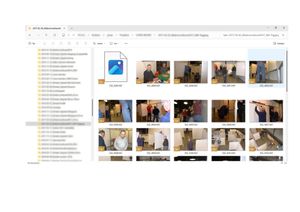
A folder is visible online, but not inside my Dropbox folder locally on the device
I am seeking help. A folder that was visible in my windows explorer seems to have disappeared. I can still see the folder in the browser version, but not in my explorer (which I could 2 days ago.). I checked the availability offline. I chose the selection in my preferences and the folder is ticked. I unticked and reticked it. I deinstalled and reinstalled the app. according to the browser version, I have access to the folder. All hidden files are shown in my explorer. It is a mystery to me and I don't know how this folder just vanished from my windows explorer-desktop app view. I went through the trouble shoots mentioned. Any other idea? thank you.233Views0likes8Comments
Unable to see the cloud icons on my folders after the app's latest update.
Operating System Windows 11 Dropbox App Version/Browser Version 232.4.5988 Question or Issue I put all my files on online only and usually I'm able to see the cloud icon on top of the files/folders here but I can't view them anymore after the latest update, is this a feature or bug?Solved231Views0likes11Comments
View prior contents of enclosing folders
I'm a novice in terms of using Dropbox for anything other than syncing my devices. So this question is probably a Dropbox 101 type. I'd like to view several folders at different points in history. Within the past 30 days. I thought I found the applicable help suggestion but it didn't work. Thanks for any help.223Views0likes9Comments