Your workflow is unique 👨💻 - tell us how you use Dropbox here.
Need clarification on an email about moving Google docs
Clarification needed on this obscure message, which directs to this help page: How to move Google Docs, Sheets, and Slides https://help.dropbox.com/integrations/move-google-docs#FAQ Which starts by stating: This article is for Dropbox users who have Google files in their Dropbox accounts. If you’ve received an email asking you to configure your preferences for migration, then this article is for you. We do not have google files on our dropbox. We simply open existing dropbox files (.xls in particular) in Google Sheets to allow collaborative editing. Could admins please confirm that the removal of this functionality does not require any action on our part, in this case? It would also be great to know why this is happening, after what was apparently a heroic effort to enable it in the first place?Solved2.5KViews6likes4Comments
How can I forward emails with attachments from Gmail to Dropbox?
I want to Autoforward all emails with attachments to Dropbox from gmail. on setting up, gmail says verification email sent to myaddressxxx@addtodropbox.com . please put verification code, to activate rule for autoforward. how do i get the verification code which has been sent to myaddressxxx@addtodropbox.com. Please help, as without this this feature is of minimal use.Solved7KViews3likes23Comments
Why did Google block Dropbox?
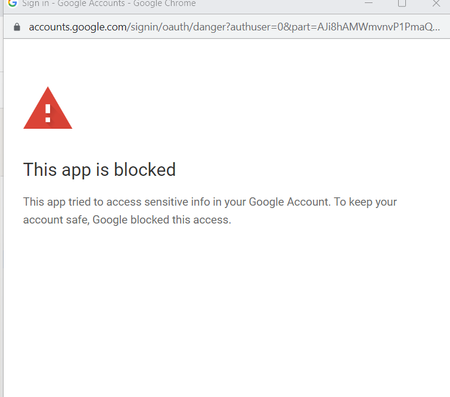
Hey all! 👋 Suddenly Google started blocking access for Dropbox When trying to download a file from a Google Drive account or create Google Docs documents, an error appears (screenshots👇)! Everything worked until today. How to solve the problem? Thanks a lot! AndreySolved13KViews2likes22Comments
How can I transfer everything from OneDrive to Dropbox?
Hi everyone, I've been searching and searching a way to transfer all my cloud from Onedrive to Dropbox for a long while now, but I can't find a way to do it other than downloading 1,5TB of data from Onedrive and uploading it to Dropbox manually. Can you please advise me an easier way? I want to get rid of Onedrive entirely and close my account. The weird thing is, In Onedrive, there is an option in my storage page which asks me if I want to transfer anything from Dropbox as well as some other cloud services. It's just one click and takes me to my Dropbox very easily to select what to import from Dropbox, but not visa versa; it doesn't allow me to transfer anything from Onedrive to Dropbox. If one-way integration is possible for Onedrive, why can't I find anything to do it on Dropbox? Thanks a lot for responses in advance.Solved1.9KViews1like4Comments
API access token expired
Why, if Google is supposed to be so great, does their software do this kind of **bleep**? I received an extremely important Proposal for Collaboration yesterday and it says the API is expired and then it wants me to program a bunch of crap. I’m not a programmer nor do I want to be. Thats why I hate Google and their products. Using Dropbox sucks. Advertising with them is a pain in the ass. They are a second rate company. Why they haven't fired their CEO and got someone to run the company who knows what they’re doing is beyond me. How do I fix the API so i can read the document?Solved3KViews1like10Comments
Could you apply to become a Cloud media provider for Android?
Not sure if this fits to the "Integrations" Category, but yeah, change it if you feel like it's wrong. https://developer.android.com/training/data-storage/shared/photopicker https://developer.android.com/guide/topics/providers/cloud-media-provider While uploading a photo to an app, photo picker interface opens. This interface (from what I can see, this looks like a new feature of Android) allows user to pick a photo from their Android device and lets user to do his action. Anyway, I met with this recently and there is an option to select the photo from a cloud media provider; where I expected to see Dropbox among the cloud service provider options, but Dropbox wasn't there. Seems like you guys have to apply to be shown as cloud service provider to Android, and seems like application can be done from this form. https://docs.google.com/forms/d/1MGECQc2N-UnYFF5DIxeRq7AjrJ9bh_3KmoWsK8dq9ZM/viewform?pli=1&pli=1&edit_requested=true So yeah, please apply, so that I can pick my photos from my Dropbox account with this interface, so that I can upload them, or send them or whatever action I wanna do.2.8KViews1like11Comments"Please connect Dropbox to the same Google account" error, but I am
I am attempting to link my google account to my dropbox account and every time I try I get an error message "Please connect Dropbox to the same Google account". They are both using the same email address so I'm not sure why this is happening.1.6KViews1like8CommentsImport from GDrive doesn't work
Hi ... I'm trying to migrate my data from GDrive. When I select the "Import from Google Drive" option, I get weird behaviour: I get a message saying "Couldn't upload files from Google Drive" Then the Google login appears, which I complete. Then I can browse my GDrive folders - I select a folder. Then I get a spinning icon, telling me a transfer is happening - "Fetching files from Google Drive". Then sometime later (presumably after a timeout) when I come back I'm left looking at another error message "Couldn't find any files in your Google Drive". What's going on? ... I thought this feature worked?Solved6KViews1like11Comments
Google migration deleted unnamed file
Looking at the "Google Migration Report.csv" file I see entries for a file that could not be converted and so it was deleted. The problem is that the "Source path" column is empty, so I have no way to know which file it was. Has anyone encountered this, and/or does anyone know how to tell which file this was? For reference, this is how the line reads in the CSV file (after quite a few tries to convert): 2023-06-01 17:01:26,,epzY3WHVhEsAAAAAAAOZfw,Error,Microsoft Office File,,,Conversion failed,File ineligible for migration,Deleted file.Solved2.7KViews1like8Comments
Google Sheets & Slides crashes with Chrome browser
Hoping someone can help as Dropbox is saying this is a Chrome issue and can't resolve. My company uses Dropbox for files. I open excel & powerpoint files from dropbox.com to google sheets & slides. Once I start typing in the google sheets or google slides file, it immediately crashes Chrome. With Google Docs, this isn't an issue with Chrome. It apparently is not an issue with anyone else in the company editing the dropbox.com files using google sheets or slides. Noting, I don't have any issues editing google sheets or slides in Safari with dropbox files, but I would like to avoid using more than one browser at work as we use a lot of Google applications and really only use Google. I've already done the following: Uninstalled and reinstalled Chrome Cleared cookies and cache Thanks for the help in advance!8.8KViews1like51Comments