We’re Still Here to Help (Even Over the Holidays!) - find out more here.
Mac
35 Topics
Dropbox Finder integration breaks Quick Look and thumbnails - Mac OS Mojave 10.14
For the past few months I've been having issues with image previews not loading on my Mac in Quick Look, Finder previews or icon thumbnails. I have experienced the problem on both Mac OS High Sierra and Mojave. My colleagues also seem to be experiencing the same issue. I finally took the time this week to figure out what is causing the issue. As far as I can tell the problem is caused by Dropbox Finder integration. As soon as I turned off Dropbox finder integration (and restart the machine) file previews and Quick Look work perfectly. For now I'm keeping Dropbox Finder integration turned off - I'm a designer and image previews are incredibly useful. I'd prefer to be able to enable Dropbox Finder integration as the sync status icons are useful. Has anyone else experienced this? Is there a fix?Solved29KViews13likes48Comments
MAC: Why does Dropbox appear in iCloud Drive settings?
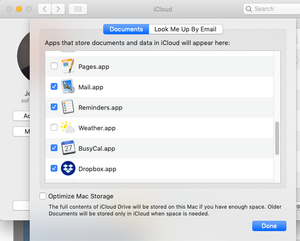
In my Mac's System Preferences for iCloud, iCloud Drive has an Options button next to it. Clicking that shows a list of apps below a statement "Apps which can store documents and data in iCloud will appear here." Most are Apple apps like Mail, Calendar, and other Apple apps. And I understand why I would want to turn them on or off. There are also 2 or 3 third party apps as well, like my Calendar replacement, a PDF editing app, and a graphics app that can share files between my Macs so I can edit images anywhere. But Dropbox is listed here too. Can anyone tell me WHY it is here and WHAT it reads/writes to iCloud? There is nothing in the iCloud Drive that is obviously Dropbox related, and no items that are duplicated in the Dropbox folder. The iCloud Drive folder (as well as looking at them in a browser logged into iCloud) only shows folders Documents, Desktop, Downloads, Shortcuts, and those 3rd party apps. Dropbox is not one of them. Apps which appear here have to have iCloud functionality built in to them...not all installed apps appear here. So I'm trying to understand why Dropbox has this ability built in, and what it's for. And can I turn it off, or is it syncing some Dropbox settings between my Dropbox equipped computers on the same account? Does it have something to do with syncing photos (I do not use Dropbox's feature to backup my iPhone photos)? Below is a screenshot of Dropbox appearing in the iCloud Drive pane:9.3KViews4likes8Comments"Enable Finder Integration"
I hope I'm asking in the right place. Did Dropbox do away with the "Enable Finder Integration" option? When it's *disabled* the image dimensions are displayed in the Finder with my pictures rather than "up to date"... That's what I want, to disable it. I don't want the big green check mark. I can't find the "Enable Finder Integration" option in preferences anymore.Solved15KViews3likes14CommentsSelecting a Paper task in sidebar doesn't take me to the actual "to do" in large docs; page reloads.
Device - Macbook pro Apple M1 Max - 32GB Operating System/Browser (if using the web) - MacOS 15.6.1 (24G90) Dropbox App Version/Browser Version - Version 139.0.7258.139 (Official Build) (arm64) Question or Issue One of the most awesome features of Dropbox Paper, besides it's elegant, minimal display options , and smooth copy-paste with Apple Mail, is the task sidebar.I have looked for a replacement as Drop[box paper has aged, and nothing comes close. Unfortunately, the sidebar has stopped working the way it was designed. When I click on a todo in the task sidebar, it always forces a reload of the page (it did not used to, if I clicked on a task that was within this document.) AND, if the document is large, it does not scroll to a todo in a large document. This renders the Task sidebar almost useless as a navigation tool. Now I have to search text to match the todo, where the Task sidebar navigation used to be seamless. Attached is a document that exhibits the "full page reload" issue. And a screen recording of a larger file, where the todo list does not scroll. PLEASE fix this! This is CRUCIAL to our workflow with our many many clients. We do NOT want to migrate off Dropbox Paper! First, the document link: link removed by moderator Next the recording, please listen to the voiceover. link removed by moderator PLEASE HELP! Dave244Views1like6Comments
AirDrop files go to /private/tmp instead of ~/Downloads
Yesterday I downloaded and installed "Dropbox for macOS on File Provider," which appears to be v215.4.7202. It is running on a Mac mini M4 Pro with macOS Sequoia 15.2 (build 24C101). Now whenever I AirDrop a file from my iPhone 15 Pro Max running iOS 18.2.1, the file ends up in /private/tmp instead of ~/Downloads. I've read Topics in the Help Center posted during the past two years that are describing exactly this problem. Some say that it is due to configuring Dropbox to automatically backup of the Downloads folder but I do NOT have Dropbox set up to backup any folders, including Downloads. How to I get AirDrop to put files in ~/Downloads again. Thank you. - nello PS: I tried to include screenshots but they were 'not allowed'.Solved973Views1like4Comments
Dropbox Mac Finder Extension in Monterey 12.4 - incompatible with Google Drive, OneDrive, and others
I'm using both Dropbox and Google Drive for different folders on my Mac. If the finder extension for Google Drive is active, then then Dropbox finder extension fails and the cloud status icons on the Dropbox folders disappear. Likewise if the finder extension for New File Menu (a nice 3rd party Mac utility) is active then again the Dropbox finder extension fails to display cloud status. Ditto for Microsoft OneDrive. I've tried to report this to Dropbox, but the response I get back is that I have to uninstall Goggle Drive and other finder extensions, which is not an option. Since Google Drive and OneDrive and New File Menu can all get along just fine, there is no inherent reason that Dropbox cannot as well if its extension were written properly. Has anyone found a way to either get Dropbox to pay attention to bug reports or to get around this particular one?Solved7.7KViews1like37Comments