We're making some changes to the Dropbox Community 👩💻 - Find out more here.
Mobile
1279 Topics
My Dropbox folder silently disappeared
I am a paid Dropbox user. I use it very often but not very folder is used all the time. Today I tried to retrieve some data from a folder I visited about a year ago. I found it disappeared. No trace, no way to find it anyway. Can't find it in deleted folder either. Does anybody has similar issue? Can I get some advice on this? Thanks.33Views0likes3Comments
I see a "syncing with Dropbox is paused" error on my Files app.
Application Affected Files App on iOS 26.4 Device iPad Air 2026 Operating System iOS 26.4 Dropbox App Version (if using the app) 466.2 Question or Issue When I go to files app, under Dropbox it shows Syncing with Dropbox paused. This is only happening on my iPad Air 2026, it works fine on my iPhone and iPad gen9. Same issue is described in 2 other discussions : “Syncing with Dropbox paused” error when I access my Files app on iPad | The Dropbox Community “Syncing with Dropbox paused” error when I access my Files app on iPad | The Dropbox Community The solutions discussed there do not solve my problem.Solved33Views0likes2Comments
How to reset my camera uploads on iOS? Dropbox will only re-add newer photos.
Hi! I need to force the iOS app to re-upload all the photos in my Camera Roll/iCloud Photos. I set it up so it uploads everything, not just new photos, but it will only upload new items. I believe it recognizes older pics as "already uploaded" and I don't know how to reset this. I have already re-installed the app, deleted all files in the Dropbox's Camera upload folder, restarted the device. Still, Dropbox will only upload new files. Thanks in advance!119Views0likes6Comments
Half of my photos are missing from the mobile app, but it still says I'm over-quota.
Device iPhone 17 Dropbox App Version (if using the app) Latest update Question or Issue I click into my Dropbox app one day and I noticed half my photos were missing don’t no why but it still says my account is full.38Views0likes1Comment
Problems uploading many files at once when using an Android.
Device Pixel 9a Operating System/Browser (if using the web) Android 16 Dropbox App Version (if using the app) Latest on play Syncing Status NA What I am trying to do: I make a new folder on my dropbox. Then I select "upload", "files". I navigate to my local folder on android which contains 3000 pictures. I press "select all", and "select". I now expect all files to be uploaded to my Dropbox folder. what happens: dropbox shows a popup with "preparing to upload". This dialog will animate for a minute or so. Then the app reloads and shows my root Dropbox folder. expected behaviour: files uploading to my Dropbox folder more stats: over 1 terabyte free space. Total upload size is less than 30 GB.63Views0likes3CommentsDropbox Pocketbook isn't supported won't let me sign in.
Application Affected (Dropbox Pocketbook.) Device PocketBook 628 Question or Issue Recently had issue with my network, was told from Pocketbook support, to do factory reset. Afterall I realized that I can't log-in with my account, cause the interface of login page was update. How should I bypass that piece of a problem, cause that was one way how I was syncink the files with my deviceSolved110Views0likes6Comments
No longer able to export a file on the iOS app
Device iPad, iPhone 13 Operating System/Browser (if using the web) ios 26.3.1 Dropbox App Version (if using the app) 460.2.2 Question or Issue For over a decade, I’ve been able to export a single file via email by just pulling up the file and hitting export. In the past year, I’ve had to change to using the check mark by the file to be able to export that single file. A more involved approach, but still doable. But as of today, the only way I can export a file is by sending a link to the folder. I don’t expect customers to follow a link to get the contract I’ve always sent to them directly. Plus, I’d have to make a folder for each contract so they didn’t see all the rest of my contracts. How do I fix this? Do I have to skip Dropbox and just send contracts directly from the signing app? How is this an improvement?Solved116Views0likes5CommentsIs viewing with download disabled for free accounts?
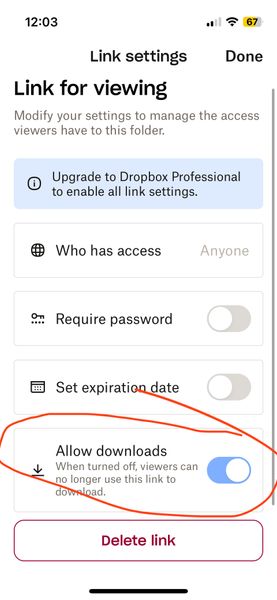
Is viewing with download disabled for free accounts? (I am on a free account) When I go to share (and subsequently generate a link) I now see a mandatory choice of either 1) editable or 2) viewable only. The software defaults to editable (which I think I was inadvertently using for a while and NOT what I want). When I noticed this today, I went to the viewable option instead and then looked at the settings. There are options (see screenshot below) but it seems like the option to have downloads enabled on viewable links is greyed out? But also kind of difficult to tell – it looks lighter blue than normal GUI switches I've seen in the past... It looks like it is on by default but I don't know if it being greyed out means that it is stuck on or that it is not functional (meaning even though its showing as on, the greyed-out-ness means it is actually off AKA no downloads for recipient). Can you please clarify this confusing interface before I send the link? I do not want to send things then recipients say they can't access it. The interface really shouldn't be this confusing. Thanks!Solved53Views0likes2CommentsTell Us How You Use Dropbox
No two people use Dropbox in exactly the same way. Some of you rely on it every day for work, others for school, creative projects, or keeping life organized - and we love that. We’d love to hear how you’re using Dropbox today - is it something you use once in a while, is it part of your day to day, are there any features you can’t live without? What workflows have you built that save time or reduce friction? And where do you see opportunities for us to do better? Your tips, ideas, and honest feedback really help us to make sure we can share useful tips, and they help other community members discover new ways to get more out of Dropbox too. Share your experience, favorite features, or suggestions in the comments below. Your voice truly helps shape the future of the Dropbox community 😁 The Dropbox Community Team3.9KViews4likes14Comments
I can't access a Dropbox offline folder through Termux with claude cli.
On Android, I can not access dropbox offline folder through termux with claude cli. Could you add an option to make the offline files appears in a folder, such as download, so that termux can directly access ? In this way, we can do coding on the phone without github41Views0likes1Comment