Our Community is in read-only mode until April 8th, learn more here. You can still search existing threads or get help via Dropbox Support, the Dropbox Help Center, or Learn.
Notifications
83 Topics
How to disable Dropbox almost full notification?
I would like to have the CHOICE to disable the "Dropbox Almost Full" notification. As a temporary solution, I have chose to not start Dropbox on system boot and close it, but I would like to know how can I disable this message with Dropbox open.Solved42KViews10likes32CommentsDropbox wants to learn more about your experience with notifications
Hi Dropbox community! My name is Justin, a PM on the Desktop experience team. I'm hoping to learn more about your experience with notifications: what's working, what isn't working, what notifications you'd like, which ones you don't. There has been a wealth of comments over the years on this topic and we want to begin addressing the biggest issues Please (1) share your comments below in a few sentence, and (2) if you'd be open to a quick conversation with Dropbox! We'll follow-up via email (you won't need to post your email below).6.8KViews4likes3Comments
Deactivate file request upload notification
Hi everyone, I created a link for file request, where people can upload images and stuff. Now, every time someone uploads a file, I get a notification via e-mail. So my inbox is now flooded with mails. My problem is, that I can’t find the option to deactivated the notification in the settings. I already unticked all options in the notification settings, but without any changes. Is there an easy solution to stop the notification or do I need to find another method to have the file sent to me? Thanks in advance.Solved1.7KViews3likes3Comments
Bogus warning from Dropbox
Dropbox keeps sending me bogus messages that my dropbox is full and that my files will soon stop syncing. My dropbox is NOT full, and I resent receiving all these bogus messages. I'm afraid this is a dirty tactic by DropBox to blackmail me into upgrading, and that they will soon stop synching my files in order to escalate this blackmailing tactic. How do I get them to STOP sending me these bogus email messages, leave me alone, and maintain my free account without fear of losing my files? I will NOT be blackmailed by ANYONE, including Dropbox!3.9KViews3likes12CommentsI got a popup on my device asking me to upgrade, even though notifications are off.
I have always left "Do not disturb" to on and disabled all app notifications in my windows 11 system settings. Today Dropbox posted a big popup in the center of the screen while I was doing something else. It was a notification that my free account was full and offered an option to upgrade or clear up space but no option to immediately close the window. It was also permanently on the foreground over top of other windows. I can't find any options to disable this from happening. All notifications in the desktop app are already set to off. This type of behaviour is totally unacceptable. If I can't find a solution and it happens again I will have to uninstall.554Views2likes7Comments
Dropbox keeps spamming me about my storage space running out
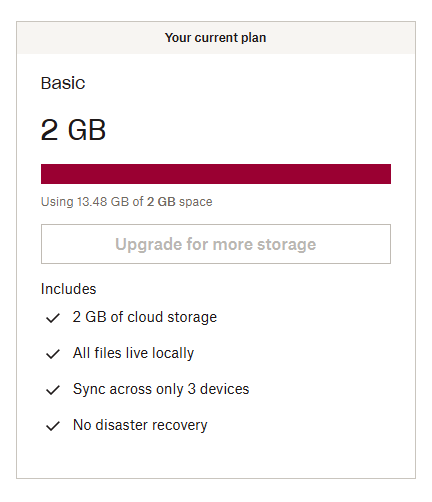
Dropbox keeps sending me emails and notifications about my storage space reaching its capacity, as if I've got 100 megabytes of it left or something. It says that if I won't buy another plan then I'm risking losing my files, and a dozen of variations of the same message. I've been using Dropbox since 2010 and I've got a basic free plan of 2 gigs, but I've increased my storage space by inviting friends and doing "challenges", so now I have around 16 gigs of space and 13.5 of them are used. That is not "critically low on space" by any means, but I keep receiving so many spam notifications that it's starting to look threatening. Either Dropbox has a bug in calculation how much space I have occupied by comparing it to the basic plan instead of actual space, or it's doing it on purpose to force me to pay. Also I cannot contact live support since I have a free plan. I'm thankful to Dropbox for the service it provides but I'm pretty sure this is not how a service should treat its long-term customers. If this is a bug then I sincerely hope that it will be fixed as soon as possible.2KViews2likes4Comments
Email notification to upgrade
Hi, Is everyone on a free subscription hassled to upgrade to a much bigger (and obviously, paid) account even when they're barely using it? I have just 3.1GB of 100GB storage in use and yet I've just received an email warning me thus "Your Dropbox is almost full and is close to reaching maximum storage capacity. Once full, your files will stop syncing across devices, which will make it harder to access your files when you need them." In addition, I can't find any way to assess how much storage I am actually using other than to select everything and then download it in a zip file. The zip file was 3.1 GB so it may well be that the actual storage being used is more, but almost 100GB? No way. Curious about the experience of others. Cheers, KevinSolved3.8KViews2likes14Comments