We're making some changes to the Dropbox Community 👩💻 - Find out more here.
Passwords
128 TopicsTell Us How You Use Dropbox
No two people use Dropbox in exactly the same way. Some of you rely on it every day for work, others for school, creative projects, or keeping life organized - and we love that. We’d love to hear how you’re using Dropbox today - is it something you use once in a while, is it part of your day to day, are there any features you can’t live without? What workflows have you built that save time or reduce friction? And where do you see opportunities for us to do better? Your tips, ideas, and honest feedback really help us to make sure we can share useful tips, and they help other community members discover new ways to get more out of Dropbox too. Share your experience, favorite features, or suggestions in the comments below. Your voice truly helps shape the future of the Dropbox community 😁 The Dropbox Community Team3.9KViews4likes14CommentsHow to import your passwords to Dropbox Passwords from other password managers
You might have heard about Dropbox Passwords, (and if you haven’t, you can learn all about it here) but what if you already use a password management tool? We have good news, it’s simple to import your passwords from another tool. Follow the steps below to import your already saved passwords from LastPass, Dashlane, 1Password and other password tools. Import from LastPass Sign into LastPass.com or LastPass browser extension Click Advanced Options on the sidebar Select Export under Manage Your Account Enter your LastPass master password If you’ve signed into LastPass.com on web, you will see your passwords data on a new Tab. Copy the content and save it to a file. You can name it <name>.csv If you’ve signed into the browser extension, you will see a lastpass_export.csv automatically downloaded From your Dropbox Passwords app, click Add button under your avatar, select Import from…, select Passwords Manager and select the csv file from step 4 Delete the file from step 4 for safety reasons Import from Dashlane Launch Dashlane and log in to your account Select File > Export > Unsecured archive (readable) in CSV format Enter your Master Password (if required) Save the file in a safe place From your Dropbox Passwords app, click Add button under your avatar, select Import from…, select Passwords Manager and select the csv file from step 4 Delete the file from step 4 for safety reasons Import from 1Password Open and unlock 1Password. Select the vault you want to export. It’s not possible to export from “All Vaults”, so you’ll need to switch to a specific vault. Choose File > Export > All Items. If you belong to a team account, there may be some vaults where you don’t have the “Export items” permission. Ask your team administrator. Enter your Master Password. Choose a location to save your export to (such as your desktop), choose File format: “Comma Delimited Text (.CSV)” , “All Fields” , “Include Column Labels”, Click “Save” From your Dropbox Passwords app, click Add button under your avatar, select Import from…, select Passwords Manager and select the csv file from step 5 Delete the file from step 5 for safety reasons Import from other Password Managers find the option from other Passwords managers to export items to a CSV From your Dropbox Passwords app, click Add button under your avatar, select Import from…, select Passwords Manager and select the csv file from step 1 Delete the file from step 1 for safety reasons Now that you can transfer your passwords over with just a few clicks, it’s the perfect time to get set up with Dropbox Passwords and leave the dreaded ‘forgot password?’ button in the past.23KViews4likes3Comments
How to Remove Passwords App and Vaults?
Hi, I clicked ok when Dropbox suggested I download both of these. I now realise I need neither of them, and they clutter up my Dropbox folders and cannot be moved. How to uninstall/unlink/unsubscribe please? I’ve asked Dropbox support on twitter but they have been no help, just asking me to send more and more of my private information, which sounds suspect. Thanks, RorySolved5.3KViews4likes13Comments
I'm getting an error exporting my Dropbox Passwords CSV file into Apple Keychain
Now that dropbox passwords is being shutdown, there needs to be a possibility to export all passwords into apple keychain. Currently, I'm getting an error message when trying to import the exported password into the keychain, stating that: "Keychain was unable to import passwords from the CSV file because it is missing column labels. If you exported this file from a password manager, you should export a new file with different settings and try importing again." Application Affected Dropbox Passwords Device MacBook Air Operating System/Browser (if using the web) OSX Sequoia / Safari Dropbox App Version (if using the app) N/ASolved1.6KViews3likes21Comments
Password changes creating new account
I’m here in the newbies group because I don’t use Dropbox much, nor do I understand what I’m doing when I have files stored there. I’ve been asked to change my password at login, when I’m using the stored password. Frustrating!. Yesterday, after changing my password (to the one it won’t accept today), a new account with no files was created!!!. Are the files that were there seconds before gone forever?2.7KViews3likes4Comments
Select an image for Dropbox Password Icon
Please, I would like to be able to select an image to my passwords instead of the name initials (similar like Authy), or just use a default image from the meta icon of the website. It looks ugly some passwords with image and the rest with initials, a bit inconsistent. Thank you for supporting ❤️Solved1.4KViews3likes1CommentGet summer ready with Dropbox Basic
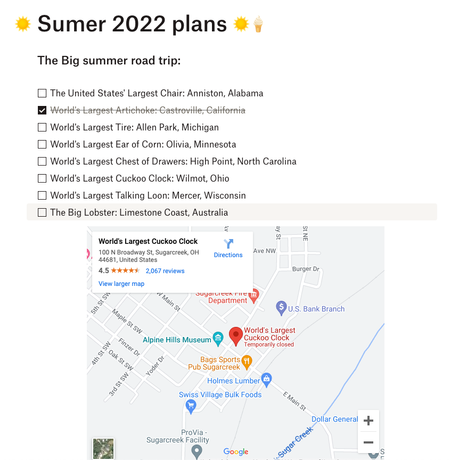
It’s getting a little warmer, there are flowers blooming and buds on the trees, and as nice as spring is, it means summer is just around the corner. We all know that summer is as good as you make it, so putting the work in now means you can enjoy every minute. We’re not talking about putting in hours at the gym, we’re talking about getting organized so you can relax and enjoy. Your Dropbox Basic account might be more powerful than you think for making your summer unforgettable. Use Dropbox for your Travel documents: If you are travelling this summer, one thing we know that can help take the stress out of planning is having digital copies of all of your documents. Whether it’s your passport, your booking confirmation for a car or hotel, tickets to events - your info can be as mobile as you are. Check out how to use Dropbox on your mobile devices here. And don’t worry, if you don’t have a digital copy you can use the Dropbox Scanner App to copy in your physical copies too. Create To-do lists with Dropbox Paper: Dropbox Paper files take up very minimal space in your Dropbox Basic account, so make Paper work for you. If you have a list of attractions, places or events you want to get to this summer, make a to-do list with links and info in advance. And if you’re really organized, you can even link the maps to some of those spots too. And, don’t forget, Paper is a collaborative tool so you can make joint planning docs for you and your friends - so you don’t have to be in charge of every details, but you know things will get done. Make the most of Dropbox Passwords: We’re here to sing the praises of Dropbox Passwords once again, because nothing is more annoying than setting up a movie night with friends and forgetting the logins for all your streaming services. Dropbox Passwords allows you to seamlessly sign in to websites and apps by storing your passwords securely. It safely stores your usernames and passwords on all your devices — so you don’t have to keep them all in your head. Everything is seamless with Dropbox Passwords: Create secure, strong passwords that sync across your devices Lock the Passwords app automatically after inactivity or whenever your device is locked Unlock the Passwords app with Face ID or Touch ID on your iOS devices or fingerprint scanner on your Android device Summer project progress photos: It’s easy to get so busy that you can lose track of time, and forget to take a moment to appreciate your work. So if you’re planning some summer projects, why not take a weekly photo and upload it to a Dropbox folder to track your progress? ConF2_0, a Community member mentioned here that she used Dropbox to save photos of her garden to track how well her plants and crops were growing, which I now do myself! So, whether it’s a DIY project, a garden, or even a new pet that’s growing rapidly, you can track the progress, remember the early days and see how far you’ve come. So - how are you going to use Dropbox to make your summer amazing?9.7KViews3likes0CommentsWhat’s new this spring
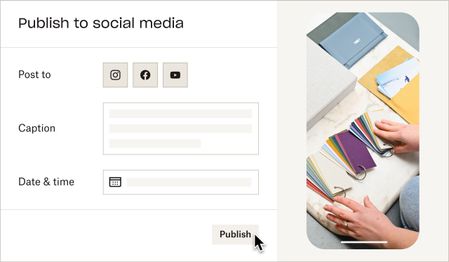
I don’t know about you, but I’m absolutely delighted to finally see spring taking it’s hold. If you’re anything like us Irish, this time of year marks a turning point, as the dark winter months are replaced by longer, brighter and warmer days. Flowers start to blossom, bees are buzzing, the birds are singing, and it nearly seems like the whole country’s mood lifts. It’s just a blooming great time of year! We’ve also got a lot to be happy about with Dropbox, too. So, here’s what’s new this spring. Publishing content to social media We’re currently in the process of rolling out a feature that will allow you to publish content straight to social media from your Dropbox account. If you’ve been using Dropbox for your social media content, you’ll know that downloading - and re-uploading - videos and images can take up quite a bit of time so you’ll be delighted to hear that you will no longer need to do this as you can now publish posts on Facebook and Instagram directly from your Dropbox account. We’re also currently working on a function that will allow you to schedule posts directly from your Dropbox account and the ability to publish content to YouTube. You’ll need an Instagram for Business account and a linked Facebook account to be able to use these features. As this is currently being rolled out, this feature is not yet available to everyone. You’ll know if you can do it if you can see the “Publish” button. If you can’t see it, have a look at this thread to find out how to opt-in. Unlimited passwords Having somewhere to track and manage passwords these days is an integral part of life, otherwise you’re left trying to remember an ever growing and ever changing list of random words, not to mention the really hard bit of trying to remember which random word fits for which random account. With Dropbox Passwords, you don’t need to worry about any of that, it will keep all your passwords, logins and card details up to date and fully synced across three devices. It will even autofill your passwords so they are as safe and securer as possible, but that’s not even the best thing about Dropbox Passwords. So, what is the best thing about Dropbox Passwords? Well, that would be the fact that it is completely free and available to all Dropbox Basic account holders. So to boost your password security game and put your mind at ease, get started with Passwords now! Mobile search improvements If you’ve been using the Dropbox mobile app, you’ve probably noticed some improvements to our search functionality recently. If you haven’t, and you’re interested in learning more, here’s a very quick run down of what’s new. To start with, we’ve made the thumbnails that appear in your search results bigger, which makes it easier to identify the things that you’re looking for and means you don’t need to strain your eyes looking at those tiny tiles anymore. We’ve also added a number of new parameters and filters to help you find what you’re looking for quicker. Your search results will now include ‘Modified Dates’ and ‘File Sizes’. We’ve introduced ‘Snippets’ for keyword matches within files and there’s also the ability to filter your search based on ‘File Type’ or ‘Modified Date’ and you can now view search results in order of newest to oldest. You can find out more or leave some feedback on these changes on this thread. And finally We’d also like to give an honorary mention to one other thing that isn’t really Dropbox related but will have a huge impact on our lives over the coming weeks and months. That is, the sun. For those of you who don’t know it, it’s the huge golden ball burning in the sky. We haven’t seen much of it around these parts recently and we’re looking forward to seeing a lot more of it in the near future. We hope you’ll also get to enjoy it and soak up some lovely vitamin-D! Just don’t forget your sunscreen. If there’s something else that you’re happy about now that spring is in the air, or just in general, we’d love to hear from you. So please let us know what you’re grateful for by leaving us a comment below!6.7KViews2likes4Comments