Your workflow is unique 👨💻 - tell us how you use Dropbox here.
Preview
55 Topics
Remove Login/SignUp dialog from download flow when sharing link to files
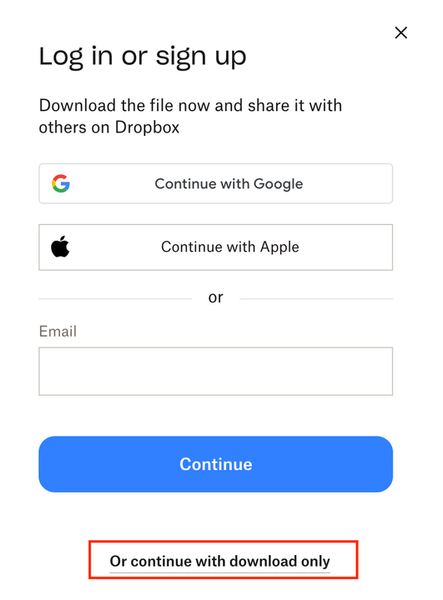
More often than not, when I share a link with a client who is not a Dropbox user, they respond to me, asking if I can please share the file with them using a method other than Dropbox because they do not want to sign up for an account. I will then have to send them detailed instructions on how to download the file, because while they can actually accomplish this without an account, the current UX/UI dissuades that by displaying Login/SignUp so prominently in the hierarchy that the small text offering the "download only" option is illegible or otherwise pushed below the fold.Solved119Views0likes4Comments
Does Dropbox compress files that user's upload?
Hello Dropbox, It's time for transparency on the topic of file compression. It is ridiculous that this question has been asked by so many users, dating back a decade, and still, I am unable to locate an official response or published document containing this sensible information. Does Dropbox compress files that user's upload? I'd like to hear it from a Dropbox representative, and: If yes; which file types are compressed? I want (require) a list of file extensions, please. Not a vague response lacking credibility besides "I work at Dropbox" or "any lossy audio file". What method of compression is used; can you at least tell me if its lossless? (again, documentation please.) Can the compression be circumvented with a workaround? Is there some container file type like .rar archives that Dropbox will leave alone? For example, what if I upload .iso or .vhd images? Would that be as easy as just changing the file extension or would I actually need to build an image because Dropbox uses heuristics to examine the raw data of the file in determining what to compress? What if I created a lossless archive that is password protected? What if I used my own file encryption software before uploading? If no, please provide a link to Dropbox official documentation stating this. I'm sorry that I don't trust you (hey, I'm honest). It's shady that Dropbox hasn't made this information easily accessible to their paid subscribers. I understand why it would be in Dropbox's best interest to compress user's files and in the end it would come down to profit and slight consideration for the user experience transferring files. I see it as, I pay (and have for ~years~) for a specific amount of storage space, therefore I should be able to choose how much of that quota my data occupies. Thank you, while irritated I do respectfully appreciate your time. WaltSolved8.3KViews1like6Comments
I need to save my Android photos to Dropbox directly as .jpg not .jpeg.
Hi all, As of a few days ago I finally figured out a great solution to my workflow by using an Android phone to take my pictures directly into Dropbox as Android creates .jpg file extensions which is the only extension a few of my other online systems accept. After checking the process again yesterday, I noticed that right clicking on the image to get the direct link now produces a .jpeg extension in the URL and is now unusable. This literally happened within a week of me figuring out the perfect flow. Now, I am back to square one sadly. I am hoping someone out there knows the answer. Many thanks!Solved4.4KViews0likes12CommentsHow can I create a shared MP3 link that can be previewed on another site?
Simply, I want to share the file EM01.mp3 from my drop box to users of my website using Google Sites. I want the file to use this basic audio player: <audio controls> <source src="YOUR_DIRECT_ONEDRIVE_MP3_URL_HERE" type="audio/mpeg"> Your browser does not support the audio element. </audio> I am missing something. I can't seem to generate my direct onedrive MP3 url. I really appreciate your help. Thanks Rick146Views0likes2Comments
Support embroidery machine file formats
I use DropBox to support my hobbies including YouTube, sewing, embroidery and cosplay. DropBox is a fabulous resource for backing up files and ensuring I don't lose digital assets such as sewing patterns (PDF) and images of my fabric stash for planning purposes. Embroidery machines use fairly unique file types and DropBox does not support the following file types: .art, .dst, .exp, .hus, .jef, .pcs, .pes, .sew, .vip, .vp3, and .xxx. I'm unable to use DropBox to support my embroidery hobby to backup/centralize/organize these specific assets.112Views0likes3CommentsIs it possible to retroactively see viewer info after upgrading?
I have the following problem: I shared some files with a company (as part of an application for a contest). I suspect that they did not actually view the files, and I would like to verify this. I understand that Dropbox Professional offers Viewer Info, which shows who viewed a file and when. However, I did not have this feature enabled at the time I shared the files. My question is: if I upgrade to Dropbox Professional now, will I be able to see the viewer info of those files retroactively (from the time before the upgrade), or does viewer info only apply from the moment the feature is available on my account?123Views0likes1Comment
A shared view-only link will not work as users have to log in and request access
I have tried this for hours and hours and it will not work. I have tried the app and the desk top version. I am doing everything correctly. Make a link for viewing only, set my password, set expiry date and copy the link. When the link is copied into my email and sent to the designated person. They are prompted to login to dropbox. They should be able to open the link in the email with NO dropbox account. If they happen to login into dropbox then they are forced to request access. I will not under ANY circumstances approve access and this changes them from link only viewing that is not downloadable or editable to being allowed to do whatever they want with the entire folder. As with other folk on the forum, I have cleared cookies and there is no placed for them to X out of the prompt to login. How do I correct this as I have a limited amount of time to send this off. If I change to one drive or Google Drive they rearrange all of my documents. I do NOT want to SHARE and I do NOT want to INVITE. As both of these allow them additional access to documents that MUST be controlled. I have also read on the forum it can be a software glitch. Why is it glitching for hours and days and weeks on end! I just finished paying for another month of professional and it does not allow me to do what I need to do and should be able to do. This is becoming a waste of my time and money.215Views0likes2Comments
We can't open files from a shared folder, as we receive errors
A user has a DropBox shared folder that is used by everyone within an organization. When we try to access, for example, an Excel file from the shared folder in File Explorer, it tries to open in the Excel app but it freezes, never loads, and gives message (Excel is not responding) in which case, we use task manager to force quit Excel. Even during times that it may open (very rarely), it gives us the following error: Error 1: Microsoft Excel cannot access the file '.....'. There are several possible reasons: The file name or path does not exist, The file is being used by another program, The workbook you are trying to save has the same name as a currently open workbook. So far, I have tried: -Uninstall / re-install DropBox app. -Sync status shows as 'All files are up to date' -Restart laptop. -Clear DropBox cache -Turn on Selective Sync -(The files are able to be opened from DropBox Online & if we download the individual files before opening.) We've opened a ticket with DropBox Support for the past month (about 3 tickets opened) but nobody is following up with us regarding this. Any help would be appreciated! -Solved627Views1like9Comments
How can I share a file with view access?
We use Dropbox for our weekly schedules. When I open a schedule (file), it opens in view mode. When my new employee opens a file, it opens in edit mode. This is dangerous because it's an excel doc and if she's accidentally in a cell and types anything, the previous information is erased. If I want to edit, from viewing the file I can click on the "open in" drop-down and choose "Excel for web", then edit and save & close. I want her to be able to open for viewing like I do with the option to open in excel for web. I've looked for help on this issue and the only response online is a quick view option . This will change settings for opening a viewing sidebar (which NONE of us want) or full screen. I've changed her settings to quick view full screen but it still opens in edit mode. Help???88Views0likes1Comment