Your workflow is unique 👨💻 - tell us how you use Dropbox here.
Shared Links
136 Topics
Displaying HTML links as raw code. Is there a workaround?
It seems that when you sent a link to an HTML file, whereas I can view it just fine, nobody else can, they get raw code. I understand that this was a deliberate policy. So, is there a workaround? Is there a link to a download possible? If I myself want to download it's fine, but what about others?Solved109Views0likes4Comments
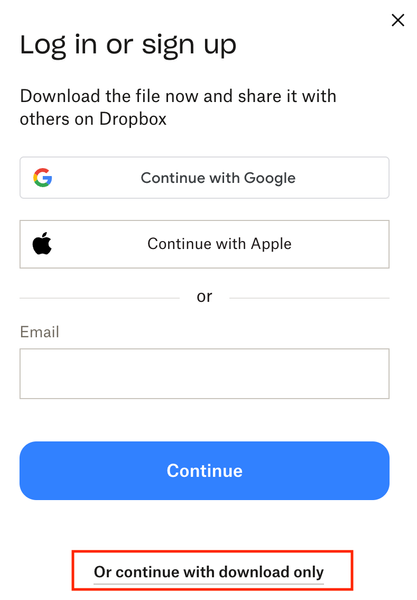
Remove login popup when sharing a link to download
Remove this very frustrating sign in popup. We're all getting sick of our customers and clients asking "can you give me access" or "we dont have a dropbox login" or "can you share it with XYZ" USERS: please like this post so dropbox considers listening. We're paying customers, stop using us as marketing to get more people to sign up. This is the reason we're looking at Sharepoint as an agency. 1 - turn it off 2 - or add a setting to turn it off for PAYING customers 3 - stop locking the topics about it: https://www.dropboxforum.com/discussions/101001014/remove-loginsignup-dialog-box-from-shared-link-download/757059 https://www.dropboxforum.com/discussions/101001012/remove-log-in-or-sign-up-popup-when-downloading-from-a-shared-link/775697 https://www.dropboxforum.com/discussions/101001012/disable-banners-and-popups-for-shared-folders/843215 https://www.dropboxforum.com/discussions/101001014/remove-loginsignup-popup-window-from-dropbox-transfer-link/767931 Remove Login/SignUp dialog from download flow when sharing link to files | The Dropbox Community https://www.dropboxforum.com/discussions/101001014/my-clients-need-to-download-files-via-link-but-the-download-button-isnt-really-v/845332 https://www.reddit.com/r/dropbox/comments/1ft6pyo/remove_log_in_or_sign_up_popop_when_downloading/ Bookmark this post as this image above is very handy to send to your customers as support.69Views0likes1Comment
Server or network failed or the format is not supported error when viewing a video
I have been trying to view a video that was uploaded here but I keep getting the error message "The media could not be loaded, either because the server or network failed or because the format is not supported." I then tried to download the video (using chrome) and it failed, saying that there was a server problem. I have tried changing my DNS settings, refreshing the page, checking to see if my browser is up to date, changed browsers, downloaded Quicktime player and VLC to try and view the video (it was captured on an iphone and is apparently an mp4 file), and even tried to disable adblock and got nothing. I'm tired of this and I just want to watch the video... What else can I do? Here is a link to the video https://www.dropbox.com/s/nru5e6j1ar2i5a9/VID_20220917_160014.mp4?dl=0Solved5.1KViews0likes6Comments"That didn't work for some reason" error when trying to open a shared link.
I was sent ym first dropbox video link in my email. When I click on it it goes to Dropbox and says..." That didn't work for some reason. If it's a fluke refresh the page..." Upon refreshing all it does is repeat this error message. Any smart peeps out there that know what's happening? Thanks for any help you can provide!24KViews0likes42Comments
Is it possible to allow someone to view a shared file but not download it?
Hi there, I am looking to upload some videos for people to "view" but not download. Is there a way to set this up this way? Once they have paid for their video, I would then like to give them access to download it. Let me know if this is possible. Thank you.Solved9.6KViews0likes9Comments
Is possible to download or export a list of links to images in a folder?
Does anyone know if it is possible to Download or Export a list of Links to images in a folder? I need to create a spreadsheet with links to each image (approx. 550) and would like to know if there is a better way than copying each link one at a time. Thanks!Solved11KViews0likes6CommentsDropbox is not allowing me to download. It usually gives me an error.
so, for almost a year now I've been having a problem with dropbox where it does not allow me to download anything directly from the site, I would have to save the file I want to download in my dropbox and either download 2 things at once or wait for dropbox to sync stuff to my PC at first, it started with not allowing me to use the download button in the middle from the file's site giving me a "there has been a problem downloading your file" or something like that, I would have to use the one on the top right corner then all of the sudden that didn't work anymore giving me the same error, so after trying to figure out how to download files I found out that I could save a file in my dropbox account and then download it from there that stopped working after some time as well like I honestly feel like dropbox is targeting me at this point so since I couldn't find anything else to download I had to download the program in my PC and wait for it to sync stuff for me I got annoyed of it after a while (for no real reason, just don't like having something like that going on for me) so I went back to the site to see if I can find a way to download anything, after a while I found out that I can bulk download files and that would be ok with dropbox honestly, if I can still download that way I am completely fine but the most thing that frustrates me is since I am not allowed to download from the file's site in dropbox, any link that has "dl=1" just doesn't open, it's just an error screen of "we can't reach this page" but I could still go around it by changing the 1 into a 0, but the real problems comes to links that are just random letters and numbers with "dl=1" in the end changing the dl=1 to a 0 will not make the page open for me to bulk download it and this frustrates me a lot a friend of mine was able to download the files I wanted and sent it to me and everything worked fine to him so it seems to be an only me thing I've tried using another browser and downloading in incognito and none of those worked out for me I hope you will be able to find something about this thank youSolved12KViews0likes8CommentsI can't download a file sent through a link by AI
Hi everyone, im chating with IA and the app designed an excel and is trying to send it to me with a dropbox link. But when i click in the link it says that de link is wrong. Do you know if its possible what im trying to do? I cant solve it. (i tried with a lot of plataforms with same result) Thanks1.1KViews0likes3Comments