Your workflow is unique 👨💻 - tell us how you use Dropbox here.
Tablet
9 Topics
Files/folders added from another device failed to appear in the Files app on my iPad
native files.app integration is still downright dangerous. When files/folders added to Dropbox from another device failed to appear on my iPad, I tried numerous remedies (none of which worked) culminatinig in reinstalling the Dropbox app and then clearing the cache under "Files.app settings". Clearing the cache resulted in the more recently added folders and their contents being deleted from my Dropbox, even though they were uploaded from a different device. The integration evidently concluded that, since they weren't on my iPad, they didn't belong in the cloud either.84Views0likes1Comment
Can't add Dropbox as a place on a Microsoft Office app on Android tablet
Microsoft wont add Dropbox as a place I use dropbox on Desktop and Apple devices with a different account. It works fine with excel to save documents. For the last 6 months my android devices have worked great as well. However, recently, when trying to save an edited excel document that I’ve opened with dropbox on my android device, it does not give me the option to save the document to Dropbox folders once I’ve edited and click “save as”. After clicking “add a place” then Dropbox, and then signing in, it loads and takes me back to excel, yet it still doesn’t show up. No error message, just isn’t an option. Click add a place again, and can click dropbox as an option again, sign in, ect. It’s an endless loop. I have tried uninstalling both apps, disconnecting Microsoft and excel from the dropbox’s connected apps, other troubleshooting. nothing working so far. If you know a solution, please advise. thanks!Solved142Views0likes3Comments
I'm seeing a weird exclamation mark next to Dropbox on Xmind on my iPad.
Hello, My Dropbox app on iPad is not syncing with my Windows 11 desktop. For example, when I open a mind mapping software that I use (Xmind) and try to open a mind map that I saved in Dropbox desktop: beside the Dropbox icon, there is a circle formed by two arrows with an exclamation point inside of the circle. I cannot find any information in Dropbox support files on this specific icon. I am guessing it is indicating some sort of sync issue. I would appreciate your instruction and help for this Dropbox newbie. Thanks much! DaveSolved728Views0likes16Comments
Do you access your Dropbox content on other apps outside of the Dropbox app? Feedback appreciated!
Hi everyone, My name is Emily, a Product Manager on the Dropbox Mobile app team and I am here because I wanted to reach out to the community to learn about how you access your Dropbox content outside the Dropbox app. We are planning to make some improvements to the way Dropbox integrates with other apps and want to hear your feedback. Here are a few questions to get the conversation started: What apps do you use to access your Dropbox content (outside of Dropbox)? What types of devices do you use them on? (iOS, Android, tablet, etc) How often do you use these apps? (daily, weekly, monthly) What works about this set up? What doesn’t? Is there anything you‘d like to see improved from the Dropbox side? We understand that everyone's experience may differ, so we welcome all types of feedback, positive or negative. We're committed to continuously improving our product so your feedback will help us make it better. Thank you in advance for your time and input. We're excited to hear what you have to say! Thanks, Emily, Mobile team876Views0likes4Comments
IPad App - Offline Excel files won’t open without internet connection
Hi there, when I click an offline excel (or any MS file) in the iPad Dropbox app, I get an error saying ‘Can’t open Excel’ and that I can view the preview of the file but not open/edit it. Is there some setting I need to change in Dropbox or Excel to access offline files (Other than make them offline in DB) Thanks, Chris3.3KViews0likes19CommentsCan't add dropbox files from my iPad anymore
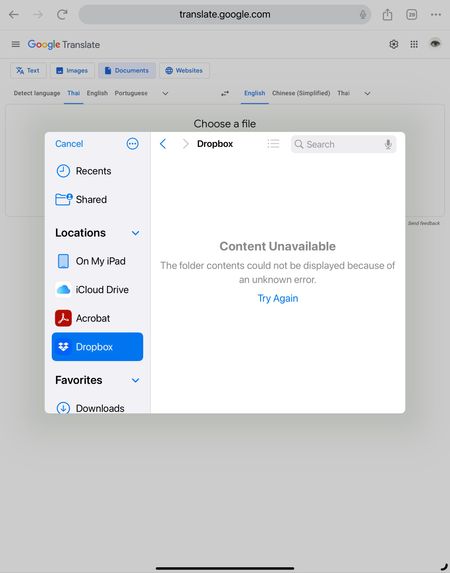
I have been using Dropbox for years and one of the feature I really like is the ability to import files directly from the Dropbox folder (on my iPad). For example, if a website is asking me for a copy of my passport, I would simply click on the upload, select the dropbox icon, and then choose the file I want to upload. But for the past couple of days this is not working anymore. It works fine on the laptop, but on the ipad I am getting this error (see screenshot below). I don't even know how to report this bug. Can anyone help? Is anyone facing the same issue?Solved1.7KViews1like3Comments
syncing bluebeam on ipad not showing all folders
I used to have dropbox synced with bluebeam revu and update files on the go with full access, then I got a new Ipad and now when I try to sync folders with dropbox it only shows my personal folder in dropbox and not the folder with all the files I use along with coworkers (bussines dropbox) I tried re installing both apps but it stays the same. I need help with this because its 90% of my job to take notes on the field and update on the go.2.6KViews0likes4Comments