Our Community is in read-only mode until April 8th, learn more here. You can still search existing threads or get help via Dropbox Support, the Dropbox Help Center, or Learn.
Third Party Integrations
724 Topics
An Official Client for Synology NAS Devices
Hi all, I use Dropbox daily and I love it. As a part of my current setup, I sync the entirety of my Dropbox folder to my Synology NAS device, in order to have all of my data available to me locally, through LAN (my laptop doesn't have enough disk space to allow for that), and to be able to copy the Dropbox data elsewhere to serve as a backup. Right now, I'm using Synology's official application - Cloud Sync - to retrieve the Dropbox data. I believe it works quite well (it has some drawbacks), but it would NEVER be as reliable as an official app. Since the OS that powers Synology units - DSM - is Linux-based, I hope this suggestions is not too much, as there's already an official Dropbox Linux client. Thanks!39KViews130likes31Comments
Migrate from Evernote to Dropbox Paper
Dropbox Paper is an ideal candidate to replace Evernote. Here's what would need to happen, I believe, for many folks to make the switch. In order of priority: Import Evernote (.enex) data (Dropbox Paper is perfect for this, because each Paper doc can contains notes, attachments, and links like Evernote notes do.) Webclipper Email to Dropbox Paper ---- Why Dropbox Paper would be better than Evernote: Active development Beautiful UI/UX Better collaboration Dropbox is *already* where I keep everything else! Way better device apps, with killer features like scan to document. Dropbox's bulletproof sync and backup. (But if I can't get started by moving my data from Evernote to Dropbox Paper, then this is all moot!)28KViews75likes9Comments
Spotlight Search Doesn't Link to Files in Dropbox in macOS 13 Ventura
After upgrading to macOS Ventura, I was prompted to upgrade to "Dropbox for macOS 12". I proceeded with that, it moved my Dropbox folder to ~/Library/CloudStorage and confirmed all was successful. Now when using Spotlight to search (I often type something like 'drawings folder' to open a folder called Drawings) the results in Spotlight show the Dropbox app icon beside the name of the item I want (rather than a Finder icon for folder or file). Hitting Enter or clicking on the result switches to Finder and does nothing, or sometimes will open the Applications folder and show the Dropbox app. It's not linking me to the actual file in ~/Library/CloudStorage. I have done the following and the problem is not solved: Restarted Ensured all files are available for offline access Rebuilt the spotlight index Unlinked Dropbox from this Mac, did a complete clean install of dropbox, performed the upgrade to v159.4.5870 and synced just one folder to begin Nothing works. Any suggestions??Solved63KViews20likes398Comments
Dropbox Integration with Zoom deprecated.
I discovered after the fact that Dropbox has decided to end its integration with Zoom. Apparently this ended on 5th February 2024. My last Zoom meeting 8 February 2024 did not upload to Dropbox automatically as usual which led me to investigate with both Zoom and Dropbox. I was just informed of the decision on Dropbox Chat. Apparently, I was supposed to have received an email but I can't find one and don't delete such things. I was advised to report the issue/complaint here. The solution offered was download and Re-upload to Dropbox which I know will work (because I used to do that years ago) but when I have multiple Zoom Sessions in one Day and there isn't time between meetings to do this this is a lot of extra work for something that prior to this change was automatic. I wonder how many others are affected by this and are just as mystified as I am? I may have to consider other options to Dropbox though need to investigate these. Thanks. Update 15th February 2024: Given the growing interest in this post and issues it is causing I have now put forward it's reinstatement here: https://www.dropboxforum.com/t5/Dropbox-ideas/Please-reinstate-integration-with-Zoom/idi-p/751519#M82875 Note: Rich a Super User II advise only one post and for others to LIKE and support it and comment otherwise it won't work. @Mark, @bblu2095, @BHappy, @Chriskynka, @marosner, @yw40, @Rockeye , @MovingMary , @nsrubio you have all been tagged in the 'NEW IDEA post link above so hopefully you will see this or the NEW IDEA post or both. Thank you. Philip WadeSolved29KViews19likes104CommentsDropbox Finder integration breaks Quick Look and thumbnails - Mac OS Mojave 10.14
For the past few months I've been having issues with image previews not loading on my Mac in Quick Look, Finder previews or icon thumbnails. I have experienced the problem on both Mac OS High Sierra and Mojave. My colleagues also seem to be experiencing the same issue. I finally took the time this week to figure out what is causing the issue. As far as I can tell the problem is caused by Dropbox Finder integration. As soon as I turned off Dropbox finder integration (and restart the machine) file previews and Quick Look work perfectly. For now I'm keeping Dropbox Finder integration turned off - I'm a designer and image previews are incredibly useful. I'd prefer to be able to enable Dropbox Finder integration as the sync status icons are useful. Has anyone else experienced this? Is there a fix?Solved30KViews13likes48Comments
Editing PDFs in Dropbox from my iPad
I'm trying to edit/markup PDFs that I have stored in Dropbox from my iPad. I'm using an Apple Pencil that's capable of "markup." The adobe integration was meant to be the answer for this; however, Adobe is now charging extra for the ability to edit. Apple allows you to edit Dropbox PDFs nicely through files; however, this seems to be hit or miss as sometimes the files won't open or get re-directed to Dropbox. Are there other ways to edit PDFs from the iPad and have it sync with Dropbox? This would seem like it should be a top priority for an added feature. OneDrive, for example, has the functionality built directly into their app. Any help would be much appreciated.Solved40KViews9likes12Comments
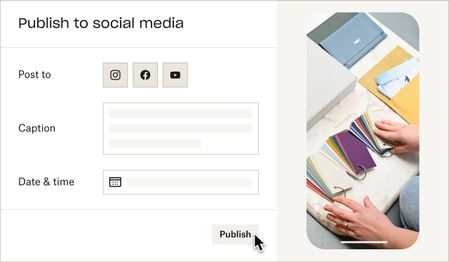
Publish to social media from Dropbox!
Hello! My name is Amanda. My team is building a feature to help users publish videos to their final destination — whether that’s social media, YouTube, your website, or elsewhere. We hear this task is repetitive and tiresome, and you shouldn’t have to waste time downloading and uploading videos to multiple places. Starting today, you can publish videos and photos directly from Dropbox to Instagram and Facebook**. Simply open a video or photo on www.dropbox.com, and click "Publish". Soon, we’ll let you schedule posts in advance, and post to YouTube. Note: This feature isn’t widely available to all users yet — if you don’t see the Publish button, reply to this thread with “opt-in” and we'll give your account access. 😉 If you’d like to collaborate and help shape the future of this feature, reply with “I’m ok for Dropbox to contact me by email” and we will reach out. **You must have an Instagram Business account and a Facebook Page to publish from Dropbox. See this article for support. ***Update - this feature has been temporarily postponed and there is no longer an "opt-in" option for it. Thank you for your continued patience.***Solved26KViews8likes32CommentsSyncing Dropbox files to Android SD card - third party apps?
Hi everyone, As you may know, Dropbox doesn't sync files on Android any more as of last year or so (see this, for example). They used to be in sdcard>Android>data>com.dropbox.android>files, but the new "available offline" option stores them in the cache of the Db app, which other apps cannot access (you wouldn't be able to locate them with Files, for example), to ensure their safety, I would guess. The only way to use these files on your device apart from through the Db app is to "export" them after they were made "available offline" (so basically to properly download them locally), and it is thus impossible to do what Dropbox is meant to do in the first place : read and write synced files. I personally would like to edit note files on my computer and my phone and to get them synced by Db, but there seems to be no way to reach and edit locally stored (note) files with my note-taking app. The only workaround I found to this problem is using third party app that syncs files with your Dropbox repository, such as Dropsync or FolderSync, which were explicitly meant for that : "New files in your cloud account are automatically downloaded onto your device. [...] This is how Dropbox works on computers but not on Android. Two-way automatic synchronization should be an essential function of the official app. For whatever reason, it is not the case. Dropsync is here to fill the gap." [Dropsync app description] But then I am not too keen on adding more complexity to my workflow, increase the likeliness of some incompatibility or other "technical issues" to emerge in the future and, moreover, to potentially put my professional and personal data into more covetous digital hands than they already are in (free apps that manipulate my data? I sense what the product might be)... So my questions are : has anyone in here ever tried these solutions and did it work as planned? Any (unusual) worries to have regarding privacy with these solutions? And above all (@support people?), is there any way to circumvent the issue without these? Cheers16KViews8likes8Comments
Why can't I open Microsoft files on my mobile device?
I updated my iPad Pro & now I can't open Dropbox files in Microsoft apps. I can see Dropbox, and I can open in other apps (Adobe, for instance), but Word, Excel, etc. tell me that the server is gone or the files are no longer on the server. But they are where they belong, and I can open them on other devices.Solved76KViews8likes173Comments