Our Community is in read-only mode until April 8th, learn more here. You can still search existing threads or get help via Dropbox Support, the Dropbox Help Center, or Learn.
Third Party Integrations
724 Topics
Links/syncing stopped working for InDesign files in Dropbox, after Adobe InDesign crashed.
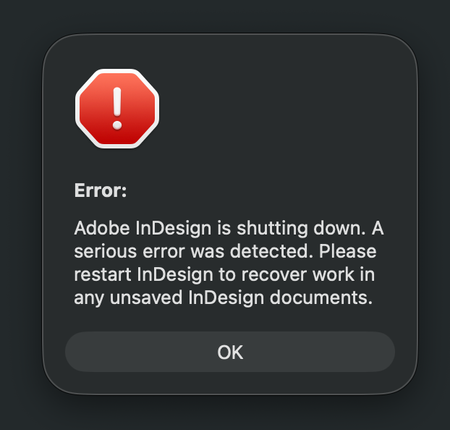
Application Affected Dropbox and Adobe InDesign Device iMac M3 - 2023 Operating System/Browser (if using the web) MacOS Tahoe 26.3.1 (a) Dropbox App Version (if using the app) 244.4.6580 In advanced, I'm sorry for my long text and spelling errors) I have a shared Dropbox with my colleges, and I work from home. Earlier this week I was working in InDesign, and it crashed while I was working. A message said it was a serious error, but no info what the error was about. (I have attached several screenshots below) Anyway, I started InDesign again, but the document I was working on could not be opened, because it was damaged. I work as a freelance book designer, but luckily for me I was only working on a book cover, and not the inside of the book. It was annoying, but not the end of the world. This was just the beginning. Now every single time I open an InDesign document from Dropbox, all the links is just shown as blank, like there is nothing there. It's just like a white new document, with nothing there, only the text. Nothing is linked anymore, and I have to link every singe images again. Let's say I have 50 images in a folder, it doesn't link everything at once, which is crazy annoying and extremely time consuming. Sometimes when I open a document in InDesign it seems fine for one second, but then all the images shows up like "crazy art" (screenshot 2) After I link an image, it seems to be okay the next time I open the document, luckily. But I have a lot of book projects and it's a crazy amount of time fixing everything manually. I also get weird messages when opening a document (the bottom screenshots) It also seems to be a problem when I have a document open, and want to edit a picture. I choose to open the picture in Photoshop, and edit there. When saving the document, it usually update the file in InDesign automatically, but not now. I guess it's just a part of the same problem. I have no idea what to do to fix the problem. All Indesign documents on my computer is fine, so the problem is only between Dropbox and Indesign, and not InDesign alone. I always work with the documents/folders (available offline) and I have never had a problem with this before the crash. I have already contacted Dropbox customer service. After a lot of back and forth, they said the problem is with Adobe. Then I contacted Adobe (which has terrible customer service) and they told me the problem is Dropbox. So here I am, with no clue on how to fix the problem. I have restarted Indsign and Dropbox, but nothing changed. I don't know what will happen with new documents placed in dropbox yet, but fingers crossed the issue will not effect new work. Time will show after the Holiday. Happy Stressfull Easter to me I guess :P77Views0likes4CommentsDropbox/Boxifier Integration - New Question
This is a technical question based on research I've been doing related to the recent issue with Boxifier no longer working with the latest version of Dropbox, and an inability to get a response from Boxifier support. In my research I've come across information that Dropbox has, with version 243.4.6956, moved from a proprietary sync platform to Microsoft-based API that leverages their OneDrive sync engine. So my first question is whether that is true. If it is true, my experience with OneDrive is that it is not possible to sync content from a NAS, or in my case WD MyCloudHome, using a mapped network drive. OneDrive will only sync content that is stored directly on the hard drive of the laptop itself, and does not support mapped drives (IE Z:/MyCloudHome/MyPictures). Previous to purchasing Dropbox and Boxifier, I had "tricked" OneDrive into syncing files from my drive mapped to MyCloudHome by using MKLink symbolic links to directories on the MyCloudHome. However, I discovered that after those directories grew to over about 100GB those symbolic links began to fail sporadically, so I had no idea which files were synced to OneDrive cloud, and which were not. After doing research on potential solutions I reached out to Dropbox and was told that the combination of Dropbox and Boxifier would meet my requirements. After testing and confirming that did work, I purchased Dropbox and a "lifetime" Boxifier license about 6 months ago. Unfortunately, "lifetime" appears to be about 6 months for Boxifier and I fear I may have thrown $350 out the window as it is probably not possible for Boxifier to continue to operate with Dropbox if indeed Dropbox is now running on the OneDrive sync engine. So, my questions are whether Dropbox is now on the OneDrive platform, and based on that answer what my options are to continue to sync my content from MyCloudHome to Dropbox going forward. I appreciate official Dropbox guidance on this matter, as well as any advice other users in similar situations might have. Thank you, Dave152Views3likes7Comments
Boxifier not working with latest Dropbox update
Good morning , Is anyone able to assist with getting hold of @Boxifier team member ? They are completely unresponsive and email or post on their website not being allowed showing as pending. Original issue i had was as below (copy of the message to @Boxifier below)Does Boxifier still exist? I’ve been using your software for several years and have been very happy with it. However, over the past couple of months I’ve been experiencing persistent issues. I frequently receive the message “core not running,” and all of my previously synced folders are being removed from the Boxifier folder. When I try to re-add the folders, it creates further problems — Dropbox begins deleting and re-uploading large amounts of data, causing several hours of disruption. Additionally, folders from my shared drives are being copied and converted into random files, while the originals remain untouched in their original locations. Attempting to re-link the folders doesn’t work either; I get an error message saying that a folder with that name already exists in Boxifier. In Dropbox’s Selective Sync settings, I can see that the folder is listed and selected to sync, but nothing happens. The only workaround I’ve found is to completely delete the folder from Dropbox online and then re-link it on my PC — which again results in hours of syncing chaos. I’ve tried reinstalling the latest versions of both Boxifier and Dropbox each time this occurs, but the problem persists. Could you please assist me in resolving this issue? It’s been quite disruptive, and I’d really appreciate your help in getting things back to normal. Last night its stopped completely following and Dropbox update to 243.4.6956, whatever i do no cant get it to work again and workflow is seriously impacted . Can anyone help please , thanks Szymon722Views1like36Comments
Quick Look flickering on macOS 26.2
I have the same Quick Look symptoms as Dropbox Finder Integration Flickering on macOS 26.2, but with some stuble differences. My problem is persistent across restarts of Mac OS and the suggested fix did not work, nor are there any pending cloud syncs. Integration Affected: Quick Look Device: Mac Mini M2 Pro running macOS 26.2 (latest version). This started with Mac OS 26.0 Dropbox: Version 240.4.8493 Issue: Document displayed using QuickLook in Dropbox folders refreshes every second, disrupting file previews and navigation. If I scroll my PDF down in the quick look window, the refresh forces me back to the top of the document, if I am using QuickLook on an Excel spreadsheet, it always forces me back to the first sheet. This behaviour happens with all documents and images, not just PDF and XLSX. Symptoms: Quick Look resets to the first page/tab of all documents (PDF, Excel etc) Unlike the other poster, my green Dropbox tick icons in Finder are constant (no flicker) Steps to reproduce: Open Dropbox folder in Finder, locate a document to QuickLook (PDF, XLSX, or anything really) Steps to reproduce Secondary problems: Select a multi‑page PDF and press space to preview. Attempt to scroll to the second page. Finder refreshes, preview resets to page one, and the Dropbox icon flickers. It is impossible to productively use QuickLook on any file in Dropbox folders via Finder. Thanks in advance!344Views0likes13Comments
Dropbox Pocketbook isn't supported won't let me sign in.
Application Affected (Dropbox Pocketbook.) Device PocketBook 628 Question or Issue Recently had issue with my network, was told from Pocketbook support, to do factory reset. Afterall I realized that I can't log-in with my account, cause the interface of login page was update. How should I bypass that piece of a problem, cause that was one way how I was syncink the files with my deviceSolved119Views0likes6Comments
Boxifier Status
Hi All, I've been following the Boxifier threads as I'm not having much luck emailing the support team directly. Christine at Boxifier has been helping me on and off since June of last year but Boxifier has not worked for me since then, yes I have the new cloud sync problem. Last I heard from Christine was right before the new year and I have reached out a few times since then with no response. They have been very helpful when active and even helped me with a license problem. But I'd like to have some response when I ask a question and some status on when this is going to be finally fixed so I don't keep losing valuable files from a broken syncing process. My regular Dropbox folder isn't synching either because of this. Any help and update would be greatly appreciated. Razvan Boxifier do you have any update? Thanks203Views0likes6CommentsIntegration with Handy Diary, backup does not work
Hello! I've been using the Handy Diary app for 6 years, and I've been constantly backing up my data. However, yesterday I ran out of storage space, so I purchased a 2 TB plan and deleted all my old backups. However, the backup process is not working. There are no errors, but the app displays a message saying "Try again later," and my personal account information is no longer visible in the app. I've tried restarting my phone, backing up to empty accounts, and all the permissions are correct. I made my last backup about three weeks ago, and this issue occurred yesterday. Please help me resolve this problem. My internet connection is also working properly, and I haven't encountered any issues in the past. I'm performing the same operation that I've been doing for the past six years, but this time, I'm encountering this problem.95Views0likes3CommentsTell Us How You Use Dropbox
No two people use Dropbox in exactly the same way. Some of you rely on it every day for work, others for school, creative projects, or keeping life organized - and we love that. We’d love to hear how you’re using Dropbox today - is it something you use once in a while, is it part of your day to day, are there any features you can’t live without? What workflows have you built that save time or reduce friction? And where do you see opportunities for us to do better? Your tips, ideas, and honest feedback really help us to make sure we can share useful tips, and they help other community members discover new ways to get more out of Dropbox too. Share your experience, favorite features, or suggestions in the comments below. Your voice truly helps shape the future of the Dropbox community 😁 The Dropbox Community Team3.9KViews4likes14CommentsI can't access a Dropbox offline folder through Termux with claude cli.
On Android, I can not access dropbox offline folder through termux with claude cli. Could you add an option to make the offline files appears in a folder, such as download, so that termux can directly access ? In this way, we can do coding on the phone without github43Views0likes1CommentI've connected Dropbox with CSEntry, but my apps don't appear.
Hello, dear community, I need help to finish something. I try to connect CSEntry and Dropbox. First I succeed the deployement CSPro to Dropbox. Now when I try to connect Centry and Dropbox, it works, but my apps don't appear. So I'd like some help to fix it. Thanks in advance.345Views0likes18Comments