We’re Still Here to Help (Even Over the Holidays!) - find out more here.
Windows
108 Topics
Download folder unaccessible after installing Dropbox
Device ASUS ROG Strix G712LV-BS71-CB laptop Operating System/Browser (if using the web) Windows 11 Dropbox App Version/Browser Version 237.4.5655 Question or Issue I'm supporting a user that I installed Dropbox for and since I in stalled it the user can't access it's download folder. This is the message (pardon the French) that appears: Which basically says that the folder is not available. All downloads from the browser fails unless I redirect the default download location to somewhere else, like the desktop. When inspecting the properties of the folder, the link for the folder location is blank. It's been a reccuring problem for him and I can't find anyone online experiencing the same issue. I tried replicating it on my computer but can't seem to be able to. It's been happening for a couple of weeks now and the workaround I found was to restart the computer so because Dropbox didn't launch at startup, the download folder was available. Upon opening the Dropbox app, the download folder is not acessible until a restart. That was for the last couple of weeks, but now even a restart doesn't temporarily solve the issue. Steps taken: - Restarting the PC. - Reinstalling Dropbox - Making sure there is no backup settings targetting the user's document folder. - Changing Dropbox's location on the computer by putting it directly on a Folder in the C:\ drive, not in the user's document folder. I'm at a loss here. Does anyone know where the issue might come from?47Views0likes1Comment
When opening a file in Windows 11, there is no other option than 'this time only'
Integration Affected office Device hp laptop Operating System/Browser (if using the web) Windows 11 Question or Issue everytime I open a file i get asked to select which program to open it with even if I have a program that is already associated with that file type (.DOC to Office Word). What makes the situation unbearable is that the only option I can select is use this program "this time only" so everytime I need to go through this again.Solved86Views0likes7Comments
My local files won't open. I can see them in the Dropbox folder, but can't preview them.
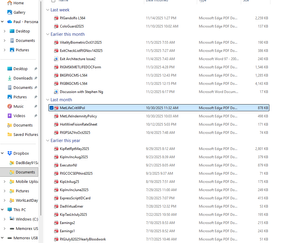
Unable to access my files on DropBox! Have had a DB account shared between a work laptop + my personal laptop (both Win 11 + fairly new) for quite some time. Recently retired-Work laptop went away. Can't seem to access much of anything on my personal laptop now. When I go to click on pictures or documents, I get the following: Hmmm… can't reach this page It looks like the webpage at file:///C:/Users/pgand/Downloads/Dropbox/Documents/MetLifeCritIllPol.pdf might be having issues, or it may have moved permanently to a new web address. ERR_FAILED I really hope I haven't lost everything I ever copied here. I attached a SNIP from File Explorer-they all LOOK PERFECT yet I can't ACCESS ANYTHING. Please help if you can thanks ! If so, kind of deceptive of DropBox as all the copies went well ! Please help if you can thanks !Solved380Views0likes22Comments
Thumbnails are not showing for files in Windows explorer
Operating System/Browser (if using the web) Windows 11 Dropbox App Version (if using the app) 234.4.5591 Question or Issue When trying to view thumbnails in Windows Explorer, I get generic thumbnails. Same as what was goin on in this thread (but now closed). https://www.dropboxforum.com/discussions/101001013/recent-update-of-the-desktop-app-not-allowing-me-to-see-clip-thumbnails-in-file-/832241/replies/839206 Please advise if there is a work around.156Views0likes5Comments
Dropbox Paper images aren't loaded on the web
Device Thinkpad X1 Carbon 2016 Operating System/Browser (if using the web) Windows 10 Dropbox App Version/Browser Version Chrome: Version 140.0.7339.185 (Offizieller Build) (64-Bit) Edge: Version 140.0.3485.94 (Offizielles Build) (64-Bit) Description Many images (~30%) in my dropbox paper document are not loading anymore. It concernc various dropbox paper files. Even if I click on the link, they do not open anymore. I am sure all of these pictures were uploaded correctly! They are usually screenshots that I have copy + paced into the document. This is very frustrating and a very big issue. I would have thought dropbox paper is more reliable! ScreenshotsSolved420Views2likes26Comments
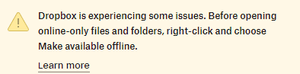
I can't view online-only files after upgrading to Windows 11.
I just upgraded my laptop to windows 11 after resisting for a long time. Now I cannot open any of my dropbox online-only files (especially .jpg and .pdf) and the system says it cannot access those files. If I make available offline, then the files open just fine. Please help. Device Dell XPS 13 Operating System/Browser (if using the web) Windows 11101Views0likes2CommentsGetting an error when trying to open documents in various Dropbox folders
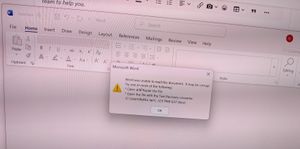
Application Affected (Dropbox Folders) Device Samsung Laptop Operating System/Browser (if using the web) (Windows 11) Dropbox App Version (if using the app) N/A Question or Issue 1. A very large of the files (Word, PDF) in various Dropbox folders do not open. For Word files, i get the foll message: 2. Such files in the Dropbox directory have a brownish tag 3. For PDF files I get the foll message: Hmmm… can't reach this page It looks like the webpage at file:///C:/Users/[removed]/Dropbox/5G%20workshop/India_2021_Forecast_Highlights.pdf might be having issues, or it may have moved permanently to a new web address. ERR_FAILED 4. The non-dropbox files do not have this problem Please suggest how to correct this.....There are a lot of Word Files in my Dropbox.... and doing anything one by one seems very painful. ThanksSolved231Views0likes9Comments
Unable to see the cloud icons on my folders after the app's latest update.
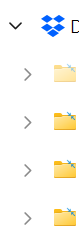
Operating System Windows 11 Dropbox App Version/Browser Version 232.4.5988 Question or Issue I put all my files on online only and usually I'm able to see the cloud icon on top of the files/folders here but I can't view them anymore after the latest update, is this a feature or bug?Solved235Views0likes11CommentsI can't see my "syncing issues" or new updates when I check my Dropbox folder.
Device (Dell precision 3551) Operating System (Windows 11,) Dropbox App Version (232.4.5988) My dropbox says it has sync issues but when I select show me the issues it just shows me a blank window. Not sure if that is related, I think I have always had that but wanted to add just in case. I have been finding recently that my dropbox files and folders haven't been up to date, new files haven't been showing on my desktop file explorer although I have everything set to sync online only. If I go to dropbox.com, it also wont give me the option to view these files in file explorer like other folders (see images). Has anyone else experienced this or knows what it might be?130Views0likes8Comments
The Dropbox desktop app is slow when navigating my Dropbox folder or viewing files on Windows 11
Device Custom desktop - AMD Ryzen 9 5900X - 64GB RAM - Samsung SSD 980 PRO 1TB Operating System/Browser (if using the web) Windows 11 Pro 24H2 Dropbox App Version/Browser Version 229.4.5197 Question or Issue As I try to navigate my Dropbox folder in Windows or view any file (regardless of size) there is about a 10-15 second delay before it does anything. I can almost log into the web version of Dropbox and access the file faster than I can clicking on a single folder directly in Windows. This has been happening for a year or so now. I reinstalled Dropbox a month or two ago, switched to the Windows Store version and just reinstalled the normal desktop app version today. It is still occurring. I don't have iCloud installed or use OneDrive, I've tried reinstalling Dropbox about 3 times now. Is there a way to tell what is causing it to run so slow? Or what is causing it to run slow?1.6KViews3likes46Comments