We’re Still Here to Help (Even Over the Holidays!) - find out more here.
Windows
50 Topics
Deleting a Large Number of Files
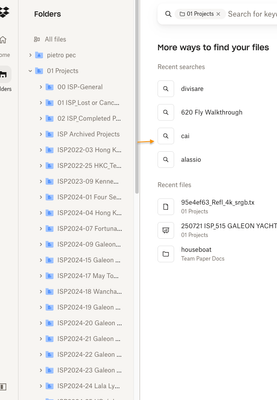
Hi there. Sorry if a topic like this has already been made, but I require some assistance. See, I play a lot of PC games, but for some reason, Dropbox, or my computer, downloads any images that are seen in the game and has it saved here on Dropbox, which I absolutely do not need. When I saw that I went over the necessary amount of file storage, I tried deleting all of the images in my account, but it says its unable to. I don't know if its because there are so many files, or because of something else. If someone can show me an effective way to delete all of the files/image I have, or better yet, have Support or an Admin do it, I'd be greatly appreciative.5Views0likes1Comment
My files appear to be empty after editing
Hello, I'm on an ASUS Zenbook running Windows 11. I have a shared dropbox folder that constantly has files getting wiped/copied (when they get copied they are empty) showing up on the dropbox. It always shows me editing the file and its usually multiple at the exact same time. All the files have nothing in them and instead are blank. I know you can restore the file but its been happening for months and across multiple different shared folders and its honestly a headache to fix. Help appreciated, thanks in advance.118Views0likes7Comments
Move my Dropbox files from PC to external drive
Hi! I don't have too much space on my PC to download all my files via Dropbox Desktop App. My goal is the backup all my files saved to Dropbox to an external drive. After I copy the downloaded files to an external drive, how can I then delete them from my PC to free up more space without it syncing and deleting the files from Dropbox.com?66Views0likes6Comments
I'm getting a message about my files being online-only when they're all available offline. Why?
Device Windows desktop PC Operating System/Browser (if using the web) Windows 10 Dropbox App Version (if using the app) 235.4.5905 Dropbox Plan Plus Plus Question or Issue Why am I getting this message? "Deleting an online-only folder permanently removes it from your PC. If you need the folder later, check your Drogbox recvcle bin." ALL my hundreds of folders in C:\Users\Terry\Dropbox\ are configured to be OFFLINE.124Views0likes9CommentsHow to delete files from an external drive backup?
Device (WINDOWS 11 ON PC) Question or Issue IN DROPBOX I HAVE A BACKUP OF AN EXTERNAL DRIVE THAT WAS CONNECTED TO AN (OLD) NON-EXISTING PC . I WANT TO DELETE SELECTED DIRECTORIES FROM THE DROPBOX BACKUP. HOW CAN I DELETE THEM AND RETRIEVE DROPBOX BACKUP MEMORY SPACE? I TRIED, WITH THE FOLLOWING RESULTS: WHEN I TRY TO DELETE, I GET A MESSAGE "If you no longer have access to the computer you used to create Extreme SSD OLD backup, click I don’t have access." (THIS IS THE CASE) THERE, I'M GUIDED TO "SIGN OUT OF THE DEVICE". I DID THAT, AND THE DEVICE IS NO LONGER SIGNED IN. NEVERTHELESS, I AM NOT ABLE TO DELETE THE DIRECTORY IN MY DROPBOX BACKUP. WHAT CAN I DO TO DELETE THAT DIRECTORY?Solved146Views0likes4CommentsZip files are corrupted and can't be opened
Operating System/Browser (if using the web) Windows 11 & Android Question or Issue In May this year, I cleaned up my dropbox. So I zipped some folders and then deleted them. Now that I need any of the files, I unzip the files, but all documents and pictures are corrupted and I can't open them. There is data inside (it has a size bigger than 0), but I cannot seem to unpack it so that it has meaningfull contents. As my 30-day restore period is already passed, I cannot restore the deleted folders. Does anyone have an idea how to get my files back?163Views0likes4Comments
Error opening and editing any file saved in a shared folder.
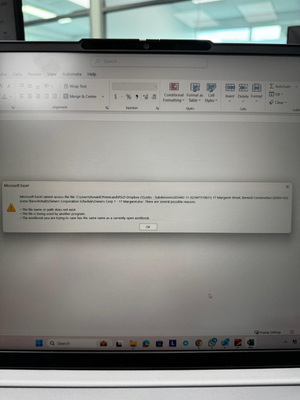
When we try to open the file it pop up with the error saying attached screenshot for better understanding. After logout and login still the same, we uninstall and install the dropbox app still the same error. Final we remove the users permission from share folder and then later we added the shared folder.
How to delete a Dropbox folder from the Windows file system?
I recently had to change my email address. Trying to adapt that in my dropbox account I accidentaly created me a second drop-box account. After finding out about my mistake I took a second attempt and then the email address change worked. But: Due to that prior procedure I had ended up having now TWO dropbox folders in my Windows box's home directory. After carefully figuring out which one is the correct/active folder I deleted the other unused/unwanted folder (via Window's right-click --> Delete). The folder disappeared from my home directory but turned into a zombie. I.e. it now sits in my recycle bin (still showing the dropbox icon) and seems to be undeletable, i.e. even having emptied my trash now multiple times that folder still sits in there and doesn't go away. How can one completely remove a Dropbox folder deleted from the Windows file system?Solved402Views0likes12Comments
My KiCAD files keep being marked as read-only and I can't edit them on the Windows desktop app.
I have a KiCAD project stored in my Dropbox and am actively editing it. I've never had issues with this arrangement before but suddenly opening some files as part of the larger KiCAD project inform me that they cannot be edited because the file is marked Read Only. In Windows explorer I go and uncheck the entire folder from being made Read Only, but then immediately check properties again and Dropbox immediately remarks it Read Only. I imagine this may impact similar types of applications with multiple files being opened and edited as part of a larger project. How can I stop Dropbox from marking this project read only? Is my only option to move it out of Dropbox and then lose backup capability?460Views0likes5Comments