Your workflow is unique 👨💻 - tell us how you use Dropbox here.
account access
4 Topics
Automatic logout
I think it would be great and very secure if dropbox logged out automatically after a period of time - decided by the owner of the account (for example after 1, 2 or x minutes) - when no actions have been made on it. This would prevent other user from using the account if the owner unadvertedly got away from the pc and left his account open. Thank you42Views1like1Comment
Google Sign-In and email aliases
I would like to report a usability issue related to Google Sign-In and email aliases, and propose an enhancement. I have: One Google account with multiple email aliases. One long-standing Dropbox account created with one of these aliases (let’s call it alias@domain.com), with its own Dropbox password. The same underlying Google account also has a “main” address (main@domain.com). What happens today: My Dropbox account email is set to alias@domain.com. If I try to log into Dropbox using “Continue with Google” and select my main@domain.com identity, Dropbox creates a completely new, empty Dropbox account for main@domain.com instead of linking the Google login to my existing Dropbox account. This behavior is consistent with the current requirement that the Google email must exactly match the Dropbox account email to use Google Sign-In. [help.dropbox](https://help.dropbox.com/account-access/google-sign-in) What I would like to achieve: Keep a single Dropbox account. Be able to: - log into that one Dropbox account with email + password (using alias@domain.com), and - also log in with Google Sign-In using the same underlying Google account (main@domain.com), without creating a separate Dropbox account. Feature request: If technically and security-wise feasible, I’d like to request: 1. A way to explicitly **link an existing Dropbox account** to a Google account for Sign-In, even if the Google address and the Dropbox email differ (for example main@domain.com ↔ alias@domain.com), possibly via a confirmation flow on both sides. [help.dropbox](https://help.dropbox.com/account-access/google-sign-in) Clearer safeguards to **prevent accidental creation of a new Dropbox account** when a user mistakenly uses Google Sign-In with an email that already corresponds (directly or via alias) to an existing Dropbox user. An advanced “login methods” section in account settings where a user can: - see which Google account is linked, - link/unlink a Google account, - continue to use email + password in parallel. This would greatly improve the experience for users with Google aliases or complex identity setups, and reduce accidental account duplication. Thank you for considering this request.48Views0likes1Comment
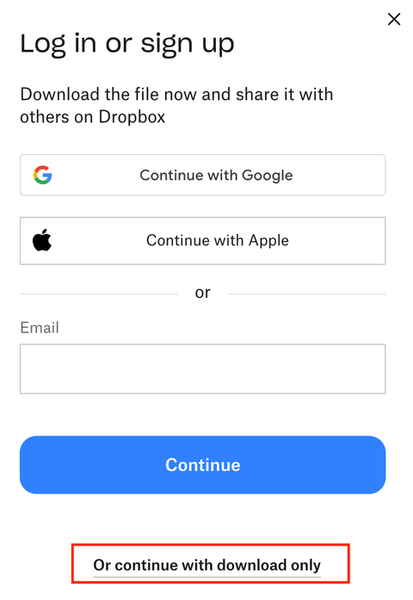
Remove login or sign-up popup when sharing a link.
how do I get rid of this frustrating pop up when sharing a link with a client? We're a paid dropbox business member and I get a tonne of clients telling me they cant access the files because of this popup. Needs to able to be switch this off. I pay to have ability to share files externally so either make it free and keep the pop up, or let me turn it off. Thanks, so this thread, but not locked - https://www.dropboxforum.com/discussions/101001014/remove-loginsignup-dialog-box-from-shared-link-download/757059#M82871508Views8likes9Comments