Our Community is in read-only mode until April 8th, learn more here. You can still search existing threads or get help via Dropbox Support, the Dropbox Help Center, or Learn.
automation
7 TopicsStay organized and save time with new folder automation updates
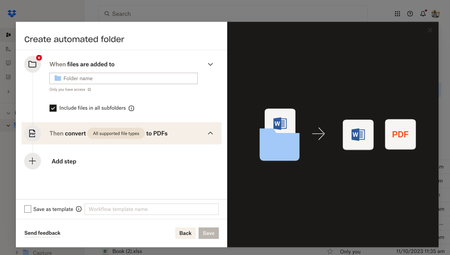
Hey Dropbox Community! We are so excited to introduce new enhancements to the folder automation features to help you stay organized. We’re introducing multiple step automations (up to five), including within subfolders. Now, you can configure multiple automations on selected folders and subfolders to automatically convert uploaded files to PDFs, rename files, add watermarks, and more. Get started by selecting “+Create” under the search bar, then select “Folder,” and finally select “Automated folder.” Tell us about your experience with Dropbox's Folder Automation Features in the comments below! Or comment down below any features you'd love to see to help you stay organized.13KViews2likes7Comments
Can't use automation to auto-add tags to files in a folder
The Dropbox tags help page indicates you can use the automation feature to auto-add tags to files in a folder. However, this option is not present in the automation task list. I tried adding it as instructed to a newly created folder, and also tried adding the automation rule to an already created folder. Neither worked. I hope this feature didn't get removed because it would be really helpful to organize all of my photos.Solved5.7KViews1like23Comments