Need to see if your shared folder is taking up space on your dropbox 👨💻? Find out how to check here.
automation
26 TopicsAutomation won't apply to existing files. How can I achieve that?
I have a directory with a very large number of files (several thousand) that I only access online. All of the files have names based on their date of creation (eg 2025-07-01-7:00.txt). I would like to organize these into subdirectories based on their date. From the dropbox website, I added an automation to sort these files into subfolders based on the month of file creation. I clicked on "Apply to existing files" when creating the automation. However, once the process starts, I get a Notification: "Automation will apply to new files added to (Folder), but not to existing files" Why isn't it applying the automation to existing files? How can I organize the existing files? There are too many files to do this by manually clicking boxes. Thanks.300Views0likes11CommentsCan I automatically rename files within a folder based on their added date/username?
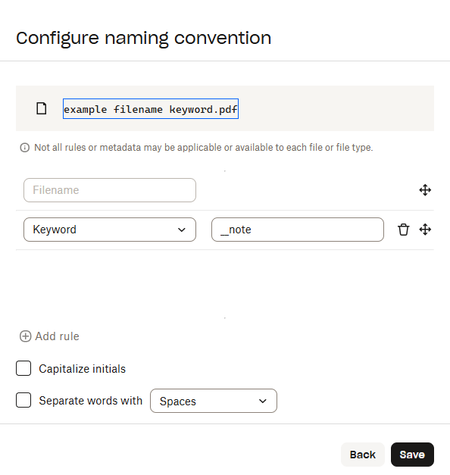
Dear Dropbox Gurus, I am setting up a folder where members of my team will be able to upload data from an external system that we will use for other processes. What I would like to do is unify the file names and if possible have Dropbox automatically rename the files to a standardized format without relying on the user to do this. We would like to have the files named in the following format: "BW_Scoring_Data_"{FileTime Stamp Format YYYYMMDD_HHNN - use date/time from file if exists/otherwise use current date/time}_{UserName}.{fileExtension} So for example: if I had uploaded the file "BW+Score+Recorder+-+with+AI_April+20,+2025_09.52 (1a).xml" I would like to have it renamed: BW_Scoring_Data_20250420_0952_GaryH_BAR01.xml Is this possible to set up via Dropbox Automation? If so, how?110Views0likes2CommentsCan I use an automation for daily file renaming?
I have daily files shared with me and i'd like to automate the following process if possible.... Copy files from the shared folder to a private folder Rename files (example below) xxx.mp3 ----> xxx - xxx.mp3 Thats it Thanks in advance for any replies :)152Views0likes5CommentsWhy is the watermark automation not working?
Hi, I have the professional essential plan, and I added watermark automation into the folder including all subfolders. I also adjust the size, color, and opacity to make sure it will show up. However, none of the photos in the folder was watermarked. I have to go into each folder and added the watermark manually which doesn't make sense at all. Can anyone tell what I did wrong? Thank you!143Views0likes5CommentsNaming conventions are sometimes buggy in subfolders.
I have a parent folder with an automation that's supposed to rename every file in its subfolders to a certain format, but it's been very buggy on if it actually works or not... I don't know if it's just bugged or if there is a solution. I'm using file requests in every child folder if that helps.493Views1like23CommentsHelp with keyword automation on a shared folder
I have tried adding automation to a shared folder. It doesn't seem to do anything so I am curious if I am misunderstanding the feature. I have a main input folder that receives a folder with file(s) on regular basis. These folders have a standard naming convention of FirstName LastName Timestamp (yyyy-mm-dd HH_MM_SS) LocationName (example: John w Smith 2025-01-28 20_23_29 Main Office) The main input folder also contains subfolders with for each location. My goal is to have the folders moved from the input folder into the location folder. I added the automation: When files are added to "Intake Folder" then organize into folders grouped by Customer filters Keyword "Main" move files to "Main Office Intake." The folder is not moved. I do have permission to edit the folder. I am part of a team on the Advanced plan. When I look at the folder on a different computer/browser, it looks like the folder is not automated. Suggestions are greatly appreciated. Thanks!Solved179Views0likes3CommentsGetting errors when managing automations
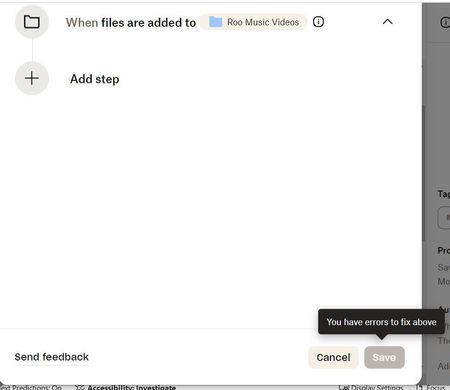
Hi when managing Automations in Dropbox I constantly get the "Couldn't add automation to..." or "Something went wrong. Please try again." I'm not creating elaborate Automations with steps; just sorting into months or years. Has anyone had the same problem and found a reason and/or fix? Br/MikkelSolved140Views0likes5CommentsThe Automation feature does not work for me - nothing happens when files are added to the folder
I'd first like to say in advance, thank you to anyone who posts here and is willing to lend a hand. 2nd I'd like to make it clear automation has never worked for me. All the other messages I've seen here regarding automation have to do with the fact it has stopped working, or it partially works. It's never worked at all for me. All I'm trying to do is simple audio file conversion. I want everything converted to Mp3. I have the automation set, and when files are added, nothing happens. I've tried dragging files straight to desktop page, I've tried moving files in from the smart phone app, I've tried different browsers, same result. No, I haven't tried clearing browser cache, because never once in my life has that ever worked when it was suggested as a potential fix, so I don't bother with it. I've tried creating the same automation in different folders, I've tried creating a new folder with the automation enabled from the get-go. Nothing works. Just for experiments sake, I also tried to setup a different kind of automation to rename the files, to see what would happen. That doesn't work either. I am willing to clear browser cache if someone REALLY thinks that's the solution here. The only way I'm able to convert the files is manually. I'll right click the file and select "save as" -- "Mp3". Then it will convert immediately. Below is a screen shot of the automation I've created. Again, thank you to anyone who offers some assistance.515Views0likes12CommentsAutomations stopped working all of a sudden
I have automations built to (1) rename files when they are dropped into a folder and then (2) move them to another folder. At 3pm, I noticed a glitch on the dropbox interface and then all automations stopped working. No renaming, no moving. Automations were all working prior to then. They all say that they are still active. Anyone else experiencing something similar?132Views0likes1CommentStay organized and save time with new folder automation updates
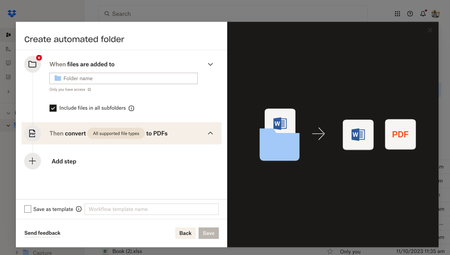
Hey Dropbox Community! We are so excited to introduce new enhancements to the folder automation features to help you stay organized. We’re introducing multiple step automations (up to five), including within subfolders. Now, you can configure multiple automations on selected folders and subfolders to automatically convert uploaded files to PDFs, rename files, add watermarks, and more. Get started by selecting “+Create” under the search bar, then select “Folder,” and finally select “Automated folder.” Tell us about your experience with Dropbox's Folder Automation Features in the comments below! Or comment down below any features you'd love to see to help you stay organized.13KViews2likes7Comments