Your workflow is unique 👨💻 - tell us how you use Dropbox here.
desktop
107 Topics
"Your Dropbox is full" but what is taking up my storage space?
On Mac air with newest OS. I uninstalled the app, checked the hard drive, restarted the computer, barked at the moon, clapped twice and prayed to allah. The problem remains. I refuse to pay to upgrade. I cannot sync additional files.Solved121KViews10likes51Comments
Unwanted 'update' to Macos on File Provider causes multiple issues - excessive disk use being one
After 10+ years of happily using Dropbox both private as for business, I got the invite to update to use Macos on File Provider. The update ran smoothly in itself, but: 1) I lost around 120 GB of disk space (free was 225 GB/1TB, free is now 101GB/1TB). Mac tells me that folder size in the new location is 497,46 GB (in 81k items) but if I look online, I am only using 331,8 GB (of 2TB). This issue is unacceptable for me, I plan to use this laptop for a few more years but I am now already on the edge of storage resources (10%). 2) I cannot access Photos anymore. Just a few weeks ago I moved my photo library to my current laptop and obviously put it in Dropbox because I want a hassle-free sync-experience. Not anymore, alas. This is also unacceptable. And, no, I don't want to partially store my files online-only. I am over 50, meaning that my primary storage is at home and online is back-up (irrational, I know, but he, those are my photos and god knows what) My question is simple: can I please revert to the old situation?Solved5.2KViews5likes5Comments
Dropbox keeps saying "Your hard drive is almost full" but it isn't
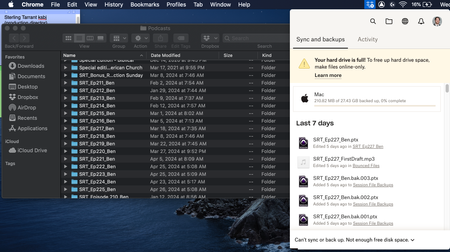
I keep getting message pop-ups from Dropbox saying "Your hard drive is almost full. Use Smart Sync to free up space." This is completely untrue. I have 60GB of free space on my computer, and I have only used 1.2TB of my 5TB online Dropbox storage, so neither my hard drive nor my cloud stotage is almost full. What is going on?Solved13KViews5likes10Comments
Annoying pop-up notifications (running out of storage) - How to stop them?
Do any of you know how to stop the VERY annoying pop-up notifications that Dropbox app on Mac keeps on showing every few minutes when you are running low on storage? This is very annoying and I could not find any info on how to disable this specific notification, as there is no option for that under Preferences/Notifications. Thank you.Solved11KViews3likes11Comments
Real folder size won't show in Finder
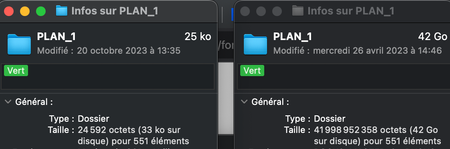
Hello, I am looking to resolve an issue I'm just experiencing now for the first time. When I do a command + i to see the size of a dropbox folder on my finder, the finder now just show me the size that the folder take locally. Before I could see the size of the full folder + the local size. For example, I have a folder of 20 go with 5 go of it accessible offline : Before the finder was saying "20 go (5 go on the local disk)" Now the finder show me "5 go (5 go on the local disk)" Here is a screencaps that illustrate the issue : To the left I have the folder "PLAN 1" in the dropbox via finder, it indicates 25 ko for 551 elements To the right I have the exact same folder on my back-up hard drive, it indicates 42 go for 551 elements (the real size of the folder). So my question is, how this feature suddenly disapperead and how can I make it come back ? It is an essential part of my business to be able to check precisely the amount of data I have ! For info, I'm running Ventura 13.6. One of my attempted was to update de MacOS because the problem started when I was on Monterey. Thanks a lot ! 🙂4.6KViews2likes22Comments
Mac seems to think HD is full of Dropbox files?
I'm using a Mac and have about 100Gb of DropBox folders, many are local on my HD as well (I have DropBox Plus 2Tb plan). I went through and changed all files to online only (grey icon) and now my DropBox folder says I have maybe 1GB...but in the finder when I look at overall space on the computer it's still showing HD is almost full! I have "Online only files on Mac" set to ON. I don't understand how DropBox deletes files because I had so much data locally stored and when I changed to online only I never saw anything show up in the Trash on my Mac...so I don't know how the files are deleted from my computer? How can I fix this so my computer doesn't think the HD is almost full? Thanks, Alan.Solved14KViews2likes24Comments
Selective sync doesn't free space!?
Hi! I've 5,8 GB of DB space. I've used it almost, so I did "selective sync" to free some space in my computer. Nothing happened eg doesn't free any space. I calculated manually the folders sizes viewable in my DB app - result is ca 3,8 GB - it means, theoretically I should manage with 2 GB-s of freed space. BUT IT ISN'T SO! WHY!?Solved4.9KViews2likes7Comments
How can I put the Dropbox on my external hard drive and remove it from my PC hard drive?
I am running out of space on my hard drive that is on my PC. I have a large external hard drive that I would like to put Dropbox on in order to free up the space on my PC hard drive. How do I do that?Solved1.7KViews1like3Comments
I'd like to sync certain folders in my Dropbox to a different drive
I know this is a frequent request, and I'm sure it will be until it's been provided! My team relies on DB a lot and we store a great deal of large files on it. At the moment I need to sync about 320GB of data, in 2GB chunks, which is a normal amount for my work. I don't have that much free storage on my system drive, and can't free it up atm, so I'm having to sync in chunks of files, then move those to my working drive and de-sync them from my system drive, rinse and repeat. I've tried downloading them in chunks from the web but they fail when my PC locks overnight. One solution is to set up DB in a VM and use that to sync certain folders to an external drive...but is that really the best way, when DB could just add optional paths for certain folders? I'm constantly surprised by how basic and unfeatured the client side is!2.1KViews1like6CommentsI updated the Dropbox app on my Mac and now it's trying to re-download all of my online files
Hey, so I recently updated dropbox, and now it's seemingly trying to redownload all of my online only files. Obviously I don't have that much storage, and I don't even have the option to make them 'online only' anymore. Everything I've seen online says to go into preferences and use selective sync. I did, and that didn't seem to change anything. I didn't try to use a different application either, as others mention. I simply updated dropbox and now it's become really hard to access my older files. Please help me1.4KViews1like9Comments