Your workflow is unique 👨💻 - tell us how you use Dropbox here.
desktop
144 TopicsDropbox wants to learn more about your experience with notifications
Hi Dropbox community! My name is Justin, a PM on the Desktop experience team. I'm hoping to learn more about your experience with notifications: what's working, what isn't working, what notifications you'd like, which ones you don't. There has been a wealth of comments over the years on this topic and we want to begin addressing the biggest issues Please (1) share your comments below in a few sentence, and (2) if you'd be open to a quick conversation with Dropbox! We'll follow-up via email (you won't need to post your email below).6.8KViews4likes3Comments
'Last Modified' column not showing date & time
When using Dropbox on a desktop, the "Last Modified" column now displays messages such as "10 minutes ago," "22 hours ago," and "last month." I found having it show the actual dates and times to be more useful. Is there a way to change the format of the column back to the way it was?Solved310Views2likes12Comments
I got a popup on my device asking me to upgrade, even though notifications are off.
I have always left "Do not disturb" to on and disabled all app notifications in my windows 11 system settings. Today Dropbox posted a big popup in the center of the screen while I was doing something else. It was a notification that my free account was full and offered an option to upgrade or clear up space but no option to immediately close the window. It was also permanently on the foreground over top of other windows. I can't find any options to disable this from happening. All notifications in the desktop app are already set to off. This type of behaviour is totally unacceptable. If I can't find a solution and it happens again I will have to uninstall.470Views2likes7Comments
Is there a way to set the Dropbox folder via the command line?
Hi Dropbox HUGELY EXASPERATING -- NO WAY TO MOVE / SET THE DROPBOX ON-PC FILE LOCN ON COMMAND LINE INSTALLS #Dropbox - presuming you are here, WHY am I having to ask the Community to help with such an OBVIOUS NEED ?????????? #### YOU SHOULD FIX THIS, DROPBOX -- IT'S BEEN OVERLOOKED FOR YEARS. SORT IT OUT PLEASE - TODAY WOULD BE GOOD. This will take a decent programmer in your offices *20mins tops to document*. PROBLEM: THE HEADLESS DROPBOX - IDEAL FOR MANY LINUXES ****HAS NO WAY TO RELOCATE THE STORAGE FOLDER***** On Win / Mac / Ubuntu there's a GUI - but for the hundreds of other Linux situations, and most servers, WE USE COMMAND LINE -- but you FORCE US to put the synch folder in the most obviously idiotic place - under home. And moving it is then IMPOSSIBLE it seems. "Jane" replied with this helpful news three years ago on this thread: [ https://www.dropboxforum.com/t5/Apps-and-Installations/Unable-to-access-preference-menu-on-linux/td-p/232112/page/3 ] . ## SO DROPBOX -- what are the millions of us out here supposed to do ????? Can you FIX this IDIOTIC OMISSION please. I only ask because I have work associates who want Dropbox. (Cloud on Linux is massively simpler with Google Drive. Just works). Looking forward in anticipation to your detailed help. No sarcasm intended. (Apologies to all the good people in Community but there seems no way to actually reach a Dropbox person). Thanks MikeHLondon [ PS that detail advice from 2013 - it doesn't work. MHL ]4.6KViews2likes7Comments
No option for "make online only" when I right click my files
I have a professional DropBox account and I'm working on a Mac, OS 12.5. I have several files that are sync'd locally that I would like to move off my hard drive and make online only. When I right-click on the folders, however, I'm not getting the option from the drop-down menu to make the files online only. Any suggestions? Thank you!Solved12KViews2likes56Comments
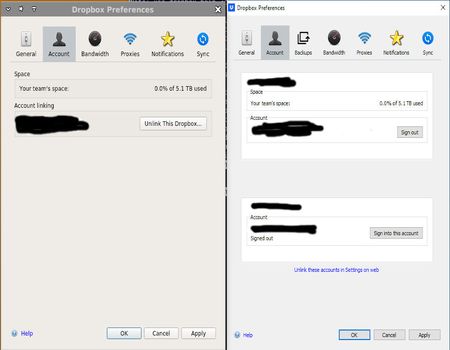
Switching between two linked accounts on linux seems to be missing ???
I am trying to set up on linux access to my linked business and personal account. But the instructions for doing so in the app do not match what the app provides. Here is a screen shot of the dropbox app when running on linux (left) and when running on windows (right): The linux version does not seems to know about my linked app. Is this a bug in the linux app or am I missing something? If a bug, how does one report a bug to dropbox?Solved2.1KViews2likes6CommentsUnable to check boxes in the Selective Sync settings to choose folders to sync
Hi there, Selective Sync has something going on with it. It won't let us select additional folders in the list available. It shows all the folders we have, but you cannot select them, the little tickmark in the checkbox won't tick. We are MS Windows 10 and 11 users. We have dropbox business subscriptions for 50 employees. It happens accross the whole firm. Any advice or other people having the same problem?1.6KViews1like8Comments
Add text saying "on" and "Off" to desktop app's preferences buttons
I have been seriously confused by the buttons on the "Preferences" menu and elsewhere. Nothing says whether the button that is a black dot on a white slide means on or what a white button on a black background means. There should be text that says "on" and "off" when the button dot is slid one way or the others.1.1KViews1like9Comments