Your workflow is unique 👨💻 - tell us how you use Dropbox here.
desktop
452 Topics
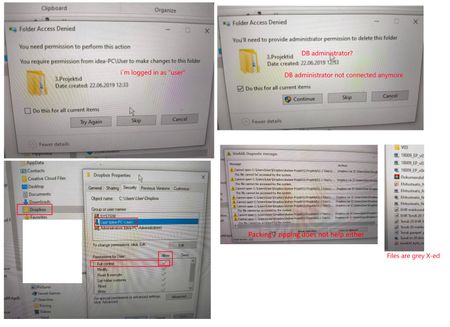
I can't delete residual files in the Dropbox folder on Windows 10
Lenovo Hybrid laptop Tablet 2014 Windows 10, DB not available How to delete residual files in DB folder if DB not available / not connected in (old) computer anymore? Have tried this > https://help.dropbox.com/delete-restore/delete-files outcome is this: > https://www.dropboxforum.com/category/101001000/discussions/10100101319Views0likes5Comments
I changed computers and now my files are missing. How can I restore them?
I purchased a new Dell laptop in December. We transferred everything over from the new one. I now noticed many of my dropbox files are missing. The folder structure is there but the files are missing. I see dropbox offers a way to create a back up but I have made changes in some of my current dropbox folders since December. Will a back up override my current folders? Bottomline, I am trying to recover my missing files.35Views0likes2CommentsRecovering files after a Mac-ScanSnap-Dropbox fumble
This information is not required, but it makes it easier for our Community members and support team to help you. Device MacBook Pro i9 Operating System/Browser (if using the web) macOS Tahoe 26.3 Chrome v145.0.7632.77 Dropbox App Version v243.3.6895 Scanner Snap ix500 ScanSnap Home v2.23.1(2) Question or Issue Deep plumbing alert! I use a Fujitsu ScanSnap ix500 scanner with my MacBook Pro. It appears I may have made the mistake of changing a folder name via Finder when that folder happened to be the ScanSnap Home (SSH) folder, which is the destination folder for scanned documents. That folder is also within Dropbox. For example, the original SSH folder was [Users/me/Dropbox/My Inbox] and the [My Inbox] folder name was changed in Finder to [My Scans]. The name change was done recently, and with plenty of my recovery period remaining. There is no longer any record of files in the now-renamed [My Scans] folder in Dropbox (online or on my device) before the date of the folder name change. There is nothing in the deleted files folder (online or on my device), including a reference to the folder name change, so I am not able to view/restore as I normally would with deleted files. However, the files (or at least thumbnails of) can still be seen in the ScanSnap app but they cannot be accessed, as an error message comes up showing the doc with the old [My Inbox] path is not accessible. Maybe the question is, how can files (20k+ files) get removed from Dropbox without any trace or record of those files ever being there? Any help or insight would be appreciated.16Views0likes1Comment
How do I resolve a selective sync conflict after reinstalling the Dropbox app on macOS?
Device MacBook Air Operating System/Browser (if using the web) macOS Tahoe 26.3 Dropbox App Version (if using the app) 241.4.4853 Question or Issue Due to a failed macOS update I had to reinstall macOS and recover my data from a Time Machine backup. However, the system reported that my Dropbox app was corrupted, so I deleted it and installed a new copy from the Dropbox website. I set it to online only. All seemed to be well. Today, I find that all my Dropbox folders are showing as having selective sync conflicts. This is both on my MacBook and in the web version of Dropbox. I don't know how this happened when none of them should have been on the MacBook to create a sync error in the first place. Having looked at other posts, I know that Dropbox can't do anything about this and expects me to go through thousnds of files manually to check them. What I don't understand is what I am then supposed to do, because the instructions from DropBox staff/moderators are not clear to me. My question is which folders I am supposed to keep and which to delete. Do I just keep the online folders? If I delete the ones on my MacBook, won't it just create a new sync conflict? Will the sync conflict warning go away if I consolidate everything online? As I pay good money for this service and it is vital for my work, I hope you can give me a clear set of instructions in plan English, because this 'feature' is now going to cost me hours of labour whrn I haven't done anything wrong.74Views0likes2Comments
Impossible to Restore an External Drive Backup
Dropbox is an absolute joke! If you back up an external drive and that drive crashes, congratulations — you’ve just discovered that Dropbox “Backup” is basically useless. You cannot restore the backup to a new drive. Let that sink in. A backup service that can’t restore to new hardware... Yeah, funny, I know. Your only option? Crawl to the web interface like it’s 2005 and manually download your own data. And it gets worse: you can’t even download large folders. Try it and you’ll be slapped with “too many files” or ZIP limit errors. So instead of restoring a drive, you’re forced to download a few folders at a time, over and over, for thousands of folders. Absolute insanity. - Easy for Dropbox support clowns to say, just do it in small batches... Right. You do understand that some of your clients have subfolder within subfolders where some of those folders have large volumes of data? Oh, duh, just download one folder at a time. OK Dropbox Support Hero, how do I reliably rebuild all this manual intervention without accidentally losing valuable data? Come on guys! You should have a restore drive option that mirrors the data on your useless server with the new drive. Dropbox Backup is not a backup service — it’s a data hostage situation. It’s fine for a couple of documents, but if you trust it with real data, you’re asking for pain. I paid for 2TB and got a masterclass in how not to design a backup product. If you value your time, your sanity, or your data: stay far away from Dropbox Our company has almost 40 team members, we are ALL moving to Google Drive the moment our paid subscriptions end.158Views0likes6Comments
Link an existing folder within another folder
Hello! I've found a number of instances where I'm creating a new folder for a new project and would like to link to an already existing folder from a past project. I don't want to move the folder or create a copy, but just link to it as a shared resource. I mostly use dropbox within Finder, but occasionally on web as well, so it would be ideal for me to see this kind of link in both interfaces. Is this possible already or if not, would others find this helpful as well?1.6KViews0likes4Comments
Mac OS – files duplicated in Dropbox folder cannot be renamed or moved, just deleted.
To those Mac and Dropbox users still suffering this annoyance, there is a slightly easier way to resolve it than having to repeatedly quit the Dropbox app. In a Mac desktop window, click on the folder containing the duplicated file. Right click or ctrl click it. In the pop-up menu select 'Make available offline'. That resolves the issue for me for all files in that folder. It's as if Dropbox is unable to set the default for duplicated files on Mac to 'Available offline', even though that option is selected in 'Sync and storage'.36Views1like1Comment
Dropbox app update stopped sorting by "date modified" when I view files in Finder
Device MacBook Pro 2023 Operating System/Browser (if using the web) Tahoe 26.2 Dropbox App Version/Browser Version Basic plan Question or Issue Dropbox update stopped sorting by "date modified" when I view in Finder. I have multiple folders that I share with different people. When they added a file or folder to a folder I share with them, it would get sorted to the top of the list when I opened Dropbox in Finder. This would allow me to see the newest additions that required attention. After the latest update last week, now when I add a file or folder, it still goes to the top of the list, but if someone adds a file or folder to a shared folder, it does not go to the top of the list. It shows a newer date, but sorting by "date modified" does not bring it to the top. Any ideas? Thanks.275Views0likes7CommentsTransferring files from desktop Dropbox to desktop Box - properties missings and files don't open
I can see this problem was discussed 11 years ago and a member describes the problem in a reply 10 years ago, but I still don't find the solution. I am trying to move files from my desktop Dropbox to my desktop (LU) BOX, like I have done countless of times before this. But I get a warning that the properties will not get copied with the file. I tried to ignore it but then I am not able to open the file after it has been copied into BOX. It has so far been Excel files and PNG I've tried to transfer, without luck. I would most appreciate help with this.78Views0likes6Comments