Your workflow is unique 👨💻 - tell us how you use Dropbox here.
desktop
107 Topics
"Your Dropbox is full" but what is taking up my storage space?
On Mac air with newest OS. I uninstalled the app, checked the hard drive, restarted the computer, barked at the moon, clapped twice and prayed to allah. The problem remains. I refuse to pay to upgrade. I cannot sync additional files.Solved121KViews10likes51Comments
Can I delete the cache folder to free up space?
On a Mac regardless of the OS, there is 3 folders, ie. Hidden, Prefetch_Cache, Temp_Hidden, and these folders appear automatically regardless if the user has a Personal or Business account. 1. Can a user delete these folders, again, regardless of the account type, without deleting any files/folders on the Dropbox servers? 2. Do these folders get recreated locally on the Mac? 3. Does the Dropbox cache have anything to do with the overall space on the Mac?Solved50KViews1like3Comments
Mac seems to think HD is full of Dropbox files?
I'm using a Mac and have about 100Gb of DropBox folders, many are local on my HD as well (I have DropBox Plus 2Tb plan). I went through and changed all files to online only (grey icon) and now my DropBox folder says I have maybe 1GB...but in the finder when I look at overall space on the computer it's still showing HD is almost full! I have "Online only files on Mac" set to ON. I don't understand how DropBox deletes files because I had so much data locally stored and when I changed to online only I never saw anything show up in the Trash on my Mac...so I don't know how the files are deleted from my computer? How can I fix this so my computer doesn't think the HD is almost full? Thanks, Alan.Solved14KViews2likes24Comments
Dropbox keeps saying "Your hard drive is almost full" but it isn't
I keep getting message pop-ups from Dropbox saying "Your hard drive is almost full. Use Smart Sync to free up space." This is completely untrue. I have 60GB of free space on my computer, and I have only used 1.2TB of my 5TB online Dropbox storage, so neither my hard drive nor my cloud stotage is almost full. What is going on?Solved13KViews5likes10Comments
Mistake! I assigned the desktop folder to the dropbox folder!
I have a win10 PC. In an attempt to include my desktop folder (50GB of files) in dropbox, I inadvertently moved the location of the contents of the Desktop to "E:/dropbox" rather than "E:/dropbox/Desktop". Now, my dropbox folder IS my Desktop folder, and vice-versa! Yikes! Now everything in my dropbox folder also appears on my desktop! Now, when I right-click on the dropbox folder and choose "properties", I get the same "location" tab that I would normally get when right-clicking on my Desktop folder. Even before I created this mess, my dropbox folder contains 800GB. I need to figure out how to separate the Desktop folder (with all it's system files) from the dropbox folder. Any thoughts on a process here?Solved12KViews0likes10Comments
'Desktop' can't be opened because the original item can't be found.
I have a Mac. I went to use Dropbox to upload some files. I got a message saying I needed to update. I followed all the prompts that popped up and ended up with Dropbox copying or moving my desktop and other files until it was full. When I try to use Finder to access my Desktop is says, "Desktop" can't be opened because the original item can't be found." I found an article that said to go to Preferences within my Dropbox App and choose Finder to access my files, which I did. The problem still remains. Now when I try to open the Dropbox App, it sends me to the online version and I'm stuck. I'm not very tech savvy at all and don't understand a lot of the instructions I've seen online; nor do I really know if the instructions I've found will actually help me or cause more harm. I saw a notification that said if I move anything out of Dropbox, it will be deleted. I cannot risk having my Desktop deleted.Solved12KViews1like25Comments
Annoying pop-up notifications (running out of storage) - How to stop them?
Do any of you know how to stop the VERY annoying pop-up notifications that Dropbox app on Mac keeps on showing every few minutes when you are running low on storage? This is very annoying and I could not find any info on how to disable this specific notification, as there is no option for that under Preferences/Notifications. Thank you.Solved11KViews3likes11CommentsDoes Dropbox store files on your computer and the site?
Hey gang, sorry if this is a rookie question, but i cant seem to find an answer on the Dropbox website and havnt got the time to trawl through the many pages here. I have the desktop app running on my Macbook, and it works fine across all platforms. But my question is do the files sit both on my hard disk AND the dropbox cloud?? ThanksSolved10KViews0likes4Comments
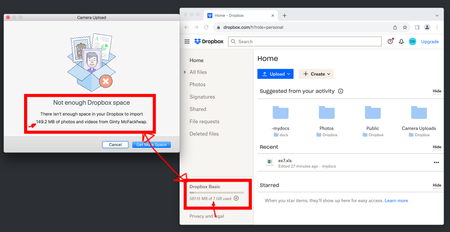
Getting a 'not enough Dropbox space' error, when I have plenty of space
Everyday I get this (see screenshot) on Mac Os when connecting any device to sync photos. "Not enough dropbox space" - Mac - But I have PLENTY of space.. and I see it on both of my macs but not my iphone (which indicates to me a poorly written client on mac). Resolution: sign out and sign in again.. but that means setting up my profile again each time, choosing locations, and closing badges, and so on and so on - and this take a lot of time.. What's the real fix or workaround here? And why haven't dropbox fixed it. Why on earth would I buy an upgraded plan when something as simple as this fails to function correctly.. Other tests I've tried: complete uninstall / reinstall.Solved9KViews1like56Comments