Our Community is in read-only mode until April 8th, learn more here. You can still search existing threads or get help via Dropbox Support, the Dropbox Help Center, or Learn.
desktop
679 Topics
Cut the Clutter: Ignore Files Feature is now live
Update: This feature is now live and available to all individual plan customers! Thank you to all our testers, and share your feedback with the team, we're still eager to hear from you! For years you’ve asked for a simple way to exclude files and folders from sync without using selective sync feature. We’re testing a new way to give you more control over what Dropbox syncs and what it doesn’t. If you’ve ever wanted to keep certain files or folders on your device without syncing them to dropbox.com, this feature is for you. 🤔 What is it? Ignore Files lets you list exclusion rules in a special text file called rules.dropboxignore placed in your Dropbox root folder. Any file or folder that matches a rule will stay on your computer but will not sync to dropbox.com or count against your storage 👀 Who we’re looking for Desktop Dropbox users on Windows, macOS, or Linux People who regularly deal with temporary or bulky content, e.g. Software Engineers Video / audio / 3D creators Anyone who hates seeing clutter in their cloud storage Someone who is comfortable trying a closed beta feature and sharing honest feedback 🗓️ How the closed beta works Here’s what to expect if you join the beta for Ignore Files: Register - Fill out the form here → [Sign-up link] Confirm: Eligible participants will receive an email to confirm their participation, along with the timeline details. Get Set Up - Make sure you have Dropbox app installed on your computer We’ll Enable It - We’ll activate Ignore Files feature for you. Try It Out - Use Dropbox as usual for 1 week, ignoring files and folders as needed. Share Your Thoughts - At the end of the week, we’ll send a quick survey. You can also opt into a 30-minute feedback chat (optional, limited spots available!) ✍️ Want in? Fill out the quick screener here by date → [Sign-up link] Keep an eye on your inbox - we’ll be in touch if you’re selected Thanks so much for helping us improve Dropbox. We’re excited to hear what you think! Got questions? Just drop them in the thread below. 💬5KViews13likes53Comments
Fix: Dropbox Finder Extension (Smart Sync / Right-Click Menu) Permanently Disabled on macOS
Hey all, I've been beating my head against the wall for a week now trying to figure out why my Dropbox Finder extension wasn't working. I don't have File Provider and really didn't want to set it up, plus I'm apparently not a candidate. I'm not sure exactly what caused this state. It was either a recent update or some aborted FileProvider migration. What I do know after much troubleshooting (thanks Claude Code, who wrote the breakdown below which I edited) is what the broken state looks like and how to fix it. Follow these instructions at your own peril. The Problem The Dropbox Finder extension stops working and can't be re-enabled: No sync status badges (green checkmarks, blue sync icons) in Finder No right-click context menu options ("Make Available Offline", "Make Online Only", "Copy Dropbox Link", etc.) Smart Sync is unusable — you can't toggle files/folders between online-only and local The extension toggle in System Settings > Login Items & Extensions keeps turning itself off immediately after you enable it Running pluginkit -e use -i com.getdropbox.dropbox.garcon (even with sudo) doesn't stick Reinstalling Dropbox doesn't fix it You may also see "Dropbox Finder Extension" listed as a File Provider extension in System Settings, which is wrong — it should be a Finder Sync extension The Broken State A ghost FileProvider domain registration gets stuck in ~/Library/Application Support/FileProvider/. You can confirm this is your issue: # Check if garcon is disabled pluginkit -mDAD -p com.apple.FinderSync 2>/dev/null | grep dropbox # Shows: - com.getdropbox.dropbox.garcon (the - means disabled) # Check if a ghost FileProvider domain exists plutil -p ~/Library/Application\ Support/FileProvider/com.getdropbox.dropbox.fileprovider/Domains.plist 2>/dev/null If the Domains.plist exists and shows something like: "Disconnected" => true "DisconnectionReason" => "This is an unlinked Dropbox" "Path" => "FPFS_SHOULD_NOT_BE_USED" "Enabled" => true ...then you have a ghost domain. It's registered and "Enabled" but completely non-functional. What this causes: When Dropbox starts, it sees a FileProvider domain is registered and enabled. It assumes FileProvider is handling Finder integration, so it deliberately disables garcon (the Finder Sync extension). But the FileProvider domain is broken/disconnected, so neither system works. You get no Finder integration at all. Why reinstalling doesn't fix it: This directory is managed by macOS, not by Dropbox. Uninstalling and reinstalling Dropbox — even Dropbox's "advanced reinstall" that removes ~/.dropbox, ~/Library/DropboxHelperTools, etc. — does not touch this directory. The ghost domain persists, and the next Dropbox install sees it and disables garcon again. You may also see ghost mounts appearing in ~/Library/CloudStorage/ (e.g., Dropbox-YourTeam or conflicted copies with timestamps in the name). These reappear even after deletion because the FileProvider domain is still registered. The Fix Make sure Dropbox is completely quit before starting. # 1. Quit Dropbox osascript -e 'tell application "Dropbox" to quit' 2>/dev/null sleep 2 pkill -f Dropbox sleep 2 # 2. Remove the ghost FileProvider domain registration # This is the key step that a normal reinstall misses rm -rf ~/Library/Application\ Support/FileProvider/com.getdropbox.dropbox.fileprovider/ # 3. Kill the FileProvider daemon so macOS picks up the change sudo killall fileproviderd # 4. Disable the FileProvider plugin, enable garcon sudo pluginkit -e ignore -i com.getdropbox.dropbox.fileprovider sudo pluginkit -e use -i com.getdropbox.dropbox.garcon # 5. Optionally clean up ghost CloudStorage mounts # (replace "Dropbox-YourTeam" with your actual mount name) sudo rm -rf ~/Library/CloudStorage/Dropbox-YourTeam*/ # 6. Start Dropbox open /Applications/Dropbox.app Verify after ~30 seconds: pluginkit -mDAD 2>/dev/null | grep dropbox Expected output: + com.getdropbox.dropbox.garcon(...) # + means ENABLED - com.getdropbox.dropbox.fileprovider(...) # - means disabled (what we want) + com.getdropbox.dropbox.TransferExtension(...) Your right-click Smart Sync options and sync badges should be back, and should survive Dropbox restarts. How We Figured This Out I had Claude compare the plugin state between two Macs — one where Dropbox Finder integration worked and one where it didn't: Working Mac: garcon + (enabled), fileprovider registered but not active, no FileProvider domain in Application Support, no CloudStorage ghost mounts Broken Mac: garcon - (disabled), fileprovider + (active), FileProvider domain present showing "Disconnected" and "unlinked Dropbox", ghost CloudStorage mounts that kept reappearing The working Mac had Dropbox syncing to an external drive, where FileProvider can't operate. So no FileProvider domain was ever created, and garcon worked fine. The broken Mac had Dropbox on the internal drive, and at some point a FileProvider domain was registered. Even though it was in a broken/disconnected state, its mere existence caused Dropbox to disable garcon on every startup. Removing the ghost domain registration was the fix. This is something a normal Dropbox reinstall (or even Dropbox's "advanced reinstall") does not do. Notes This keeps Dropbox in "legacy" mode (syncing to a folder in your home directory rather than through ~/Library/CloudStorage/). This is preferable for workflows that need files to stay reliably local — for example, video editing with Premiere Pro, where FileProvider can silently evict media files and cause "media offline" errors. If Dropbox attempts another FileProvider migration in the future, the ghost domain could return. If garcon stops working again, check ~/Library/Application Support/FileProvider/com.getdropbox.dropbox.fileprovider/ first. Tested on macOS Tahoe 26.x with Dropbox Business v244.4.6580 on Apple Silicon, but the issue isn't version-specific — the ghost domain mechanism has been the same since macOS introduced FileProvider.125Views0likes2Comments
Dropbox Desktop vs CloudMounter, Cyberduck, Mountain Duck for Multiple Accounts - which is better?
Hey, I just joined the Dropbox Forum and need some advice from experienced users. I really hope someone has some tips. I’ve got two Dropbox accounts (personal + work) and I’m thinking whether to stick with the native Dropbox client or switch to a cloud manager, since I might add Google Drive later. I want everything to show up like normal folders in Finder/Explorer, avoid syncing the entire cloud to my disk, survive sleep/reconnects, and not lose share permissions when moving files between accounts. If you’ve done this, is it smarter to keep the Dropbox app if you only use Dropbox, or go with a manager from the start? Curious about real-world differences in speed, caching, stability and security — short tips or quick examples would be much appreciated.337Views0likes4CommentsExciting news — we’ve launched the new Sync & Storage Dashboard in the Dropbox desktop app!
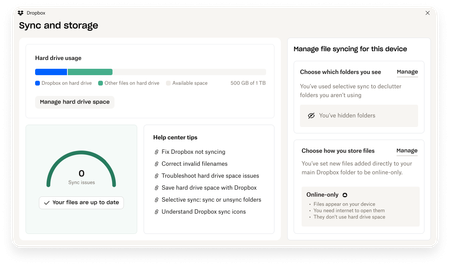
This dashboard makes it easier than ever to keep your files organized and your computer running smoothly. With just a click, you can: Get a real-time view of your sync status Quickly spot and resolve any syncing issues Monitor and manage how much disk space your Dropbox files are using Adjust your selective sync and storage preferences To open the dashboard, click the Dropbox icon in your taskbar (Windows) or menu bar (Mac), then select your avatar and choose Sync & storage. We’re excited for you to try it out! Please let us know your thoughts and how we can make it even better!9.1KViews6likes14Comments
Stable Build 238.4.6305
Thanks for using Dropbox! The desktop client is regularly updated with many improvements and fixes. Download Windows(Windows 10 or later) Standard Installer Offline Installer (32 Bit) Offline Installer (64 Bit) Offline Installer (ARM64) Enterprise Installer (32 Bit) Enterprise Installer (64 Bit) Enterprise Installer (ARM64) Windows(Windows 7, 8, 8.1) Standard Installer Offline Installer (32 Bit) Offline Installer (64 Bit) Offline Installer (ARM64) Enterprise installers are not supported. macOS (macOS 11 or later) Standard Installer (Universal) Offline Installer (Intel) Offline Installer (Apple Silicon) Enterprise Installer (Intel) Enterprise Installer (Apple Silicon) macOS (macOS 10.13, 10.14, 10.15) Standard Installer (Universal) Offline Installer (Intel) Offline Installer (Apple Silicon) Enterprise installers are not supported. Linux x86_64 Offline Installer Auto-updates: In progress2.5KViews1like0Comments
Export bulk Dropbox image folder URLs
The problem is that there are hundreds of photos. It is almost impossible to enter the URL for each rock sample manually. I need some automated way to copy the Dropbox photo URLs. You can use my script below to generate bulk Dropbox links. * Requires TamperMonkey or GreaseMonkey addon in your browser. I wrote a script to accomplish this: https://gist.github.com/tyhallcsu/89d6c672f93e94cbd651354b587306b4 This is a userscript that extracts image URLs from a Dropbox page and copies them to the clipboard when a button is clicked. The script creates a button on the page that, when clicked, scrolls to the bottom of the page, waits for new images to load, and extracts the image URLs. The script then joins the URLs into a string separated by newlines. It then puts the links on your clipboard with ?dl=0 replaced with ?raw=1 parameters. Floating button in the bottom right of your browser window: Code: // ==UserScript== // name Extract All Dropbox Image URLs in Folder to Clipboard // @namespace https://www.example.com/ // @version 3 // @description Extracts image URLs from a Dropbox page and copies them to the clipboard when a button is clicked. // @author Tyler Hall Tech // match https://www.dropbox.com/* // Grant GM_setClipboard // Grant GM_log // run-at document-idle // ==/UserScript== (function() { 'use strict'; const SECONDS_TO_WAIT_FOR_SCROLL = 1; // adjust as needed const DOWNLOAD_URL_REPLACEMENT = '?raw=1'; // function to get all image link elements function getImageLinks() { const imageLinks = document.querySelectorAll('a.dig-Link.sl-link--file[href*="dl=0"]'); return Array.from(imageLinks).map(link => link.getAttribute('href').replace(/\?dl=0$/, DOWNLOAD_URL_REPLACEMENT)); } // function to scroll to the bottom of the page and wait for new images to load async function waitForImagesToLoad() { window.scrollTo(0, document.body.scrollHeight); await new Promise(resolve => setTimeout(resolve, SECONDS_TO_WAIT_FOR_SCROLL * 1000)); } // create an array to hold the image URLs let imageUrls = []; // add a button to the page that will copy the image URLs to the clipboard when clicked const copyButton = document.createElement('button'); copyButton.classList.add('dig-Button', 'dig-Button--primary', 'dig-Button--standard', 'copy-urls-button'); copyButton.textContent = 'Copy all URLs'; copyButton.style.position = 'fixed'; copyButton.style.bottom = '20px'; copyButton.style.right = '20px'; copyButton.style.zIndex = '9999'; document.body.appendChild(copyButton); // add a click event listener to the button copyButton.addEventListener('click', async function() { let finished = false; let numUrls = 0; while (!finished) { // scroll to the bottom of the page and wait for new images to load await waitForImagesToLoad(); // get the newly loaded image URLs const newImageUrls = getImageLinks().filter(url => !imageUrls.includes(url)); imageUrls.push(...newImageUrls); // check if all images have been loaded finished = newImageUrls.length === 0; numUrls += newImageUrls.length; } // join the image URLs into a string separated by newlines const imageUrlString = imageUrls.join('\n'); // copy the image URL string to the clipboard GM_setClipboard(imageUrlString, 'text'); // disable the button and change the text to indicate that the URLs have been copied copyButton.disabled = true; copyButton.textContent = `${numUrls} URL(s) copied to clipboard`; // enable the button again after 3 seconds setTimeout(function() { imageUrls = []; copyButton.disabled = false; copyButton.textContent = 'Copy all URLs'; }, 3000); }); })(); Hope this helps someone. I hope Dropbox natively supports this some day. But for now, this works just fine 🙂6.3KViews2likes9CommentsUpdates to How Dropbox Works on Older Operating Systems 💻
Hi everyone! We want to share a heads-up about an update rolling out for Dropbox users on older versions of Windows and macOS. The new simplified version of the Dropbox desktop app lets us continue the extended support of older operating systems while ensuring your experience stays efficient, reliable and hassle-free 🤗. Here’s What’s Changing If you’re using Dropbox on: Windows 7, 8 or 8.1 macOS 10.13 (High Sierra), 10.14 (Mojave) or 10.15 (Catalina) You’ll soon see a message letting you know that Dropbox is updating how the desktop app works on these systems. To keep using all desktop app features, you’ll need to upgrade to a more recent operating system (Windows 10 or newer, or macOS Big Sur or newer). But don’t worry - your files will continue to sync without interruption, no matter what 📁. What If I Can’t Update Right Now? If updating your operating system isn’t possible, Dropbox will automatically switch you to a streamlined version of the desktop experience. It still handles the basics - like reliable file syncing - just without some of desktop app features. Of course, you can also continue accessing all your content through dropbox.com or the mobile app. For more details, including OS requirements and upgrade tops check out this article here. Thanks for your understanding as we roll out this update. These changes help us keep Dropbox secure and reliable while ensuring your files stay in sync. Got any additional questions? Drop them below, we’re always happy to help 💙.253Views0likes3CommentsBeta Build 239.3.7987
Thanks for using Dropbox! The desktop client is regularly updated with many improvements and fixes. Download Windows(Windows 10 or later) Standard Installer Offline Installer (32 Bit) Offline Installer (64 Bit) Offline Installer (ARM64) Enterprise Installer (32 Bit) Enterprise Installer (64 Bit) Enterprise Installer (ARM64) Windows(Windows 7, 8, 8.1) Standard Installer Offline Installer (32 Bit) Offline Installer (64 Bit) Offline Installer (ARM64) Enterprise installers are not supported. macOS (macOS 11 or later) Standard Installer (Universal) Offline Installer (Intel) Offline Installer (Apple Silicon) Enterprise Installer (Intel) Enterprise Installer (Apple Silicon) macOS (macOS 10.13, 10.14, 10.15) Standard Installer (Universal) Offline Installer (Intel) Offline Installer (Apple Silicon) Enterprise installers are not supported. Linux x86_64 Offline Installer Auto-updates: Everyone who chose "Include me on early releases" on the Settings page This is an early release feature that is subject to these additional terms.149Views0likes0Comments
Really appreciate the new Sync and Storage Dashboard
Before I saw the announcement, I stumbled upon the Sync & Storage Dashboard while reviewing some updates in my Dropbox on my laptop. I like the clear visibility into the current storage on my device, as well as tips on improving storage and managing which files/folders are using storage, etc.303Views2likes7CommentsBeta Build 238.3.6038
Thanks for using Dropbox! The desktop client is regularly updated with many improvements and fixes. Download Windows(Windows 10 or later) Standard Installer Offline Installer (32 Bit) Offline Installer (64 Bit) Offline Installer (ARM64) Enterprise Installer (32 Bit) Enterprise Installer (64 Bit) Enterprise Installer (ARM64) Windows(Windows 7, 8, 8.1) Standard Installer Offline Installer (32 Bit) Offline Installer (64 Bit) Offline Installer (ARM64) Enterprise installers are not supported. macOS (macOS 11 or later) Standard Installer (Universal) Offline Installer (Intel) Offline Installer (Apple Silicon) Enterprise Installer (Intel) Enterprise Installer (Apple Silicon) macOS (macOS 10.13, 10.14, 10.15) Standard Installer (Universal) Offline Installer (Intel) Offline Installer (Apple Silicon) Enterprise installers are not supported. Linux x86_64 Offline Installer Auto-updates: Everyone who chose "Include me on early releases" on the Settings page This is an early release feature that is subject to these additional terms.178Views0likes0Comments