Your workflow is unique 👨💻 - tell us how you use Dropbox here.
dropbox business
590 Topics
Will there be a 2 TB option for personal accounts?
I am running out of space with my 1TB drive. Is there an option to get 2TB? I know about Dropbox for business, with 5 Tb, but the price is just not compatible with my needs. It is too big a jump from 1Tb price to minimum of 5 users at $ 15 each.Solved29KViews31likes70Comments
Dropbox removing external disk support for Mac users
In case anyone's unaware... if you're a Mac user storing your Dropbox on an external drive, you'll shortly lose that ability. https://talk.tidbits.com/t/dropbox-drops-support-for-storing-files-on-an-external-drive-and-onedrive-retains-it/20797/16 https://help.dropbox.com/installs/macos-support-for-expected-changes Just confirmed this with DB support (see below). Gutted - been with Dropbox for years and our entire video team flow is based around it 😕 >Hi there, I read today that you are scrapping the ability to store the Dropbox folder on external disks, on OSX. I'd like to ask more about this please. > Hello Jon, and thank you for contacting Dropbox Support. My name is Joseph, and I will be more than happy to look into your request, right away. That is correct Jon, as part of the Dropbox for macOS update, the Dropbox folder must be located in ~/Library/CloudStorage. >This is a showstopper for us, and will mean we have to move to another service. We have a large distributed team using DB for video work, no way it'll fit within internal drives. Is there a workaround? > I totally understand and I apologize for the inconvenience. Unfortunately, there is no workaround on this as changing the location of your Dropbox folder is no longer supported by macOS. >This change doesn't seem to have hit us yet - we're running a variety of machines inc Ventura What will trigger its enforcement? Can we stay on an earlier OS or Dropbox version? >The updates happening automatically every time the Dropbox app is restarting, for example if your device never restarts it should maintain the older version but we can't guarantee full functionality on older versions of the application. >So what will happen - if we have a Dropbox folder on an 8TB drive and a tiny internal drive - will it try to clone stuff across and eat up the space? What's the mechanism? >That's right, it will try to move the content on your internal drive until it has no space and gives you an error. >Is Smartsync still supported? I.e. will it move stuff to being online only if it won't fit? >It is, however it is now known as online-only.Solved118KViews25likes697Comments
With a 300k file limit does Dropbox really provide business solutions?
For many many years, I've been a Dropbox Pro member. During this time, they decided at some point, that 300,000 files is the maximum they will support. Now, I know what you are thinking. The article hotlinked everywhere says anything above 300,000 files will have degraded performance. However, the problem is much deeper than this. The dropbox desktop application often crashes, stops syncing new clients - and sometimes stops syncing old clients. I've opened multiple support tickets on this issue, on the crashing issue, on the sync issue - and I keep getting told by the support teams the same answer. They will not support me with more than 300,000 files - and they close the tickets. So, I ask in seriousness, most businesses have far more than 300,000 files they want to keep available through cloud solutions. OneDrive, Google Drive and many others have no file support count limit - in fact Google Drive has some pretty sweet optimizations for working specifically with millions of little files. Anyway I've spent the last month trying to get Dropbox support to address the crashing issue (we are at about 40% of the 1TB limit, with around 3 million files) and I keep hitting a brick wall with them. Fortunately, it comes at a time where we haven't yet purchased Dropbox for Business. Today, I cancel my many many many years old Dropbox subscription for favour of a new vendor - but I have to ask... what exactly does Dropbox provide for Small Business? Do they actually support more than 300k files for business clients? Because they sure don't for pro users. And I'd like to be able to make informed suggestions for my clients (we do a lot of consultant work). I've had a lot of other issues over the years, including their support system based around Zendesk no longer sending emails and support teams blind closing tickets. I asked many times to have them address this issue as well - and they do not. Not to mention support tickets getting generated 4 or more times on submission to Zendesk. We've even had large groups of files vanishing with a Server Error 500 when trying to restore, causing us at one point to lose over 100,000 files. The cause was never determined and took almost 20 support requests with them repeatedly advising me they were restoring the files (after lots of apologies later, the files were still never restored). So seriously asking, is the business package really a business grade solution? Minor update : After 3 years of reporting issues and logs, I caught one of the many repeat crash errors in a debugger today. The dropbox team needs to learn how to wrap their file operations in a try catch and how to fix their own server 500 errors. After being refused support again, we left dropbox and I've never looked back PLEASE NOTE BELOW: I have NEVER accepted this as the solution, nor do I agree with their posted response. It is factually incorrect, and dishonest, and they marked their own response as the resolution - which it is not. The right answer is to switch a professional platform. We currently have over 10 million files stored on Google Drive, and we have not had an issue in the 6 years since we transitioned. Dropbox crashed and would not run (as shown above and proven in logs) after 300K with their support refusing to assist once you exceed the "soft" limit. It is not a business solution, it is incapable of it.Solved26KViews12likes76CommentsRemoving external user from all shared folders
Hi Dropbox and forum, There seems to be no way of removing all access of an external user to files/folders shared to him. Lets say you have a team folder with "Projects", and in this folder you have hundreds of subfolders shared with different external collaborators. One user has been invited to 70 of the subfolders, and you need to remove his access to everything. As far as i see, there is no other way to remove this user but to go through every one of the 70 folders and manually remove him. If this isn't possible, it should really be a high priority feature request.5.6KViews10likes4Comments"files stay here for the team" prevents me from moving files from team to personal folder
I - a TEAM ADMIN - cannot move files or folders from a team folder, to my personal (i.e. ADMIN) folder. I get an incredibly annoying message "files stay here for the team". How do I get around this?10KViews9likes54CommentsWeb Videos now supports auto-generated Video Transcriptions + Closed Captioning
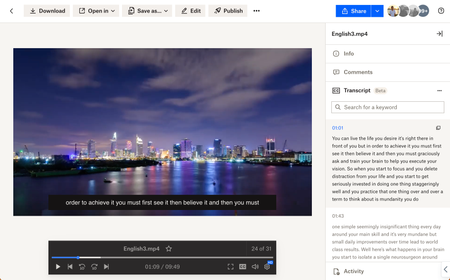
Hey folks! My name is Derrick and I work on a team that improves the file preview and viewing experience at Dropbox. We are excited to announce two features on Dropbox.com to enhance your video viewing experience: video transcriptions and closed captioning. Here’s how to use: Simply upload your video to Dropbox and voila! Your videos will have auto-generated transcripts and closed captioning at your disposal with a click of a button. Even more so - watch videos shared from your colleagues - and copy transcribed segments to instantly quote them in a presentation. Tell me about your experience with our new features! We are all ears. Help Center Article URL: https://help.dropbox.com/view-edit/transcript-closed-captions12KViews9likes9Comments
TERRIBLE SUPPORT SERVICE
I am extremely angry with the unbelievably bad service from Dropbox. The Support Team in Australia as NO WAY OF CONTACTING their own Restorations Specialists team in the US. Having opened a ticket 4 days ago, I have not had my issued solved, I have emailed the US consultant repeatedly for an update (he told me it would take an hour to restore my lost job folders, 3 days ago), I have called the Support team repeatedly for a status report but they have told me they have no internal communication with the other department. HOW CAN THIS BE POSSIBLE? I am paying top dollar for Dropbox Business for the assurance of seemless business operation but yet no one can tell me what is happening, I am not receiving replies to my emails, and nobody by phone can give me an update. I cannot work without my files. I wrongly believed that storing them in Dropbox alone they would be secure. Does anyone know how I can reach I higher level of management to speak to someone who can help?Solved8.1KViews9likes31Comments
How do I rename the root folder?
I recently joined Dropbox for Business on a trial basis. As part of the process, it forcefully renames your Dropbox folder to "Dropbox (Personal)". I have since decided not to use Dropbox for Business. Although I now only have one dropbox folder, it is still called "Dropbox (Personal)" - it did not automatically change back when the accounts were unlinked. How do I get Dropbox to change the name back?Solved48KViews9likes24Comments
Retrieve your content more quickly with our new advanced search operators!
Hi Dropbox community! I'm a product manager at Dropbox working on the search experience on dropbox.com. Paid users already have access to advanced search features like full-text search, OCR (searching for text within images), full-text search, and image search (searching for objects within images). However, this can often return a lot of results leading to a poor experience having to wade through and find exactly what you're looking for. So, we're happy to announce that we're adding a few new operators to help you retrieve your files/folders more quickly: title:(new lead) => See results with only the specific words in title of the file title:"new lead" => See results with exact phrase match in title of the file. Note that quotes only work with title searches and can't be used to match on content type:image => Filter results by a certain types like image, video, document, spreadsheet, etc. type:jpg => Filter results by a certain types like file extension like jpg, png, docx, etc. before:2022-01-01 => Allows you to see all content before a certain date. Uses YYYY-MM-DD format. after:2022-01-01 => Allows you to see all content after a certain date. Uses YYYY-MM-DD format. lead AND new => AND operators will show results that contain both words. lead OR new => OR operators will show results that contain either words. To use these operators, login to Dropbox.com, click on the searchbox at the top, and start typing your query. You can learn more about our operators on our help center article here: https://help.dropbox.com/view-edit/search Note that there are some limitations: - This feature is Web only (for now) - Searches may return inaccurate results for contents of a file, certain images, and Paper docs if you're using the old release of Dropbox Paper. - Quotes will only work on file titles, not matches on content (for now) Try it out and let us know what you think! Thanks for your patience as we ship new features to improve your overall Dropbox experience! Rhut4.5KViews7likes2Comments
Tell us what you think of the mobile search improvements
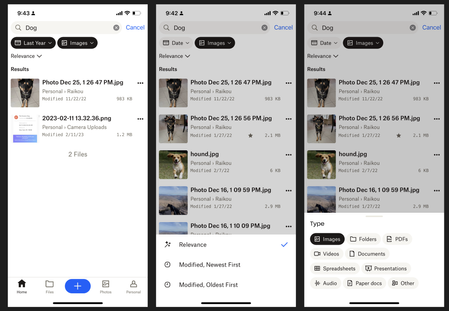
Hello! My name is Luke and I work on the Mobile app team at Dropbox. We're excited to share some updates that we've made to the Search experience on the Android and iOS apps. Here's what's new: Larger Result Thumbnails Modified Dates in search results File Sizes in search results Snippets for keyword matches within files Sorting results by newest or oldest Filtering results by File Type or 'Modified Date' We hope that these changes will help you retrieve your files more quickly and easily! We'd love to hear what you think -any feedback is welcome.4.5KViews7likes3Comments