Your workflow is unique 👨💻 - tell us how you use Dropbox here.
dropbox business
178 TopicsRemoving external user from all shared folders
Hi Dropbox and forum, There seems to be no way of removing all access of an external user to files/folders shared to him. Lets say you have a team folder with "Projects", and in this folder you have hundreds of subfolders shared with different external collaborators. One user has been invited to 70 of the subfolders, and you need to remove his access to everything. As far as i see, there is no other way to remove this user but to go through every one of the 70 folders and manually remove him. If this isn't possible, it should really be a high priority feature request.5.6KViews10likes4Comments
Need to see creation date of backups loaded to Dropbox
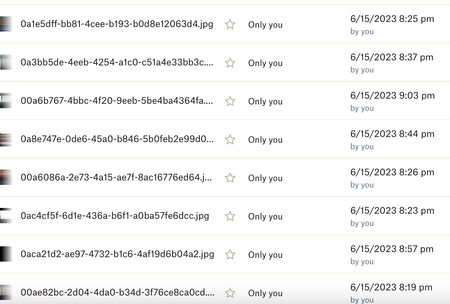
I am using Dropbox as a secondary backup for customer files from my server. If a customer needs me to restore their data from a particular date I have to locate the files they want by the backup date of file . I just noticed Dropbox is changing all my file dates to the date I uploaded them from my server to Dropbox. I cannot figure out how to see the creation date of the files anymore. This makes them unusable to me as backups since I have no idea what date the backups are for All the files have a 6/15/23 date now so if I need to restore files from 5/1/23 I can't figure out a way to do that. Please advise.3KViews3likes9Comments
Allow us to create top level team folders locally on the desktop app again.
The new feature wherein no one can create a top level team folder locally on computer is the dumbest thing I have come across. I see it is no longer possible even rename the folders. Hope this idiotic feature is eliminated else I will move to one drive.156Views2likes2Comments
Email to Dropbox not working, no files uploading.
I've been using the email to dropbox function pretty consistently for a few months now. Just today I noticed it doesn't seem to be working. I have an application setup to email invoices to my dropbox email for later processing. The emails I sent this morning did not hit my folder (but the emails and files did go out). I tested it by sending an email from my regular email and the file I attached again did not make it to my folder. I confirmed the dropbox email hasn't been changed and I don't see anything on the dropbox status page about this being an issue.Solved8.9KViews2likes48Comments"We were unable to complete your request"
A Dropbox business account from my work is trying to share a folder with my personal account. When I try to add the shared folder, I get "we were unable to complete your request." I cannot figure out what is going on. I have enough space in my Dropbox account for the folder and I even converted my account to work account to see if that would make a difference. I tried contacting Dropbox with a help ticket and recieved a generic response that did not help at all. I have also tried going through a different browser and the app on my phone with the same result. Any suggestions?7KViews2likes7CommentsWhat are the best practices when sharing files with other users while on a Dropbox team?
We are a small core team that engages with freelance producers and editors on a project-by-project basis. Dropbox is central to our workflow, which is why Dropbox Business works well - we are on the annual Dropbox Business basic plan with three licences/9 TB of storage, and also add on 2 x Dropbox Replay licences. My question is about how best to work the above with our freelancers when we need them to be able to collaborate with us with assets stored on our core Dropbox. - Let's say Freelancer A works with us for six weeks; we buy a Dropbox licence for them in order for us to collaborate. As we're an annual plan, that's a chunk of cash. - When that project comes to an end, what are the options for Freelancer A's Dropbox licence? Cancel/request pro-rata refund? Lose the lot? Keep licence and it goes into a "pool" ready for reassignment? - Let's say we engage Freelancer B to work on another project a couple of weeks later - is it just a case of reassigning what was Freelancer A's licence to Freelancer B? Or do we have to purchase a whole new licence? Or, is there another way we should be thinking of this? Transferring assets to freelancers, and then them transferring assets back when they've completed work, doesn't easily work for us given the fluid nature of the projects we work on - as new assets arrive, we need our team to be able to see them immediately (ie sync, not share). I'm sure this is a common use case, so hoping to hear from others who have found the best way of working with freelance/project staff alongside Dropbox Business/teams. Thanks in advance!Solved254Views1like3Comments
Setting Dropbox Transfer preference
Hi, I’m on a Mac using the v.206.4.6506 of Dropbox desktop app. Recently when I’m uploading files using Dropbox Transfer, I set the expiration date, let’s say one year later, and turn off the download notification slider. The file upload and it’s done. Everything is fine BUT when I do another transfer I have to set the date and notification again. It’s pretty annoying since I do a many transfers every day. In the past weeks, the app remembered these settings but since a recent update it no more remember the settings. Is there a way to set a preference so I don’t have to set it each time? Otherwise is there a way to escalate this to Dropbox engineer team so they can find a solution for this? ALSO, before this recent update, we were able to have multiple Transfer window opened and uploading at the same time on the desktop. Now it’s only one. Why this change? Is it possible to bring back the multiple transfer? Thanks!Solved1.4KViews1like3Comments
I'm suddenly unable to create a new folder in File Explorer, even though I'm an admin.
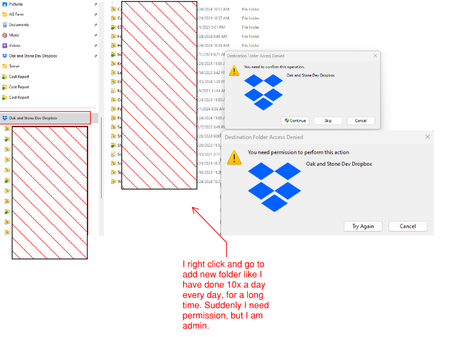
Hello, suddenly, I am unable to create a new Dropbox folder in File Explorer. It says I need permission. But I've always been able to do this. I have all my dropbox folders in file explorer and can work out of, share, create folders right there. Suddenly I need permission. I'm an Admin. Using dropbox via file explorer is beyond critical for efficiency.929Views1like4Comments
Best practices for remote staff & is the app better than the website?
I have a team of 3 part-time staff. We use Dropbox for Business for all of our client files. What are the best practices for syncing files to the staff's hard drive vs. staff using the web-based platform through a browser? Two of the staff utilize their own computers and are reluctant to sync files to their local machines due to space concerns and prefer to use the web-based app. However, the web-based app seems clunky and difficult to use. It is more difficult to navigate than Windows File Explorer for example. However, I have been researching the online-only option. I looked at my synced data, and it seems that 70GB of files takes up only 2.8 GB of hard drive space. Maybe syncing is not that bad after all? We work on a client-by-client basis. Once a client is done, we may not open their files for another year. So one option is for my staff to go into the Dropbox settings and sync only the client she is working on at that time or sync the portion of clients they are working on and leave the online-only option on. But that seems like unnecessary admin time. What are best practices for dealing with Dropbox and staff who are part-time outside of getting them their own work computer?751Views1like2Comments
I'm an admin on Dropbox, but I can't create a folder - "You need permission to perform this action"
Hello guys, I used Dropbox of business plan as a admin, but the folder cannot create and just pop-up notice that ' You need permission to perform this action' but.. I already admin and paid by myself... Can you know why this problem happen..?Solved1.9KViews1like7Comments