Your workflow is unique 👨💻 - tell us how you use Dropbox here.
edit
53 Topics
Can people without Dropbox accounts work on shared files?
Hi all, I have a Dropbox Plus license. For a project I work together with two other people, none of which have a Dropbox account. I know I can share files/folders by using a link or give them permission to open a specific file/folder in my Dropbox account. But is it possible for them to change a file/folder and upload it again to my account? When they do will Dropbox still sync the changes they made with my i-Phone and i-Pad? What are the limitations when we use the folder in my account in order to work together, even if two colleagues do not have a Dropbox account? Thanks in advance and with kindest regards, Leo.Solved274Views0likes12Comments
Sharing a folder and giving someone editing access, but I don't want them affecting my photos.
I want to share a folder that contains photos and I'd like the person I'm sending it to to have editing access so they can save to their own personal folder and be able to edit, crop or send the photos to others. If they make changes to any of the photos, are the changes only in their personal folder on their PC, or do their edits also appear in my folder, or affect the photos in my personal Dropbox folder. I am the owner of the file. I don't want their edits to affect my original photos in any way. I did not see this answer online. Thank you.Solved7KViews0likes7CommentsSimultaneously work on desktop version Excel files using the same Dropbox account
Good morning, I have a Dropbox Basic account. I have linked my account to three devices in the house. Sometimes my partner and I need to simultaneously edit Excel files in my account. So we both log in with my Dropbox account on two different PCs on which there is the same Dropbox folder on the desktop, so we access the same identical files without any difficulty. The only problem is that when we open the same Excel file to make changes, Dropbox creates conflict copies. For our case, having a single Dropbox account in the family, is there a way to work simultaneously from two devices without having problems? I specify that, if possible, we would prefer to continue working with the desktop version on the PC and not online through for example office.com. Thanks in advance. FedericoSolved3.7KViews0likes3Comments
Data missing from a shared Excel file in Dropbox
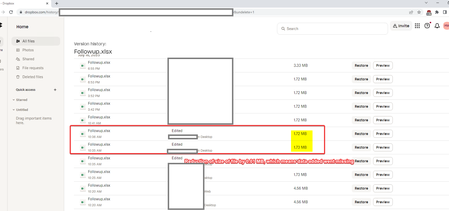
Hello all, We are having an issue where the excel files modified through Dropbox sync are losing data when checked the next or following day. This has happened around twice in the last one month. In one of the recent cases, the excel file present in the one of the Dropbox folders was modified by the shared user, let us say 'User A 'on 16-07-2025 around 10:25 AM in the morning and some data was saved between 10.25 AM and 10:35 AM IST , but the following day when same file was opened by another user, let's say 'User B' from another remote location ( he has access to all files and folders same as User A), the rows of data entered in the excel were missing. User A usually edits the excel file from the shared Dropbox folder located in the Windows explorer of PC, not directly modified in Dropbox online. Both the shared users 'User A' and 'User B' checked it independently the following day and data was missing. To confirm whether data was inadvertently deleted or deleted by one of the shared users by mistake, we downloaded the file to our local PC and checked the 'Track changes' option in Microsoft Excel for the file, and upon checking there was no indication that data was entered or deleted purposely. (This confirms that data missing was not due to human error from User A's side. Because if the user himself had deleted that data then the same will be present in this track changes as deleted rows) We also have referred to the Dropbox's 'Activity' history , which confirms that user 'User A' had indeed modified and saved some data to the excel around 10:25 AM. The data added after 10:36 AM is missing in the excel document. The file was not unshared at the time. We have confirmed that the syncing was ON at the time and there was no changes in any of the sync settings. The network speed at both locations was good for regular usage. We have attached screenshots with this question below. Any help on how to resolve this is much appreciated. Feel free to request any additional info in case we have missed. Thanks. Dropbox version: 229.4.5197 (Latest ; Auto update is on) Plan: Dropbox Basic (Free) PCs involved: Windows 10 Laptop ( User A) and Windows 10 PCs ( User B )Solved332Views0likes6Comments
How can I access files shared with me without upgrading my Dropbox account for more space?
Dropbox Plan N/A Device N/A Operating System/Browser (if using the web) N/A Dropbox App Version (if using the app) N/A Question or Issue I have collegue who "own" a Dropbox and have been invited to it. I have the free version of dropbox so limited space for files and folders. The question is how to avoid filling my space and just use my collegues space as he has the upgraded version. Not quite sure how it functions, but yesterday I had used 1,77 GB and this morning 2,34 GB so over the top. what to do when not interested in getting more space? Also when it is one of my collegues uploading files/folders is it possible for me to correct files without they take up space in my dropbox?106Views0likes1Comment
Option to rename a file before uploading through the iOS app is not working
Suddenly today (and for the first time ever that I can remember) the RENAME button in the iPhone app upload is dead (does not work). Help please - I need to rename before uploading anything to Dropbox. Thanks, amcofficeSolved626Views4likes17Comments