Your workflow is unique 👨💻 - tell us how you use Dropbox here.
emails
23 Topics
Why does Dropbox keep emailing me about billing after I've downgraded?
Don’t know who is supposed to look at this, but I canceled my subscription to Dropbox (I wasn’t using it; I don’t need it.) via the Apple app just like the website tells me to do. Since then, I have been getting harassing emails from the Dropbox billing mail bot telling me they can’t bill my credit card. No sh*t Sherlock … I canceled the subscription … and I did it before the renew process was to have begun. So why are you sending me emails, multiples even, each day when I have followed your process to unsubscribe, downgrade, and cancel billing? Now, I’ll be happy to pay Apple for the extra storage space if and when I need it.Solved9.4KViews3likes21Comments
False missleading emails
Just got a email with the Title "⚠️Action requested: ****, your files are about to stop syncing!" Only for it to be a sales email telling me to upgrade my accout The accout has be used to archive some stuff and has not been added to in ages and has over 400MB of the 2GB free. "NOTICE: ****, your files will stop syncing soon." "Your Dropbox storage is reaching maximum capacity. Adding one more file could fill up your account—and keep you from syncing and accessing your files when you need them." Yes and adding 100 small files may not fill up or I may delete stuff to free space and it may never fill up This is nothing but false underhanded scare tactics spam to get people to upgrage. If this is not true please explain why my files will stop syncing Soon If I stay below my limits?7.7KViews9likes11CommentsEmail notifications stopped for shared folders
A folder was shared by the owner with five people. It contains a spreadsheet that is routinely updated. For more than a year, we have received email notifications when the owner made changes. Now those emails have stopped for some reason. Owner hasn't made changes to her settings, either have recipients. I can go into Dropbox, open folder, and see the Activity pane at the right telling me she's edited the document. But we're no longer receiving the email notifications. How do we fix this?2.7KViews1like14Comments
Unsolicited marketing email
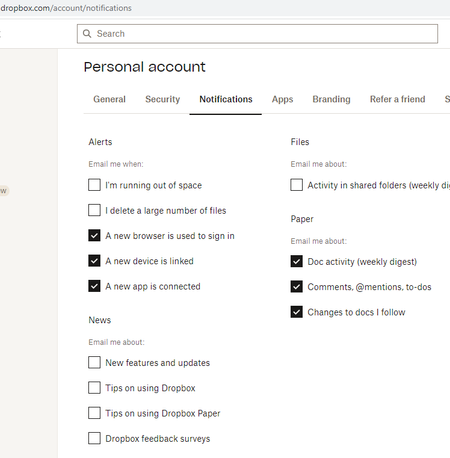
I've been continuing to receive marketing emails from Dropbox at no-reply@em-s.dropbox.com although my marketing email settings are disabled. The last 4 marketing email subjects were "Top 4 tips to get your photo storage in focus" (3/17), "Your video files" (2/11), "ATTN: You can now scan your documents" (1/25), "Your video files" (1/13). In my Dropbox email settings, all of the "News" categories are disabled, including "New features and updates", "Tips on using Dropbox", "Tips on using Dropbox Paper", "Dropbox feedback surveys". I reached out to Dropbox support and strangely they said they couldn't help and to ask the community... Naturally I responded in that ticket and said this is something Dropbox would have to resolve. But while I'm here, besides ensuring my marketing email settings are disabled in my settings, what else does the community think I can do to stop receiving Dropbox marketing emails before I start reporting them as spam?2.2KViews1like7Comments
Dropbox keeps spamming me about my storage space running out
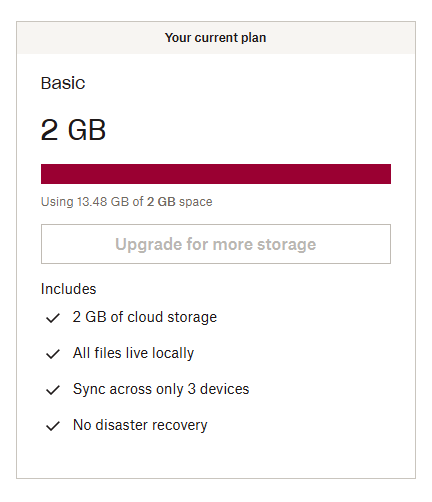
Dropbox keeps sending me emails and notifications about my storage space reaching its capacity, as if I've got 100 megabytes of it left or something. It says that if I won't buy another plan then I'm risking losing my files, and a dozen of variations of the same message. I've been using Dropbox since 2010 and I've got a basic free plan of 2 gigs, but I've increased my storage space by inviting friends and doing "challenges", so now I have around 16 gigs of space and 13.5 of them are used. That is not "critically low on space" by any means, but I keep receiving so many spam notifications that it's starting to look threatening. Either Dropbox has a bug in calculation how much space I have occupied by comparing it to the basic plan instead of actual space, or it's doing it on purpose to force me to pay. Also I cannot contact live support since I have a free plan. I'm thankful to Dropbox for the service it provides but I'm pretty sure this is not how a service should treat its long-term customers. If this is a bug then I sincerely hope that it will be fixed as soon as possible.1.9KViews2likes4Comments
Not getting Email notifications - all boxes are checked in settings
Hi all, I am in IT Helpdesk - I have 2 users that have stopped getting email notifications when projects are added to their Dropbox. All email options are checked but the emails are not coming in. It does say "your team admin may be controlling some email settings" but I don't know how to find out who that is. Thank you in advance!! dianders1.7KViews0likes6Comments