We're making some changes to the Dropbox Community 👩💻 - Find out more here.
iOS
68 Topics
Why have new Camera Upload files changed to the format "Photo abc"?
At some point over the last few months, Dropbox randomly stopped uploading my photos from my iPhone 13 (iOS17 and now 18). After lots of poor app behaviour, I eventually managed to re-enable it, having manually been uploading files for quite some time. As soon as I pointed it back at the right folder, it started uploading... but with the word "Photo" in front of the filename!! So thanks to this stupidity, I now have hundreds of duplicate photos, called things like "2024-09-18 19.38.54.jpg" and "Photo 18-09-24, 19 38 54.jpg". So not only has it completely renamed it, it's ruined all possibilities to sort by title. As a final slap in the face, it's processed the images to half their size and reduced the quality! So, Dropbox... how do I disable this ridiculous "feature" that some imbecile decided would be good to suddenly implement?Solved162KViews0likes13Comments
Why are my iPhone photos imported as .heic files when uploading them to my Dropbox account?
Why are my photos from iPhone suddenly imported as .heic files to Dropbox? This only happened this week, say on Tuesday (July 4th). Has never happened before. Now I cannot see these photos on the desktop version of Dropbox. On the Dropbox app for iPhone, I see the files (with the ending .heic) but I cannot open them and cannot preview them. What has happened and how do I fix this?Solved114KViews2likes15Comments
“Couldn’t save content. Check your internet connection and refresh the page." on iOS mobile app
Running iOS 17.3, just updated. When I try to share content to Dropbox, I get an error message: “Couldn’t save content. Check your internet connection and refresh the page. There’s not internet connection issue; I’m connected. This is Dropbox-specific. If I use share to Save to Dropbox, that works fine; no error. This also seems unique to the latest iOS update, as I didn’t encounter it before that. I tried uninstalling and re-installing Dropbox, and simply re-starting. Neither helps.Solved17KViews3likes119Comments
Error message "couldn’t communicate with a helper application" when trying to move a folder
Hi, I'm trying to move a folder that contains folders with photos in it from my dropbox to Files App in iPad. Previously it worked wonderfully and i can move them just fine. But, now after i updated to the latest iPad iOS 16.1, i can't move folders from my dropbox to my iPad in the File App. It still works when moving the picture directly though but its a pain to create the folder manually my self. I've tried restarting my iPad, delete my dropbox and re-installing them, and reconnecting them all those stuff but still got those error when moving a folder. Any idea how to fix it? or is it a bug in the iPad iOS 16.1?9.8KViews1like47Comments
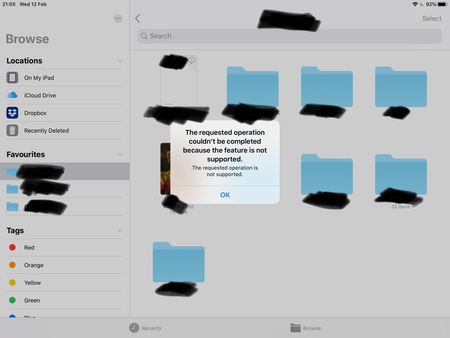
The Requested Operation Couldn’t Be Completed error - Dragging & Dropping into Files app on iPad
Dragging and dropping error using the stock files app on iPad OS (13 latest) with the latest version of Dropbox installed. Each time I try to drag and drop a file using the files app I'm greeted with an error message: The requested operation couldn't be completed because the feature is not supported. Any ideas to fix it? Or is it just another Dropbox issue that won't ever get addressed like the missing favourites bug? Note, dragging and dropping works flawlessly using Google Drive, One Drive, iCloud etc. I've tried removing and redownloaded Dropbox etc.8.8KViews2likes26Comments
I downloaded my iCloud photos as a .zip file, and need to save the content to Dropbox.
i want to get my photos and videos off icloud and into dropbox for safe keeping, I downloaded all of my photos etc (in a zip file) but I can not do anything with the file! i tried to cut and paste into my picture file on the computer - no luck windows cant open it. I've no idea how to get the file into dropbox, if anyone can give me a step by step guide so I can turn off Icloud I will be very thankful. Cheers, TinaSolved6KViews0likes4CommentsDo photos disappear if I delete them on my iphone?
Hi Dropbox Community! I've run out of space on my iphone and would like to ensure all photos on my phone are in dropbox. Here are my questions: 1. I'm not convinced that ALL photos on my iphone have uploaded to dropbox. How do I double check to ensure they are all there? 2. If I solve problem #1 and have all of my photos on dropbox, then delete them on my iphone, will the dropbox delete them as well when it tries to sync to an empty photo folder on my phone? Thanks in advance for your help!Solved4.3KViews0likes3Comments
iPhone videos are not uploading and I can't find the settings to check.
My iPhone is uploading photos I select in the Photos app, but does not upload vieos. I've seen replies here about this problem saying "If you access your Account tab inside our app, you should be able to see your Camera Uploads settings." But I see no such option? If I click the Dropbox icon in my Windows 10 PC tray, I see only these: Upgrade View sync issues Snooze notifications > Preferences Manage hard drive space Help Quit ® Add team account And none of those displays Camera Upload Settings.3.3KViews0likes9CommentsScanned PDF Files not uploading
Just in the last week or so (April 9, 2024) my scans to PDF have stopped uploading...they just get stuck with a spinning status indicator. I am using an iPhone 8, iOS 16.7.7, with the Dropbox app, and have plenty of Dropbox capacity, and have 16GB free out of 64GB available. Taking a photo and saving it works just fine. This is a very critical part of my day-to-day activities as I rely upon this feature to save documents on the fly. I am dead in the water without it. Please please help. I have reinstalled the app to no avail.Solved3.3KViews0likes11Comments